Mass Rename Command Prompt File And Folder Rename From Command Prompt Tutorials How To Rename The File Using Command Prompt YouTube Linux Batch File Rename Command Line Ploraproof File And Folder Rename From Command Prompt Tutorials Mass Rename Files Using Powershell Cyberkesil Renaming a file on Windows 10 is simple You just right click and select Rename But doing this for a few dozen or a few hundred files gets tedious Thankfully it s easy to batch rename files in Windows 10 using File Explorer PowerShell or the Command Prompt
Open the folder containing your files using File Explorer Select all the files that you want to batch rename To select multiple files in an order click the first file in the list hold Shift and click the last file All the files between the first and the last file will get selected To select multiple files in no order select one file and Launch Command Prompt then type cmd in the Cortana Search Bar You can also press Windows Key R and type it in In the Command Prompt navigate to the desired folder that
Mass Rename Files Using Powershell Cyberkesil Ren Or Rename Command Command Prompt YouTube PowerShell Get User Group Membership Windows 10 11 Full Guide 2 Command Prompt Create Folder Rename Move YouTube 3 Ways To Batch Rename Files In Windows Make Tech Easier How To Batch Rename Multiple Files In Windows File And Folder Rename From Command Prompt Tutorials How To Create Open Rename And Force Delete A Folder Using Command Prompt How To Create Open Rename And Force Delete A Folder Using Command Prompt
Mass Rename Command Prompt
 Mass Rename Command Prompt
https://www.sevenforums.com/attachments/tutorials/48119d1486570914t-file-folder-rename-command-prompt-rename_file.jpg
You can rename a file with two dots like abc xyz jpg using the following REN jpg thumb The pattern can be extended for any number of dots in the name See How does the Windows RENAME command interpret wildcards for more info Share Follow edited Dec 28 2018 at 14 58
Templates are pre-designed documents or files that can be used for various functions. They can save effort and time by offering a ready-made format and layout for developing various kinds of material. Templates can be used for individual or expert projects, such as resumes, invites, flyers, newsletters, reports, discussions, and more.
Mass Rename Command Prompt
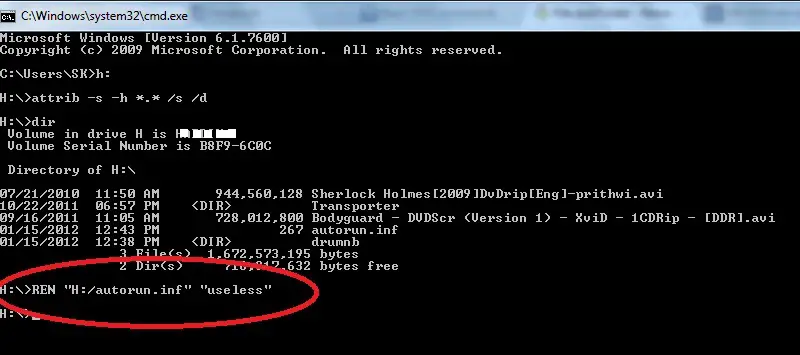
Remove Virus Or Unwanted Files Using Command Prompt

Ren Or Rename Command Command Prompt YouTube
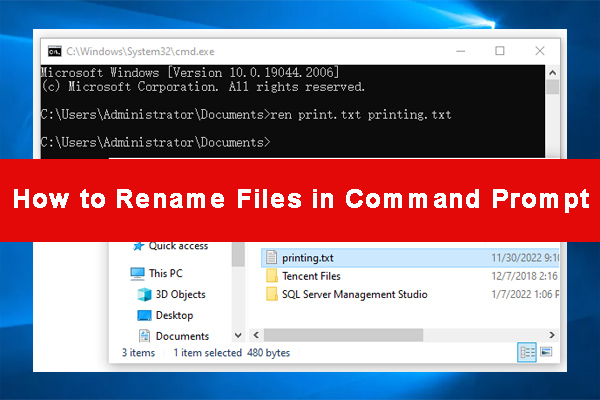
PowerShell Get User Group Membership Windows 10 11 Full Guide

2 Command Prompt Create Folder Rename Move YouTube

How To Batch Rename Multiple Files In Windows
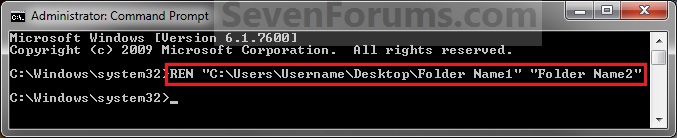
File And Folder Rename From Command Prompt Tutorials

Command Prompt PowerShell PowerToys On Windows 10 changing the name of one file is easy The problem is when you must rename many files in a specific folder but don t worry In this

The usage of shareware file manager Total Commander makes it very easy to rename lots of files or folders in a folder or a folder tree or spread over all drives very easy without any coding skills and being nevertheless extremely powerful with its built in awesome Multi rename tool Mofi Aug 13 2020 at 17 28

104 I know in your title you say in dos but I get the impression you are just looking for a way to do this and are wondering if that is the best way The absolute best tool I have found for this is Bulk Rename Utility It isn t a command line tool but they do have a command line version if you really want to use it that way

2 Batch Rename with Command Prompt The Windows Command Prompt offers a bit more flexibility for batch file renaming You can use the ren command to rename multiple files simultaneously Ren is short for rename The command allows for the wildcard characters and

To batch rename files just select all the files you want to rename press F2 alternatively right click and select rename then enter the name you want on the first file Press Enter to change the names for all other selected files
How to rename multiple files using Command Prompt Command Prompt also offers multiple ways to change the name of multiple files in bulk on Windows 10 and 11 How to Rename a Single File in Windows To rename a single file with Command Prompt use these steps Press the Windows key to open the Start menu search for Command Prompt and click 9 Answers Sorted by 179 Option 1 Using Windows PowerShell Open the windows menu Type PowerShell and open the Windows PowerShell command window Goto folder with desired files e g cd C house chores Notice address must incorporate quotes if there are spaces involved You can use dir to see all the files in the folder
Actually Windows provides 3 ways to quickly change the name of multiple files You can batch rename files under the same folder either in File Explorer or using Command Prompt or PowerShell Batch Rename Files in File Explorer To rename multiple files in Windows 10 it should be the easiest way to use File Explorer