Mac Compress Pdf File Size How To Compress Pdf File Size To Less Than 50 Kb Online compress PDF How To Compress PDF File Size YouTube How To Compress A PDF File On Mobile For Android Or IOS How To Compress Files On Mac Step by Step Guide How To Compress A PDF File For Email To compress PDF with ColorSync Utility Open ColorSync Utility from Finder Finder Applications Utilities ColorSync Utility Go to File in the top ColorSync menu Open Select the PDF you want to compress Open Choose Reduce File Size from the dropdown Filter menu at the bottom left Apply
On a Mac Open Finder Right click on the PDF file Select Get Info Look at File Size to see how large the PDF is On a PC Open Files Explorer Right click on the PDF file Select Properties Look at File Size to see how large the PDF is Remember one megabyte MB equals 1 000 kilobytes KB The easiest way to compress a PDF file on a Mac is to use the Preview app Preview is macOS built in tool for viewing document and image files It also includes other useful features
How To Compress A PDF File For Email How To Compress PDF File Size With TinyWow Pdf File Compressor Hot Sex Picture Compress PDF Files Size Apps On Google Play Compress Pdf File Size Free Arctictide How To Reduce PDF File Size On Mac Compress PDF On Mac Comment How To Compress Pdf File Size Free YouTube Compress Video Compressor App Review Reduce The File Size Of Any Video Compress PDF To 300KB Reduce File Size Free SignHouse
Mac Compress Pdf File Size
 Mac Compress Pdf File Size
https://i.ytimg.com/vi/-uM8AcmGJPk/maxresdefault.jpg
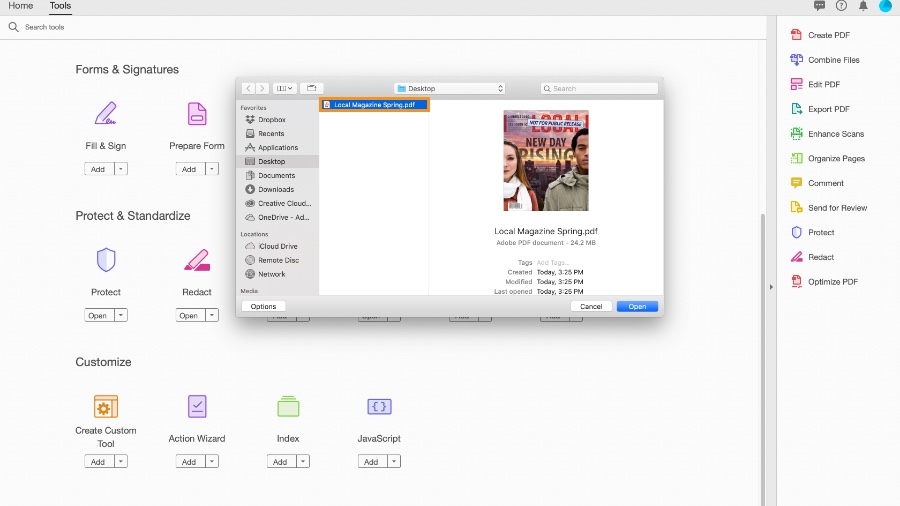
Locate your file and click Open Click Reduce File Size in the top menu Select appropriate compatibility settings and click OK Name your file and click Save You can apply these settings to multiple PDFs using the dropdown menu Reduce File Size Reduce Multiple Files Add all the PDFs you want to compress and then hit OK Why compress PDFs
Pre-crafted templates provide a time-saving solution for creating a varied series of documents and files. These pre-designed formats and designs can be utilized for numerous individual and expert tasks, including resumes, invitations, flyers, newsletters, reports, presentations, and more, improving the material development procedure.
Mac Compress Pdf File Size
How To Compress A PDF File
How To Compress PDF File Size With TinyWow
Pdf File Compressor Hot Sex Picture
Compress PDF Files Size Apps On Google Play

How To Reduce PDF File Size On Mac Compress PDF On Mac Comment
How To Compress Pdf File Size Free YouTube

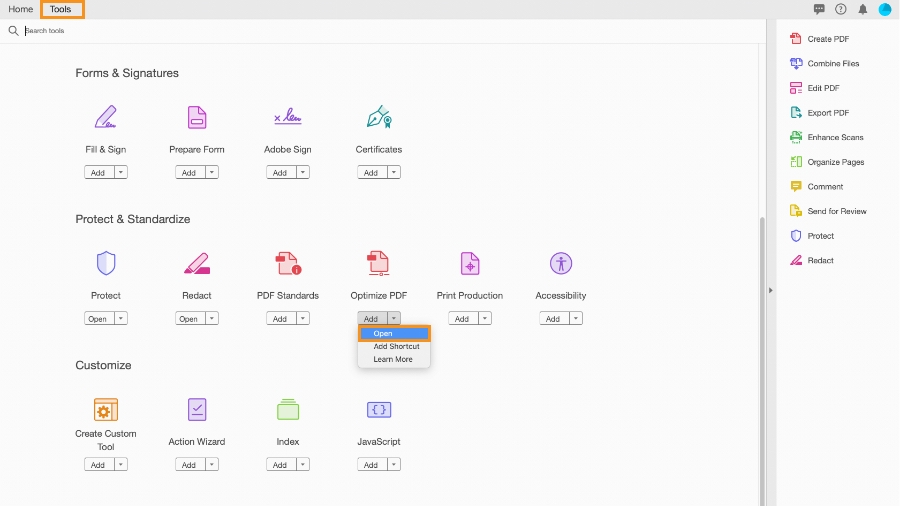
Open the Optimize PDF tool Locate your file and click Open Click Reduce File Size in the top menu Select appropriate compatibility settings and click OK Name your file and click Save There are many ways to compress a PDF on a Mac to make it easier to store and share

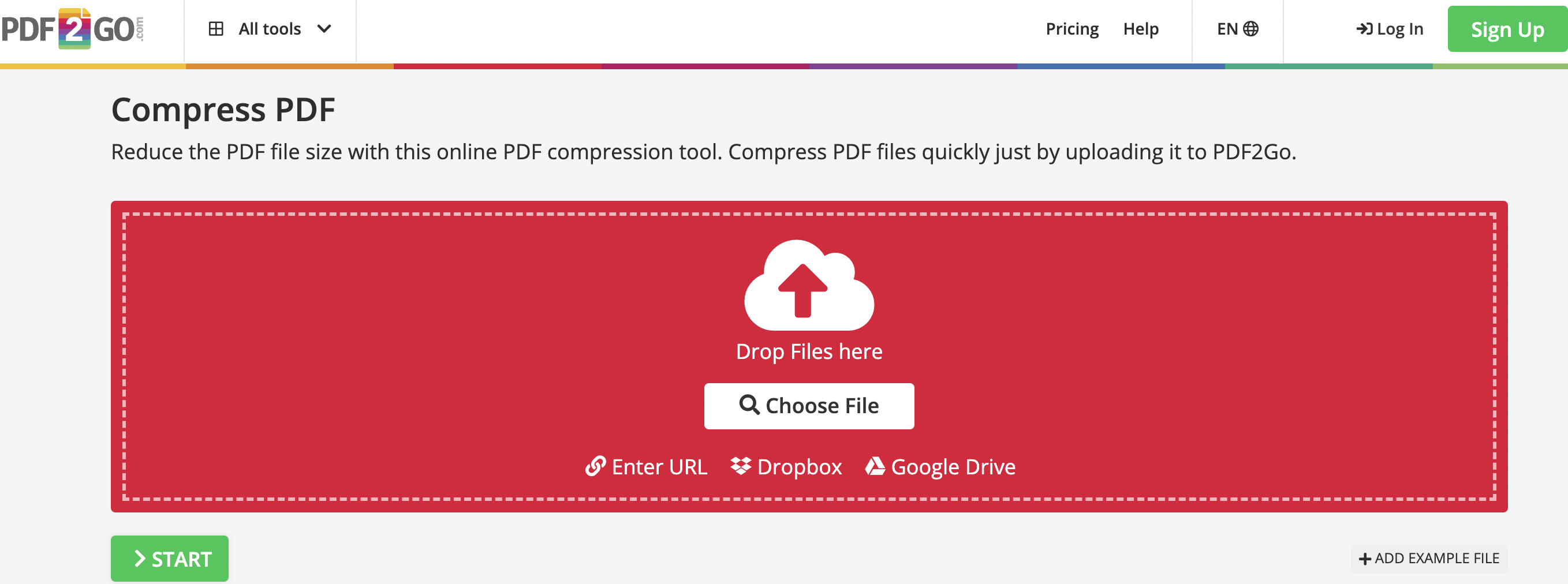
Step 1 Click the Select PDF File to select the PDF file you want to reduce or compress from your Mac You can also drag n drop the PDF files directly into the online PDF compressor on Mac Step 2 Once the PDF files are uploaded the online tool will slim the PDF and maintain the maximum quality
Open Adobe Acrobat Pro Tools Open the Optimize PDF tool Select the PDF you want to make smaller Click Reduce File Size in the top menu Set compatibility click OK Name and save your new file How to compress a PDF on Mac with preview Different operating systems have their own PDF readers

Select Go Go to Folder from the menu bar then enter the location System Library Filters The contents of the resulting folder control the options available in the Quartz Filter dropdown mentioned earlier You should see one called Reduce File Size qfilter Copy this and paste it to your desktop or another convenient location
Choose Export Devon Delfino Insider 4 You ll see a pop up window appear over the top middle section of the PDF click the drop down menu next to Quartz Filter and select Reduce File Size
1 Open the PDF document in Preview on your Mac As you can see the current size before shrinking is 3 3MB 2 In Preview click File and Export as you can see below 3 And then open the Format menu and select PDF And then open the Quarts Filter menu and select Reduce File Size and then click Save 4 Step 1 Launch Preview and open your PDF file with it Step 2 Tap File on the ribbon and select Export Step 3 Choose PDF as the output format select Reduce File Size from the Quartz Filter drop down options Step 4 Fill in the Export As field to rename the PDF determine where to save it and hit Save
Any Apple gadgets are supported If you are an all Apple user with this free PDF compressor you can perfectly reduce PDF file size online on a MacBook Air or Pro iMac iPhone Pro Pro Max Mini SE and iPad Different versions of iOS are supported Not only you can shrink but you can convert PDF to Word on iOS too