Mac Clear Command History Adidas Tracktop Mac sku M2LPHN 1x1 0 png width 1440 height 1440 Home Front Command APK F r Android Download Mac sku M3800A 1x1 0 png width 1440 height 1440 Solved How To Clear Command Prompt Screen Windows 10 The Vrogue There are three ways to clear Terminal history on your Mac 1 Use the history command to view and clear Terminal history The quickest and easiest way to clear Terminal history is to use the history command in a Terminal window It allows you to view and delete Terminal history
1 Launch the Terminal app enter the following command and then press the return key on your keyboard history 2 Your entire command line history up to the last clear will be displayed At this point you re free to scroll up and down in the Terminal window to see what kinds of commands have been used There are several ways of displaying your history list In most cases you want to see the most recent commands One way to do this is to run the history command with an argument that says
Solved How To Clear Command Prompt Screen Windows 10 The Vrogue How To Clear Command Line History In Linux OSTechNix Makeup Artist Tips Makeup Tips Beauty Makeup Illustration Techniques EuGH Erkennt Homosexualit t Als Asylgrund An Gunda Werner Institut How To Clear Command Line History Videogame Schnipsels 2015 Command An Conquer Red Alert KW02 Norths File Vanessa Hudgens 15 2012 jpg Wikimedia Commons How To Clear Command Prompt Screen Windows 20 Christmas Tree Made Of Lights PIMPHOMEE
Mac Clear Command History
 Mac Clear Command History
https://static.footshop.com/648631/191098.jpg
2 Answers Sorted by 1 On the user s folder in macOS Catalina zsh history contains the entire list of commands invoked by that user You can find this file if you open the user s folder in Finder and press Command Shift to show hide these type of hidden files starting with dot
Templates are pre-designed documents or files that can be utilized for various purposes. They can save time and effort by providing a ready-made format and layout for developing different type of material. Templates can be utilized for individual or professional projects, such as resumes, invitations, flyers, newsletters, reports, discussions, and more.
Mac Clear Command History

Sweatshirt Adidas Retro Hoodie
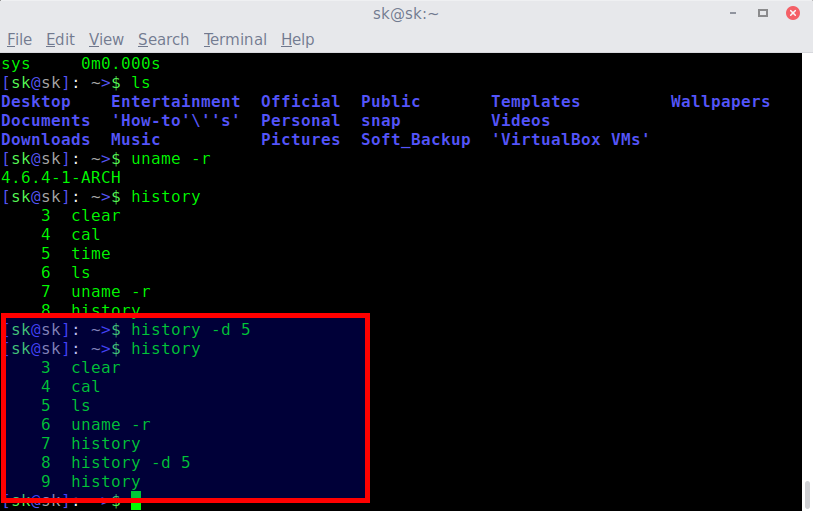
How To Clear Command Line History In Linux OSTechNix

Makeup Artist Tips Makeup Tips Beauty Makeup Illustration Techniques

EuGH Erkennt Homosexualit t Als Asylgrund An Gunda Werner Institut
Videogame Schnipsels 2015 Command An Conquer Red Alert KW02 Norths

File Vanessa Hudgens 15 2012 jpg Wikimedia Commons

Clear Terminal command history Ask Question Asked 6 years 8 months ago Modified 9 months ago Viewed 47k times 21 I m trying to clear the history of commands that have been run on Terminal I found an article which said I can do it with rm bash history However I am still able to see the previous commands that I ve ran by pressing the up arrow

Here s how to clear Terminal s command history When you type commands and press return in macOS s Terminal app it remembers the commands you type and stores them in case you want to

History c deals with the current session The history command is built into Bash itself and the c modifier tells the program to clear that history This command will prevent anything in your current session from being written to your long term history but does not clear out that long term history Clear All of Your Bash History
Clear Using the History Command Now why and how do we clear this history Well for the Z shell that s the brain behind your Mac Terminal there are three main ways to do it Let s check them out
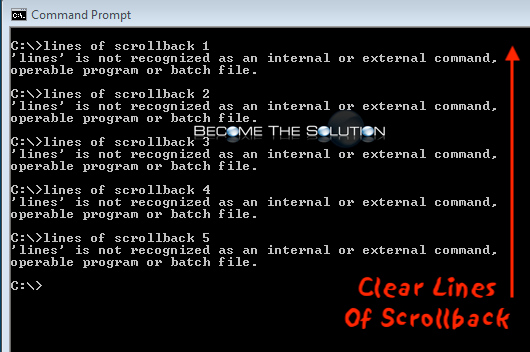
On Mac OS X Terminal this functionality is already built in to the Terminal Application as menu View Clear Scrollback the default is CMD K So you can re assign this as you like with Apple s Keyboard shortcuts Just add a new shortcut for Terminal with the command Clear Scrollback
You ll need 2 things 1 Enter this command in your terminal to make sure histappend is turned on shopt s histappend shopt histappend 2 You ll also need to know where your history commands are being stored My history files are stored in bash sessions so that s what my code will reflect To clear out command history you just need to attach a c flag to the familiar history command looking like so history c That command when executed will manually wipe the bash history file or if you re using a different shell it should wipe that too zsh tcsh bash etc
How to Clear Command History in Mac Terminal The Terminal app on Mac allows you to interact with the operating system using command lines in a shell environment like Zsh or Bash Such a shell environment will save your command history for future retrieval enabling you to cycle through previous commands by pressing the up and down arrow keys