Linux Yum Remove Package And Dependencies How To Use Yum To Install Packages From Repositories On Linux Systran Box Difference Between YUM And RPM Differbetween Linux Package Installation rpm Yum Apt get Dpkg CentOS6 Box Yum Remove Percona Server shared 51 Dependencies YouTube YUM Install Specific Version Of Package iemblog To remove a package and erase all the unneeded dependencies use the following command yum autoremove package name Note When a user installs a package YUM downloads and stores it in var cache yum However packages remain in cache even after they ve been installed and removed
Removing Packages Similarly to package installation Yum allows you to uninstall remove in RPM and Yum terminology both individual packages and a package group Removing Individual Packages To uninstall a particular package as well as any packages that depend on it run the following command as root yum remove package name In this article we will explain two ways to remove or uninstall a package along with their dependencies using YUM package manager in CentOS and RHEL distributions 1 Using YUM s Autoremove Option This method requires you to add the directive clean requirements on remove in YUM s main configuration file etc yum conf
YUM Install Specific Version Of Package iemblog Static IP Ubuntu 20 04 LTS IP Tech Junkie Blog Real World Tutorials Happy Coding Linux CentOS In Linux Yum 1024 Linux YUM Yellowdog Updater Modified Commands For Package Management Linux rpm RHCSA RHEL7 SELinux Solved error Failed Dependencies Install Remove Rpm With What Is YUM Package Manager Packagecloud Blog
Linux Yum Remove Package And Dependencies
 Linux Yum Remove Package And Dependencies
https://syscdn.systranbox.com/1661752780674.png
Let s remove the cache sudo yum clean packages Loaded plugins fastestmirror Cleaning repos base extras updates 7 package files removed Therefore the yum clean command removes any cached packages on the Linux machine and as a result frees up disk space 2 2 Clean Package Headers
Pre-crafted templates use a time-saving solution for developing a varied series of documents and files. These pre-designed formats and designs can be utilized for different personal and expert jobs, consisting of resumes, invitations, flyers, newsletters, reports, presentations, and more, simplifying the material production process.
Linux Yum Remove Package And Dependencies

How To Uninstall Packages Using YUM Command LinuxForDevices
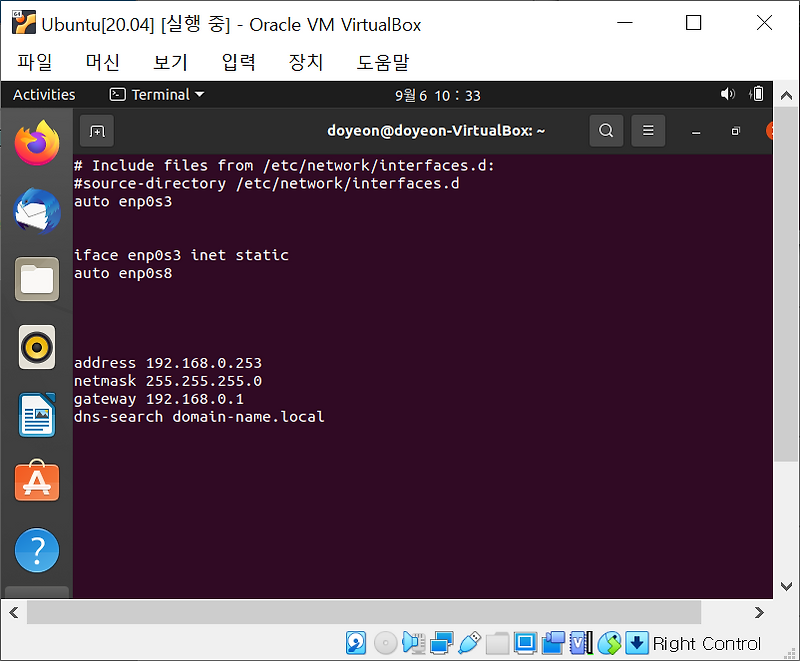
Static IP Ubuntu 20 04 LTS IP

Tech Junkie Blog Real World Tutorials Happy Coding Linux CentOS In

Linux Yum 1024

Linux rpm

RHCSA RHEL7 SELinux

It only removes four dependent packages And if I remove it with the command sudo yum remove okular It removes only one package which is okular x86 64 Now my question is that is there a way to remove all 37 installed packages with a command or do I have to remove all of them one by one centos terminal yum dependencies uninstall Share

Normally removing a package using YUM package management system will remove that package together with its dependencies However certain dependencies will not be removed on the system these are what we can term as unused dependencies or so called leaf packages according to YUM man page

How to completely uninstall a package including all extra files that came with it using yum or rpm Ask Question Asked 11 years ago Modified 3 years 11 months ago Viewed 152k times 27 When I do yum remove it sometimes keeps a package s configuration files

1 Using noautoremove to Remove YUM Package Without Dependencies YUM with the option remove is used to uninstall a package Generally yum remove also removes dependencies while removing a package But by adding some more options it can be set to remove only the specific package without it s dependencies

1 Uninstall a YUM Package Without All Dependencies Here I will describe the detailed process of uninstalling the Google Chrome package Packages have dependencies to function properly In this case the YUM package manager automatically removes the unused dependencies of the Google Chrome package So follow the steps carefully
Package management is a method of installing updating removing and keeping track of software updates from specific repositories repos in the Linux system Linux distros often use different package management tools Red Hat based distros use RPM RPM Package Manager and YUM DNF Yellow Dog Updater Modified Dandified YUM How to Remove Packages with Dependencies Using Yum By Aaron Kili September 19 2018 Tecmint In this article we will explain two ways to remove or uninstall a package along with their dependencies using YUM package manager in CentOS and RHEL distributions LinuxToday is a trusted contributor driven news resource supporting all types
List and remove the indicated packages and all their dependencies but with a y N confirmation yum remove php To bypass the confirmation replace yum with yum y Using rpm This section builds upon the answers by twalburg and Ricardo List which RPMs are installed rpm qa php rpm qa grep php Alternative listing