Linux Schedule Service Restart How To Schedule Tasks Using The Linux at Command Enable Sysadmin How To Schedule Future Processes In Linux Using At MLFQ 20 How To Schedule Using Corntab Linux Unix In Telugu YouTube Promise VTrak Storage Monitoring Web Apr 21 2022 nbsp 0183 32 How can I do this 20 04 schedule Share Improve this question Follow asked Apr 21 2022 at 6 00 birgersp 421 1 7 19 Add a comment 1 Answer Sorted by 4
Web Nov 14 2018 nbsp 0183 32 In short at 08 00 run systemctl runtime set property wibble service Restart yes and at 17 00 run systemctl runtime set property wibble service Web Dec 6 2019 nbsp 0183 32 How to Restart a Service To stop and restart the service in Linux use the command sudo systemctl restart SERVICE NAME After this point your service should be up and running again You can verify
Promise VTrak Storage Monitoring Linux Shutdown Command with Examples How To Restart Service In Linux IMG 0528 Linux Con Japan Schedule Pintu k Flickr How To Restart Apache On Ubuntu 20 04 Focal Fossa Linux Tutorials Learn Linux Configuration Restart Nginx Linux Redhat Hello This Is A Heading November 2014 How To Schedule Commands In Linux Using At And Cron Systran Box Promise VTrak Storage Monitoring
Linux Schedule Service Restart
 Linux Schedule Service Restart
https://www.redhat.com/sysadmin/sites/default/files/styles/google_discover/public/2021-12/unix-time-system-uts-namespace.jpg?itok=F5FMedCF
Web Nov 1 2023 nbsp 0183 32 To start stop or restart a service on Linux with systemd we use the systecmctl command To start the SSH service that command would be To start the
Templates are pre-designed documents or files that can be used for numerous functions. They can save effort and time by offering a ready-made format and design for developing various type of content. Templates can be utilized for individual or professional tasks, such as resumes, invites, leaflets, newsletters, reports, presentations, and more.
Linux Schedule Service Restart

Scheduling System Tasks With Cron On Linux FOSS Linux
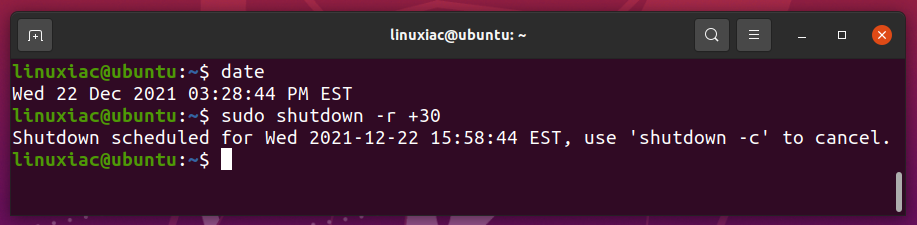
Linux Shutdown Command with Examples
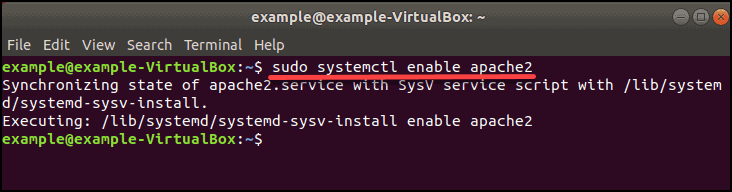
How To Restart Service In Linux

IMG 0528 Linux Con Japan Schedule Pintu k Flickr

Restart Nginx Linux Redhat

Hello This Is A Heading November 2014

Web To make a service restart after a crash or reboot you can usually add a line like this to the init script ms 2345 respawn bin sh usr bin service name To enable a System V

Web Jun 25 2015 nbsp 0183 32 Yes you can make your service to restart it periodically by making your service of Type notify Add this option in Service section of your service file along with

Web Jul 13 2014 nbsp 0183 32 I have a service I need to restart every hour I m using Ubuntu 12 04 LTS and I don t really seem to find a script suitable restarting a service based on a prefixed

Web Sep 1 2023 nbsp 0183 32 If your service is being managed by Systemd you can use the Restart and RestartSec options to configure this behaviour for a particular service etc systemd system daemon service Unit
Web Oct 5 2022 nbsp 0183 32 service crond restart Or try the older commands etc init d crond restart For Ubuntu and Debian systems use sudo service cron restart The older command can also be tried sudo etc init d cron
Web 1 1 at the command line type which reboot 2 once you know where reboot is located usually sbin reboot cd into one of the the directories in etc cron daily Web Show activity on this post If it is one time deal you can use shutdown command with r as argument Instead of using shutdown now you can add time as parameter Example
Web Sep 4 2023 nbsp 0183 32 Method 1 uses systemd and you manage sevices with systemctl command Method 2 uses init and you manage services with service command Check if You Are