Linux List Hard Drives How To Find Out Hard Disk Specs Details Auf Linux Natuurondernemer Pin On Powershell And Cmd Periszk p El re voda Cmd Show All Hdd Nyugtat Sinewi Jurassic Park How To Format Storage Devices In Linux Linux 4 Ways To Back Up Your Entire Hard Drive On Linux Web 22 I would like to list ONLY devices connected via usb The problem is that Ubuntu seems to see all thumb drives as removable in sys block removable but it does not see external hard drives the same way This is a bit more specific than How to detect an USB device command line usb Share Improve this question Follow
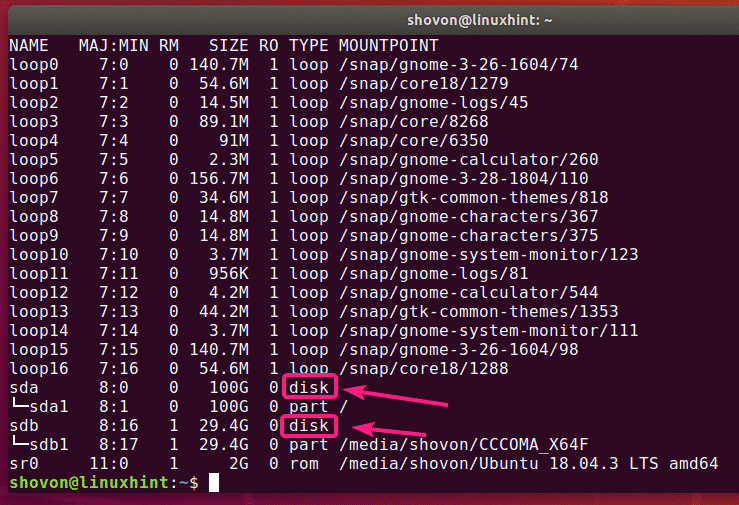
Web Oct 8 2022 nbsp 0183 32 The lsblk command will show all storage devices connected to your system their configured partitions and the sizes lsblk The screenshot below shows us that we have one hard drive identified as sda with a size of 50 GB You can see its partitions and their sizes listed under the disk Web Jun 21 2022 nbsp 0183 32 How to List Disks in Linux Command Line 3 fdisk l The fdisk command is a text based utility used to manage disk partitions Using fdisk you can list disk 4 parted l Parted is a useful and powerful tool used to manage hard disk partitions from the command line like list 5 cfdisk The
4 Ways To Back Up Your Entire Hard Drive On Linux Linux Command To List Hard Drives Linux World HowTo Linux List Disk Partitions Command ServerNoobs How To Resize Hard Drive Partitions On Linux Linux Hard Drive Linux Linux List Users Members In Group Commands Syntax EASY List Disks On Ubuntu Linux ITIGIC List Hard Drives Using Command Prompt And PowerShell How To List Users In Linux Linuxize
Linux List Hard Drives
 Linux List Hard Drives
https://www.cyberciti.biz/media/new/faq/2007/10/linux_disk_utility.png
Web Apr 22 2017 nbsp 0183 32 1 727 6 31 43 Add a comment 2 Answers Sorted by 17 ls shows individual partitions though ls dev sd dev sda dev sda1 ls just disks ignore partitions ls dev sd a z dev sda fdisk fdisk l 2 gt dev null awk Disk print substr 2 0 length 2 1 dev xvda Share Improve this answer Follow edited Jul 15 2020 at 14 41 roaima
Pre-crafted templates offer a time-saving option for producing a diverse series of files and files. These pre-designed formats and designs can be made use of for various individual and professional projects, consisting of resumes, invites, flyers, newsletters, reports, presentations, and more, simplifying the content creation process.
Linux List Hard Drives

How To Hide Any Drive In Windows Using Command Prompt Www vrogue co

Linux Command To List Hard Drives Linux World

HowTo Linux List Disk Partitions Command ServerNoobs

How To Resize Hard Drive Partitions On Linux Linux Hard Drive Linux
List Disks On Ubuntu

Linux ITIGIC

Web You ll like this you can do sudo lsblk scsi and this shows the disk types including name sda sdb scsi addr type vendor model rev it s easy to find which is which when you want to physically locate the disk Another way to

Web Jun 24 2021 nbsp 0183 32 Display all Drives on Linux To display all of your drives on a Linux system you can perform any of the following four methods Method 1 Using the fdisk Command The fdisk command can be used to display the drives in Linux in the manner shown below sudo fdisk l The output produced by this command is shown in the following
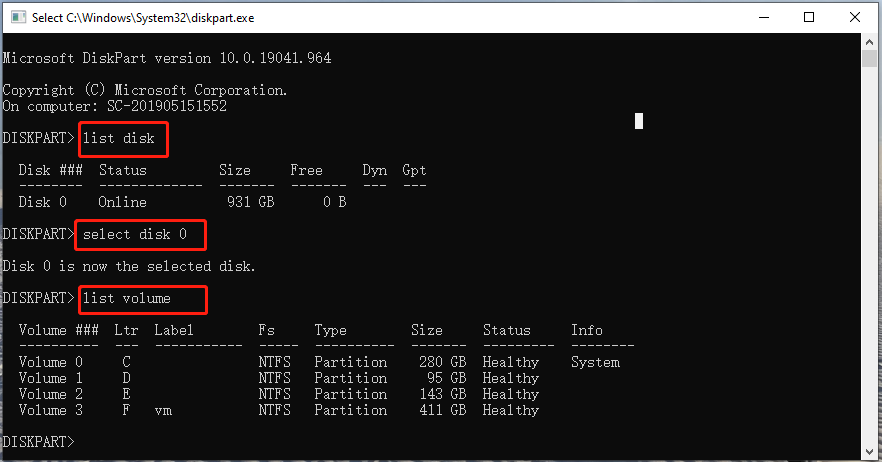
Web Depending on what you re doing udisks I found a useful page describing many common hardware commands with a search on Google The disk drive ones include lshw List Hardware hwinfo Hardware Information lsscsi List scsi devices lsusb List usb buses devices lsblk List block devices fdisk l and mount
Web Mar 7 2021 nbsp 0183 32 List Disks on Linux using lsblk Name the name of the device It is quite important for you to know that Linux devices have a specific prefix depending on the nature of the device Filesystem type if your partition contains a filesystem it should be listed in this column xfs swap or encrypted

Web Jan 3 2023 nbsp 0183 32 To list mounted drives with the df command you d need to use 3 options with it sudo df a T h Here a will available filesystems T will print the filesystem type h will get you output in human readable form And if you want to list mounted drives specific to a filesystem type all you need to do is add the t option with the previous ones
[desc-11] [desc-12]
[desc-13]