Keyboard Alt Codes Check Mark How To Type A Check Mark Symbol On Keyboard TechOwns Dentrodabiblia Alt Codes Repareer ALT codes Die Niet Werken Op Windows 10 Windows Bulletin The ALT Codes List Of Alt Key Codes Alt Symbols I am accidentally hitting a key combination that turns accenting on in an application For example the key is being rendered as 233 and I don t know how to turn it off It s on a per application
Oct 8 2021 nbsp 0183 32 However my keyboard with English UK is US In Windows 10 it was not a problem I had only one keyboard US with English UK language In Windows 11 I have now two Jan 12 2010 nbsp 0183 32 I m a bit embarrassed to ask this but how can I enter the I can t see it in my keyboard that is part of the control sequence CTRL The character is often called caret
List Of Alt Key Codes Alt Symbols How To Get Special Characters Using Alt Key Codes Or The Word Symbols Dentrodabiblia Alt Codes How To Get Special Characters Using Alt Key Codes Or The Word Symbols Image Result For All Alt Key Codes Symbols Simboli Della Tastiera Dentrodabiblia Alt Codes ALT Codes Cheat Sheet Just For Kicks Pinterest ALT Codes Alt Key Codes Computer Shortcuts Computer Basics Dentrodabiblia Alt Codes
Keyboard Alt Codes Check Mark
 Keyboard Alt Codes Check Mark
https://i0.wp.com/www.techowns.com/wp-content/uploads/2020/05/check-mark-symbol-on-keyboard.jpg?fit=1280%2C720&ssl=1
Keyboard 2014 12 19
Pre-crafted templates provide a time-saving option for developing a diverse range of documents and files. These pre-designed formats and layouts can be used for different personal and expert projects, consisting of resumes, invitations, flyers, newsletters, reports, discussions, and more, enhancing the content development procedure.
Keyboard Alt Codes Check Mark
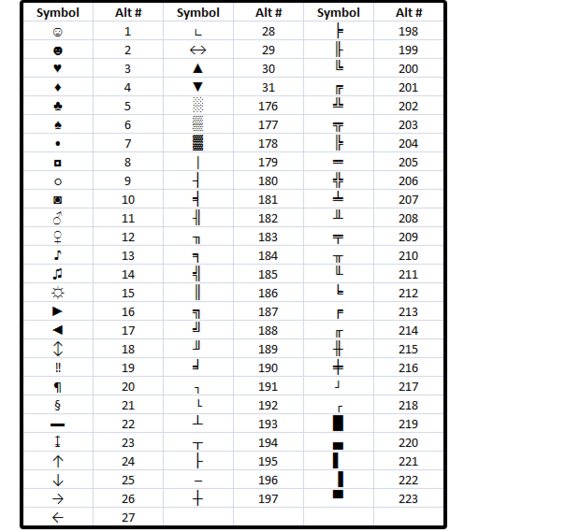
How To Get Special Characters Using Alt Key Codes Or The Word Symbols

How To Get Special Characters Using Alt Key Codes Or The Word Symbols

Dentrodabiblia Alt Codes

How To Get Special Characters Using Alt Key Codes Or The Word Symbols
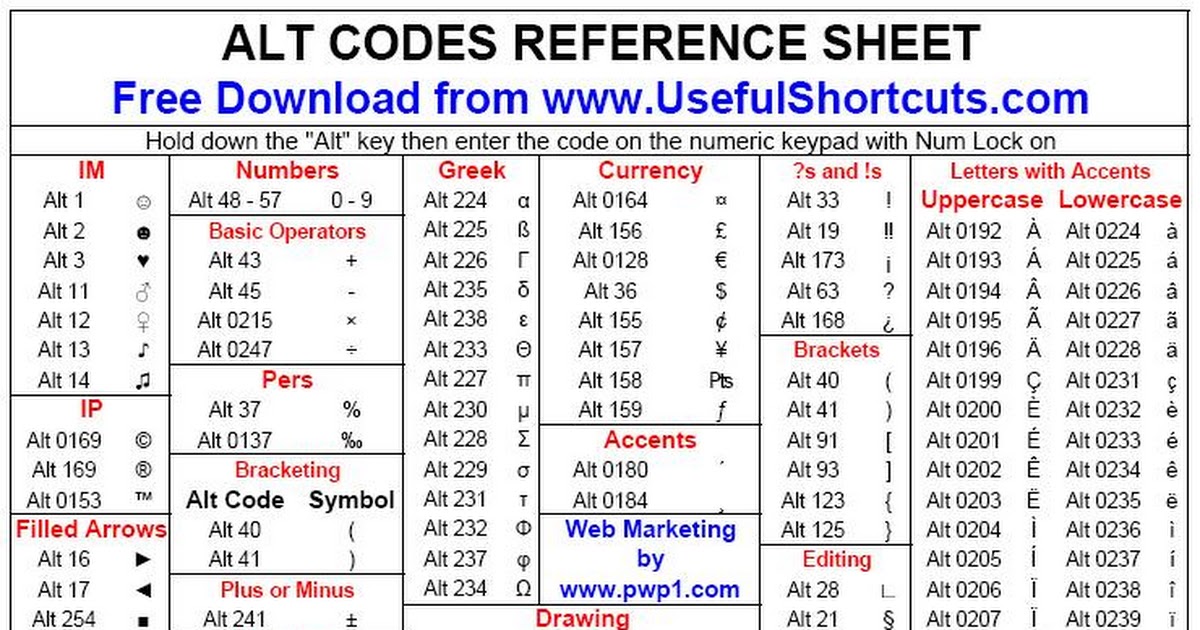
Dentrodabiblia Alt Codes

ALT Codes Cheat Sheet Just For Kicks Pinterest

I am using the Lenovo Laptop which do not have the numeric key pad Ctrl Num and Ctrl Num keys are used to zoom in and zoom out the text in notpad In lenovo laptops one can

Apr 1 2023 nbsp 0183 32 I use two different keyboard layouts but every I boot up my PC I have to change to the second layout How do I make it the default one

In Windows there is the possibility to type special signs from the keyboard by holding the Alt key and typing a few numbers that depends on which sign you want to use Does it work with

Nov 4 2023 nbsp 0183 32 My keyboard stops working properly for instance if I type the D key actually Windows understands ALT D Any key I type is interpreted as this key plus ALT Usually

Apr 13 2011 nbsp 0183 32 Is there a keyboard function that will allow me to do this I like to use the keyboard to avoid repetitive mouse motions I can use the shift key and arrow keys to make a selection
[desc-11] [desc-12]
[desc-13]