Install Windows 10 Without Flash Drive How To Install Upgrade Windows 10 From A USB Flash Drive Tutorial How To Install Windows 10 Without CD DVD Or USB Flash Drive Install How To Install Windows Without A Disk And Without A Flash Drive How To Install Windows 10 On A MacBook Without Flash Drive Or A DVD HOW TO INSTALL WINDOWS 10 WITHOUT DVD OR BOOTABLE USB YouTube Web Apr 6 2021 nbsp 0183 32 published 6 April 2021 Windows 10 install on limited storage PC Image credit Windows Central Whether you use Windows 10 on a tablet or laptop with limited storage or you have
Web Step 1 Download the ISO files for the version of Windows you want to install from Microsoft Follow the below links to find your chosen ISO files Windows 10 Disc Image ISO File Windows 8 1 Disc Image ISO File Windows 7 Disc Image ISO File Step 2 Download and install Virtual CloneDrive You can find a link for the download page here Web You can use installation media a USB flash drive or DVD to install a new copy of Windows perform a clean installation or reinstall Windows To create installation media go to the software download website where you ll find step by step instructions
HOW TO INSTALL WINDOWS 10 WITHOUT DVD OR BOOTABLE USB YouTube Clean Install Windows 10 Without DVD Or USB Flash Drive Tutorials Re Install Windows 10 Without An Installation Disc Or USB Clean Install Windows 10 Without DVD Or USB Flash Drive Tutorials Windows 10 Doesn t Require A Product Key To Install And Use Clean Install Windows 10 Without DVD Or USB Flash Drive Tutorials Clean Install Windows 10 Without DVD Or USB Flash Drive Tutorials Install Onedrive Windows 10 On Flash Drive Jzajuicy How To Install Windows 10 Without USB Stick Or DVD Easy 1080p YouTube
Install Windows 10 Without Flash Drive
 Install Windows 10 Without Flash Drive
https://i.ytimg.com/vi/raNdNPk-sJI/maxresdefault.jpg
Web To use the media creation tool visit the Microsoft Software Download Windows 10 page from a Windows 7 Windows 8 1 or Windows 10 device You can use this page to download a disc image ISO file that can be used to install or reinstall Windows 10 The image can also be used to create installation media using a USB flash drive or DVD
Templates are pre-designed files or files that can be utilized for numerous purposes. They can save effort and time by supplying a ready-made format and design for creating various kinds of material. Templates can be used for personal or professional projects, such as resumes, invitations, leaflets, newsletters, reports, presentations, and more.
Install Windows 10 Without Flash Drive

How To Install Windows 10 Without Optical Drive Czrts
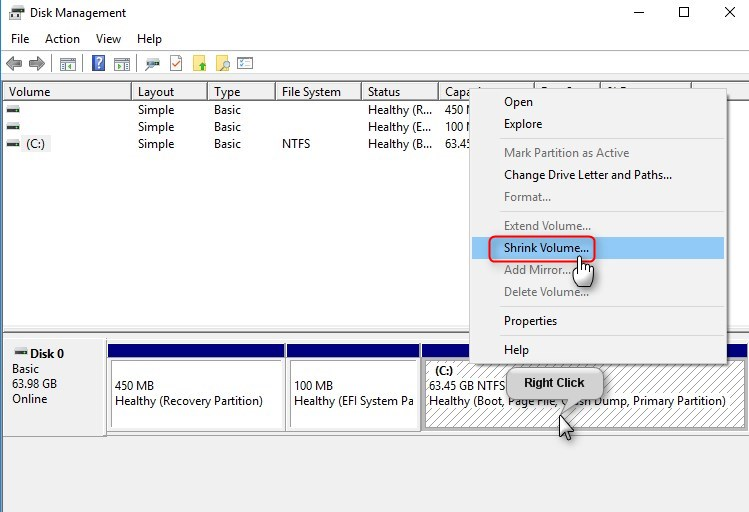
Clean Install Windows 10 Without DVD Or USB Flash Drive Tutorials

Re Install Windows 10 Without An Installation Disc Or USB
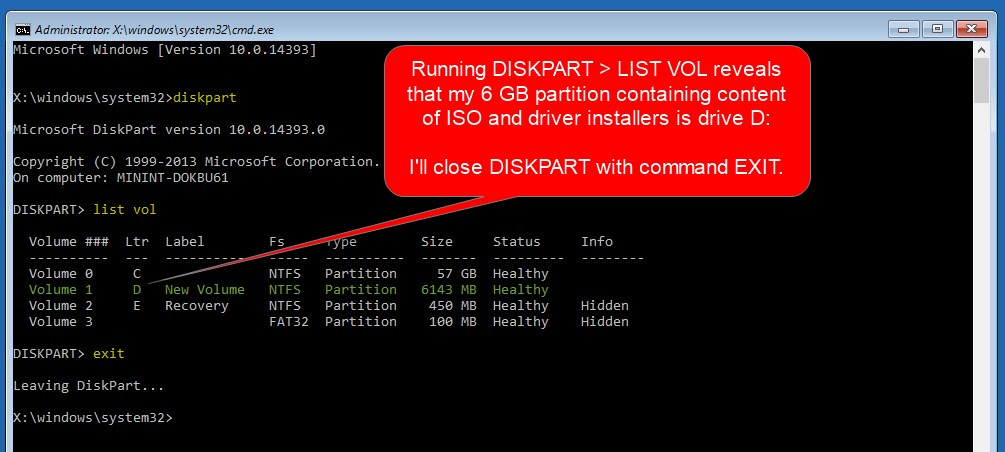
Clean Install Windows 10 Without DVD Or USB Flash Drive Tutorials
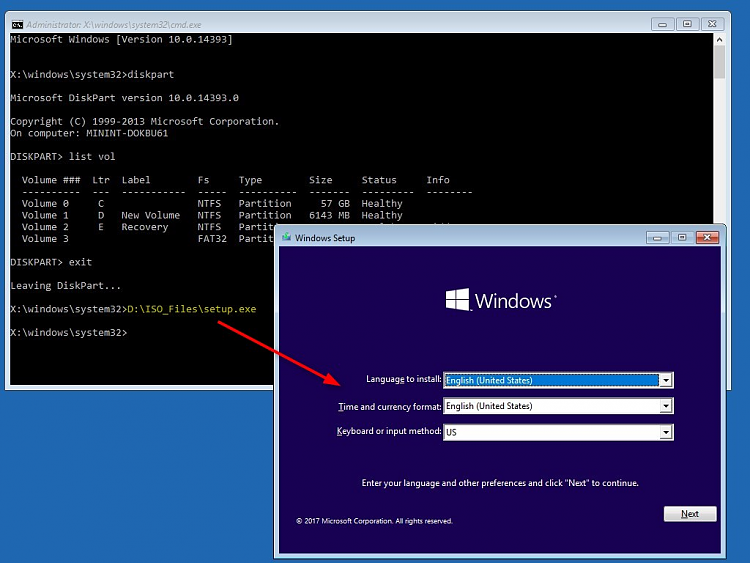
Clean Install Windows 10 Without DVD Or USB Flash Drive Tutorials
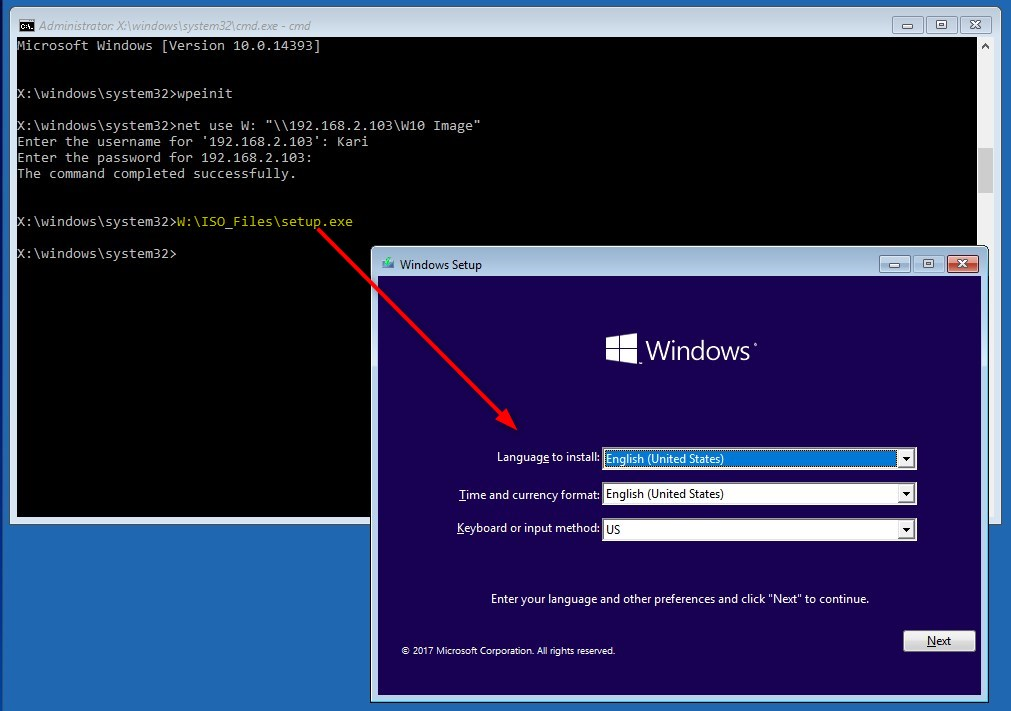
Clean Install Windows 10 Without DVD Or USB Flash Drive Tutorials

Web Mar 20 2019 nbsp 0183 32 Click this link https www microsoft en us software downlo to download the Media Creation Tool Click on Download Tool Now with that you can download the latest Windows 10 ISO Select Create Installation Media for Another PC you can create a bootable USB flash drive min 8GB using that tool

Web You ll need to buy or borrow and 8gb flash stick Example https www amazon SanDisk Flash Cruzer Gli Create the bootable media which always has the latest version available from the Media Creation Tool here https www microsoft en US software downlo

Web Jun 6 2021 nbsp 0183 32 1 2K Share 161K views 2 years ago Windows 10 Instruction in text https bit ly 3yht1xE 2 ways to install Windows 10 8 1 or 7 without a bootable USB flash drive or CD DVD

Web Nov 28 2019 nbsp 0183 32 The best possible fix to make Windows fast again is to reinstall or perform a clean install of Windows 10 by deleting files settings and installed programs Traditionally when it comes to installing or reinstalling Windows users prepare a bootable media and then use it to install reinstall Windows operating system

Web May 26 2023 nbsp 0183 32 Can I reinstall Windows 10 for free without losing data Certainly In the following sections we will teach you the process of reinstalling Windows 10 both with and without a CD or USB drive How to reinstall Windows 10 without CD or USB drive How to reinstall Windows 10 from USB drive or with CD disc
Web Jun 16 2022 nbsp 0183 32 Install your new hard drive or SSD in your computer Plug in your Windows 10 installation USB drive or insert the Windows 10 disk Change the boot order in the BIOS to boot from your install media Boot to your Windows 10 Web Sep 1 2021 nbsp 0183 32 Create the Installation Media Install Windows 10 from the USB Drive Most modern computers don t have a CD or DVD drive so installing Windows 10 using a disc isn t always possible The good news is you don t need discs anymore
Web Windows 11 Windows 10 If you re having problems with Windows 11 on your PC or you want a fresh copy of Windows 11 without the clutter of old files or apps you can reinstall Windows 11 to try and fix your issues and return your PC