Install Ubuntu On Flash Drive How To Install Ubuntu On Flash Drive usb YouTube How To Install And Run Ubuntu OS On An USB Flash Drive Digitional Installing Ubuntu On A Second Hard Drive With Windows10 Already Install FULL Ubuntu On USB Drive Tutorial BENISNOUS How To Install Ubuntu How To Install Ubuntu On A Flash Drive Web Sep 29 2023 nbsp 0183 32 Ubuntu can be installed from a USB flash drive This may be necessary for most new portable computers without DVD drives and is handy for others because a USB flash drive is so convenient Also you can configure Ubuntu on the USB flash drive to save changes you make unlike a read only CD DVD disk
Web Insert the USB flash drive into the laptop or PC you want to use to install Ubuntu and boot or restart the device It should recognise the installation media automatically If not try holding F12 during startup and selecting the USB Web Dec 8 2016 nbsp 0183 32 Head to Ubuntu s download page and download the version of Ubuntu you want either the stable quot Long Term Service quot release or the current release If you re not sure which one to download we recommend the LTS release Below we ll show you how to turn this ISO into a bootable flash drive on both Windows or an existing Linux system
How To Install Ubuntu How To Install Ubuntu On A Flash Drive How To Install Ubuntu Linux From USB Pen Drive Blog Archives Softozsoftguru Can You Install Ubuntu On A Mac Using A Flash Drive Kopfetish How To Get Ubuntu Linux Disk Image iso File For Creating Bootable Bauen Auf Hafen Infrastruktur Ubuntu Install On Usb Stick Adaptiv How To Install Ubuntu How To Install Ubuntu On A Flash Drive Install Onedrive Windows 10 On Flash Drive Onthegover Ubuntu Download On Virtualbox Alertface
Install Ubuntu On Flash Drive
 Install Ubuntu On Flash Drive
https://i.ytimg.com/vi/9GWUWS495Vk/maxresdefault.jpg
Web Apr 22 2022 nbsp 0183 32 Select Language and Try Ubuntu Insert the target flash drive Start GParted Unmount any mounted partitions on the Target drive Select Device tab and create a GPT partition table on the Target drive Create a 1GB NTFS or FAT32 partition on the right side optional Linux Windows data partition See Note 3 at bottom
Pre-crafted templates use a time-saving option for producing a diverse variety of documents and files. These pre-designed formats and designs can be utilized for different individual and expert projects, consisting of resumes, invites, flyers, newsletters, reports, presentations, and more, simplifying the content production process.
Install Ubuntu On Flash Drive

How To Install Ubuntu Linux On Flash Drive How To Install Ubuntu On

How To Install Ubuntu Linux From USB Pen Drive

Blog Archives Softozsoftguru

Can You Install Ubuntu On A Mac Using A Flash Drive Kopfetish
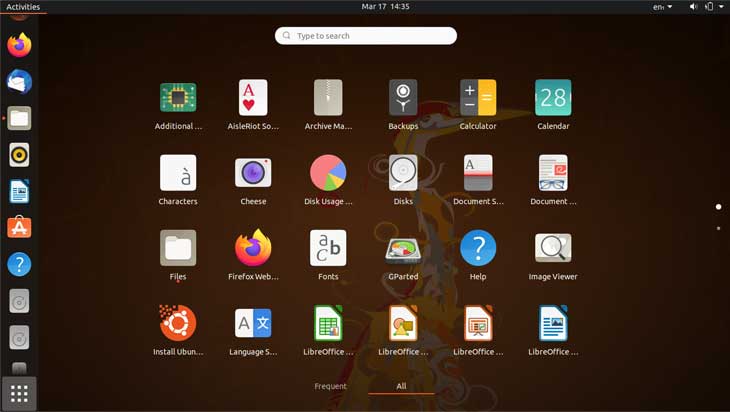
Bauen Auf Hafen Infrastruktur Ubuntu Install On Usb Stick Adaptiv
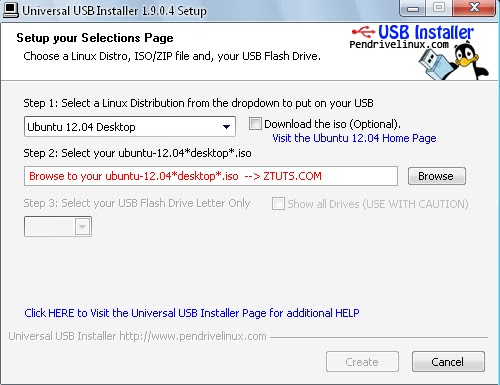
How To Install Ubuntu How To Install Ubuntu On A Flash Drive

Web Boot into Ubuntu on a borrowed machine or from an internet cafe Use tools installed by default on the USB stick to repair or fix a broken configuration This tutorial will show you how to create a bootable USB stick on Microsoft Windows using Rufus

Web Nov 16 2023 nbsp 0183 32 To install Ubuntu on a USB drive using balenaEtcher select the ISO file then the destination drive and click quot Flash quot balenaEtcher runs an integrity check after installing Ubuntu to the USB disk so wait for it to finish before ejecting the thumb drive

Web Mar 17 2020 nbsp 0183 32 Select Language and Try Ubuntu Insert the target flash drive Start GParted Unmount any mounted partitions Select Device tab and create a GPT partition table on the Target drive Create a 3GB NTFS or FAT32 partition on the right side optional Linux Windows data partition See Note 3 at bottom

Web Sep 26 2021 nbsp 0183 32 This tutorial shows the steps for actually installing Ubuntu Linux on an external US drive with the bootloader installed on the USB It is NOT live USB set up This USB will work as portable operating system and can be used on any computer system Abhishek Prakash 31 Jan 2023 11 min read Let me recall a few things
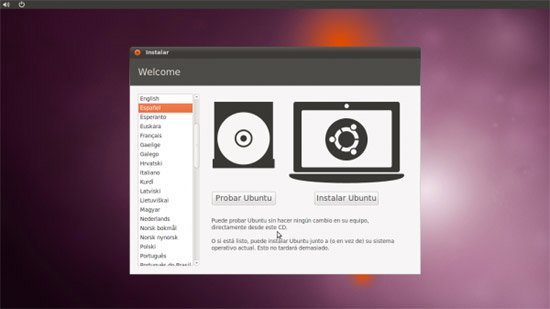
Web Feb 20 2019 nbsp 0183 32 Insert the flash drive Insert the Live USB or Live DVD Start the computer the USB DVD should boot Select language Select install Ubuntu Select Keyboard layout Select quot Continue quot Select installation type and quot Download updates while installing Ubuntu quot and Select quot Install third party software quot optional Select quot Continue quot
Web Dec 17 2022 nbsp 0183 32 You will need two flash drives one as a bootable USB to install Ubuntu and the other to install Ubuntu onto You may need to disable secure boot on PCs in order to boot from the USB since it will contain its own EFI partition Web Apr 3 2019 nbsp 0183 32 I n this tutorial we are going to perform a complete installation of Ubuntu on a USB Flash drive Note that this is not about just creating a bootable Ubuntu Live USB drive Instead we are going to help you install a full fledged Ubuntu on a USB drive It s like having a portable Ubuntu system Complete Ubuntu on a USB Flash Drive
Web Sep 1 2022 nbsp 0183 32 Step 1 Create Live USB on USB First let s create a live USB USB 1 in our case using a USB creator Download Ubuntu from the official site Choose whether you want to download the desktop version or the server version of Ubuntu Download a USB creator Here I am using Rufus