Install Pytorch Windows Pycharm Install And Configure PyTorch On Your Machine Microsoft Learn PyCharm PyTorch PyTorch Vs TensorFlow In 2022 Install Pytorch Using Pip Windows Image To U How To Install PyTorch On Windows 11 YouTube WEB Nov 27 2022 nbsp 0183 32 Joey sTech 2 99K subscribers 46 4K views 11 months ago Installation and setups By watching this video you will learn to install the PyTorch library in Pycharm for your python project
WEB Sep 12 2021 nbsp 0183 32 Open File gt Settings gt Project from the PyCharm menu Select your current project Click the small symbol to add a new library to the project Now type in the library to be installed in your example quot torch quot without quotes and click Install Package Wait for the installation to terminate and close all popup windows WEB Nov 24 2023 nbsp 0183 32 Related Python 3 6 Installation Guide for Windows macOS and Linux pip installed by default with recent Python versions or Anaconda installed This tutorial uses pip 23 3 1 and Anaconda 23 7 4 CUDA drivers and toolkit installed if your Windows system or server is GPU supported Installing PyTorch via pip
How To Install PyTorch On Windows 11 YouTube Install PyTorch Windows YouTube How To Install PyTorch In Windows 10 GitHub How To Set Up PyTorch With GPU Support On Windows 11 A Comprehensive Pytorch For Windows 11 PyTorch Forums PyTorch Tutorial 01 Install PyTorch Windows 10 Pip YouTube PyTorch Aprender libre 2023 Septiembre Pytorch Creating A Custom Dataset Class With Specific Data Publishing Python Installation How To Install Pycharm Vrogue
Install Pytorch Windows Pycharm
 Install Pytorch Windows Pycharm
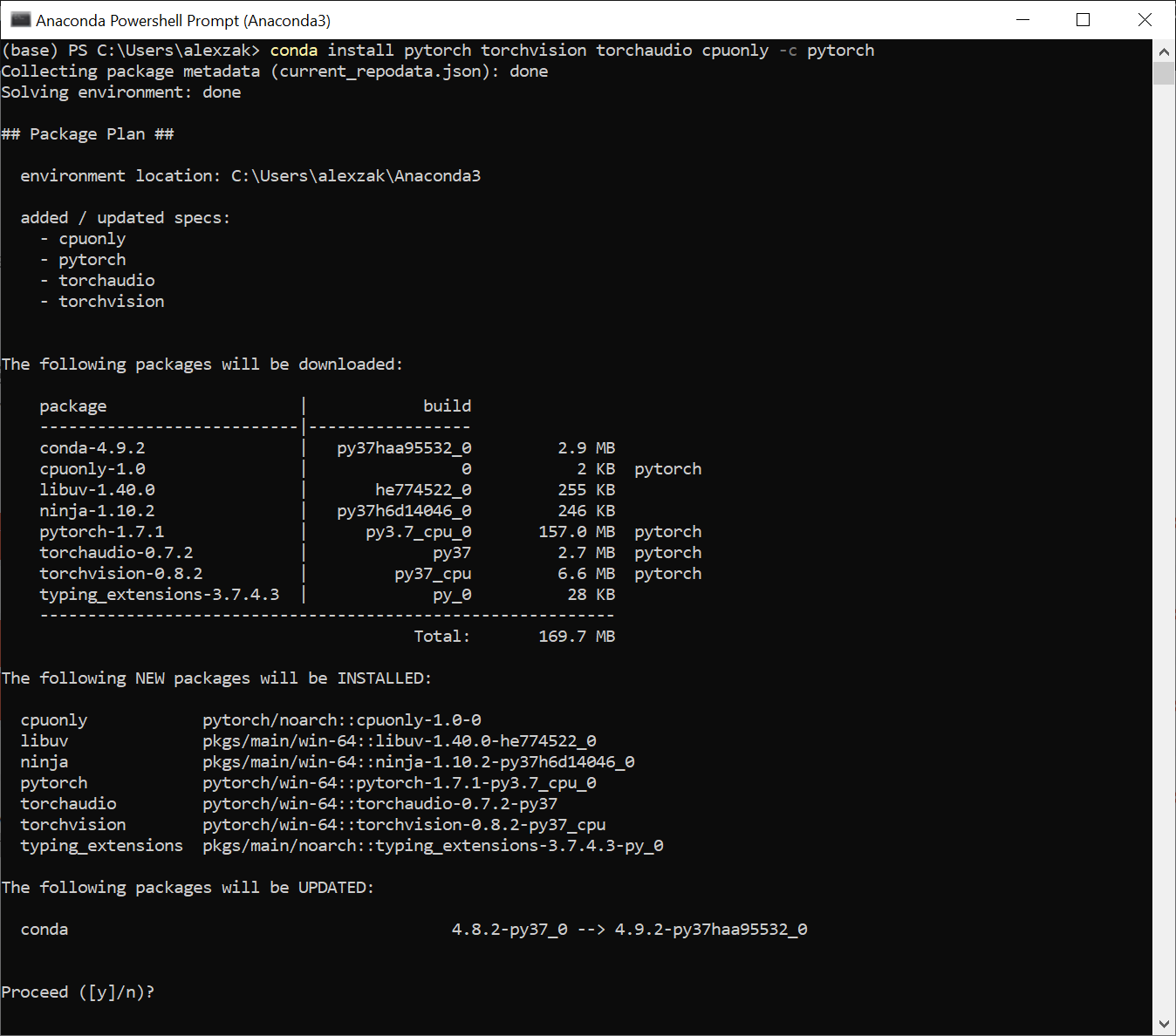
https://learn.microsoft.com/en-us/windows/ai/images/tutorials/pytorch/anaconda-install.png
WEB Jan 5 2021 nbsp 0183 32 Content Download NVIDIA CUDA Toolkit Download and Install cuDNN Get the driver software for the GPU Download Anaconda Download Pycharm 1 NVIDIA CUDA Toolkit It is a development environment that creates GPU accelerated applications It includes libraries that work with GPU debugging optimization tools and many other
Pre-crafted templates offer a time-saving solution for creating a diverse range of documents and files. These pre-designed formats and designs can be used for various individual and expert projects, including resumes, invites, leaflets, newsletters, reports, presentations, and more, enhancing the material production procedure.
Install Pytorch Windows Pycharm

PyTorch Nuyoah
Install PyTorch Windows YouTube

How To Install PyTorch In Windows 10 GitHub

How To Set Up PyTorch With GPU Support On Windows 11 A Comprehensive

PyTorch Tutorial 01 Install PyTorch Windows 10 Pip YouTube

PyTorch Aprender libre 2023 Septiembre

WEB pip3 install https download pytorch whl cpu torch 1 0 1 cp37 cp37m win amd64 whl That s all you have to do for installing Pytorch in Pycharm How to test or check if Pytorch is installed or not After installing the Pytorch you can easily check its version Just use the following code

WEB Dec 29 2021 nbsp 0183 32 Select the relevant PyTorch installation details PyTorch build stable Your OS Windows Package Conda Language Python Compute Platform CPU or choose your version of Cuda In this tutorial you will train and inference model on CPU but you could use a Nvidia GPU as well Open Anaconda manager and run the command as

WEB Aug 7 2019 nbsp 0183 32 pip3 install https download pytorch whl cpu torch 1 1 0 cp37 cp37m win amd64 whl And for torchVision pip3 install https download pytorch whl cpu torchvision 0 3 0 cp37 cp37m win amd64 whl

WEB In this tutorial we ll learn how to install Pytorch on a windows machine with Pycharm IDE To install Python and Pycharm watch this https www youtube w

WEB Install PyTorch Select your preferences and run the install command Stable represents the most currently tested and supported version of PyTorch This should be suitable for many users Preview is available if you want the latest not fully tested and supported builds that are generated nightly
WEB Sep 8 2023 nbsp 0183 32 Download and install PyCharm Community Edition from jetbrains pycharm Make sure to customize the installer to add Anaconda Python environment support Once setup is complete open PyCharm WEB January 5 2021 Last Updated on January 5 2021 by Editorial Team Configure a Conda environment in Pycharm to enable the use of CUDA Continue reading on Towards AI 187 Published via Towards AI Note Content contains the views of the contributing authors and not Towards AI
WEB Feb 11 2021 nbsp 0183 32 Activate your environment source pytorch bin activate Then install PyTorch On macOS install PyTorch with the following command pip install torch torchvision On Linux and Windows use the following commands for a CPU only build pip install torch 1 7 1 cpu torchvision 0 8 2 cpu f