Install Nginx In Debian 10 How To Install Nginx On Ubuntu 20 04 TechNextGen How To Install Nginx On Ubuntu 16 04 18 04 18 10 19 10 PixelsPress Debian 12 Ubuntu 22 04 LEMP How To Install NGINX On Debian And Ubuntu How To Install PhpMyAdmin With Nginx On Debian 11 Debian 10 Web Jun 3 2023 nbsp 0183 32 Install Nginx on Debian 10 Linux with our step by step tutorial It is a web server and reverse proxy that powers millions of websites globally DevOps Tutorials VegaStack
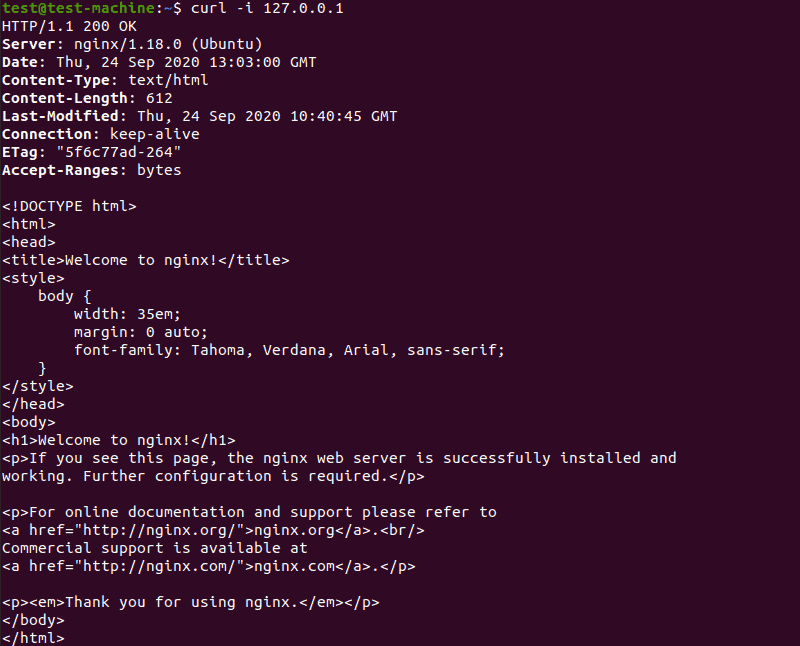
Web Nowadays Nginx software packages built in Debian 10 default software repository so the installation is effortless You just run the following commands in terminal sudo apt update sudo apt install nginx After installation of Nginx you can check the status of the Nginx service by using the following command sudo systemctl status nginx Web Feb 10 2022 nbsp 0183 32 This tutorial describes how to set up an Nginx server on Debian 10 Prerequisites Make sure you meet the following prerequisites A domain name pointing to your public server IP Nginx is installed on a Debian system You are a user with root or sudo privileges In some documentation the term Server Blocks is referred to as Virtual
How To Install PhpMyAdmin With Nginx On Debian 11 Debian 10 Debian Ubuntu Nginx How To Install PHP For Nginx On Ubuntu 18 04 LTS Tutorials24x7 Debian How To Install Nginx On Debian 12 11 Or 10 LinuxCapable How To Install And Configure Nginx From Source On Linux How To Install Https And Configure Nginx On Ubuntu 20 04 ok Full How To Install The NGINX Web Server On Ubuntu Nginx Centos 8
Install Nginx In Debian 10
 Install Nginx In Debian 10
https://mlgj6fuqw9tv.i.optimole.com/T2OxRZ8.-l4e~30c07/w:1200/h:600/q:90/https://technextgen.net/wp-content/uploads/2020/05/Nginx-Ubuntu.jpg
Web Oct 19 2020 nbsp 0183 32 Since this is our first interaction with the apt packaging system in this session we will update our local package index so that we have access to the most recent package listings Afterwards we can install nginx sudo apt update sudo apt install nginx Step 2 226 Adjusting the Firewall Prior to testing Nginx the firewall programming should
Pre-crafted templates provide a time-saving service for creating a diverse variety of files and files. These pre-designed formats and layouts can be used for numerous individual and professional tasks, including resumes, invites, flyers, newsletters, reports, discussions, and more, improving the material production procedure.
Install Nginx In Debian 10
How To Install Nginx On Debian 11
Debian Ubuntu Nginx

How To Install PHP For Nginx On Ubuntu 18 04 LTS Tutorials24x7
Debian
How To Install And Configure Nginx From Source On Linux
How To Install Https And Configure Nginx On Ubuntu 20 04 ok Full

Web Jul 16 2019 nbsp 0183 32 In this tutorial we ll explain how to install and manage Nginx on Debian 10 Buster Install Nginx The Nginx package is included in the default Debian Buster repositories The installation is pretty straightforward just run the following commands as root or user with sudo privileges sudo apt updatesudo apt install nginx

Web Oct 20 2023 nbsp 0183 32 Install Nginx on Debian 12 11 or 10 via APT Step 1 Preparing Your System Before Nginx Installation Ensure your system is updated before installing Nginx This prevents potential conflicts during the installation and reduces the risk of compatibility issues and security vulnerabilities To update your system packages run the following

Web Apr 16 2018 nbsp 0183 32 Currently the best way to install NGINX on Debian 10 is to use the version included in Debian s repositories sudo apt update sudo apt install nginx Add a Basic Site Create a new directory for your site Replace example with your site s domain name sudo mkdir var www example
Web 1 Installing Nginx 2 Adjusting the Firewall 3 Checking your Web Server 4 Managing the Nginx Process 5 Setting Up Server Blocks 6 Getting Familiar with Important Nginx Files and Directories Content Server Configuration Server Logs
Web Oct 26 2023 nbsp 0183 32 Step 1 Import Nginx GPG Key on Debian The first step is to download and add the Nginx GPG key This key is necessary to verify the authenticity of the packages we will install curl fSsL https nginx keys nginx signing key sudo gpg dearmor sudo tee usr share keyrings nginx archive keyring gpg gt dev null
Web Jul 18 2019 nbsp 0183 32 Nginx is available on the default Debian 10 Buster repos and can be installed using the APT package manager Run system update To resynchronize your system packages to their latest versions run the commands below apt update apt upgrade Install Nginx on Debian 10 Buster apt install nginx Running Nginx Web Aug 20 2019 nbsp 0183 32 Update Debian 10 Repository Step 2 Install Nginx on Debian 10 Since Nginx is present in Debian s repositories we can comfortably go ahead and install it using the apt package manager that comes with Debian sudo apt install nginx y Install Nginx on Debian 10 Step 3 Checking the Status of Nginx Webserver
Web Sep 7 2023 nbsp 0183 32 How To Install Nginx On Debian 10 In this tutorial we ll explain how to install and manage Nginx on Debian 10 Buster Install Nginx The Nginx package is included in the default Debian Buster repositories The installation is pretty straightforward just run the following commands as root or user with sudo privileges sudo apt