Install Mongodb Ubuntu Digitalocean How To Install MongoDB On Ubuntu 16 04 Champ96k How To Install MongoDB On Ubuntu 16 04 How To Install Mongodb Ubuntu 20 04 Topax How To Install MongoDB On Ubuntu 14 04 WPcademy Install MongoDB Community Edition On Ubuntu 22 04 Getting Started How to Create MongoDB Database Clusters Create a MongoDB database cluster from the DigitalOcean Control Panel How to Connect to MongoDB Database Clusters Connect to MongoDB database clusters from the command line or other applications How to Import MongoDB Data Import or export data with the MongoDB command line tool
Was this page helpful Give Feedback Getting Started with MongoDB Validated on 9 Aug 2023 Last edited on 6 Sep 2023 MongoDB is a source available cross platform document oriented database program for high volume storage Classified as a NoSQL database program MongoDB uses JSON like documents with optional schemas MongoDB Quickstart Step 1 Importing the Public Key In this step we will import the MongoDB GPG public key MongoDB is already included in Ubuntu package repositories but the official MongoDB repository provides most up to date version and is the recommended way of installing the software
Install MongoDB Community Edition On Ubuntu 22 04 How To Use MongoDB Compass DigitalOcean How To Install MongoDB On Ubuntu 22 04 How To Download Install Mongodb On Windows MongoDB Tutorial Wikitechy Install MongoDB On Ubuntu 16 04 LTS Hevo Blog MongoDB Ubuntu 18 04 Timeweb Community How To Install And Configure MongoDB On Ubuntu 18 04 LTS How To Install Mongodb Ubuntu 20 04 Wearlop How To Create And Use MongoDB Backups On Ubuntu 14 04 DigitalOcean
Install Mongodb Ubuntu Digitalocean
 Install Mongodb Ubuntu Digitalocean
https://1.bp.blogspot.com/-Zj3G553SZRg/XZgjkfhlQZI/AAAAAAAABRE/_NnG8bwlYGAj0iMgeIbw6lClgHXS3nnGQCLcBGAsYHQ/s1600/install-mongodb-ubuntu-16-04-title.png
To install MongoDB on Ubuntu 20 04 on DigitalOcean follow these steps Connect to your DigitalOcean droplet via SSH Update the package list sudo apt update Install MongoDB sudo apt install mongodb Start the MongoDB service sudo systemctl start mongodb Verify that MongoDB has started successfully sudo systemctl status mongodb
Pre-crafted templates use a time-saving service for developing a varied variety of files and files. These pre-designed formats and designs can be made use of for different personal and professional tasks, consisting of resumes, invitations, flyers, newsletters, reports, discussions, and more, streamlining the content development procedure.
Install Mongodb Ubuntu Digitalocean

Panduan Instalasi Dan Konfigurasi MongoDB Di Ubuntu 18 04 Ekarzaen Blog

How To Use MongoDB Compass DigitalOcean

How To Install MongoDB On Ubuntu 22 04
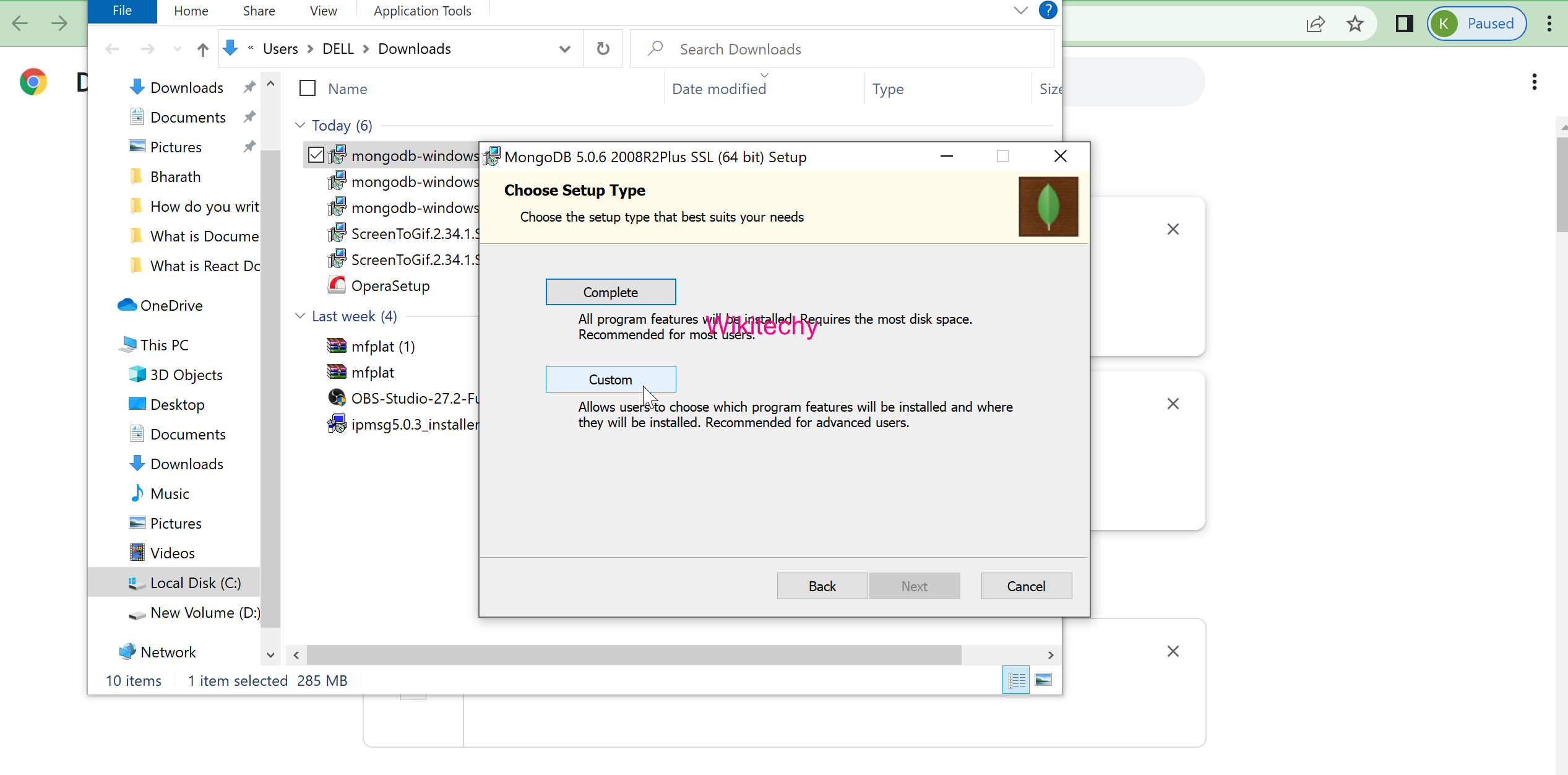
How To Download Install Mongodb On Windows MongoDB Tutorial Wikitechy

MongoDB Ubuntu 18 04 Timeweb Community
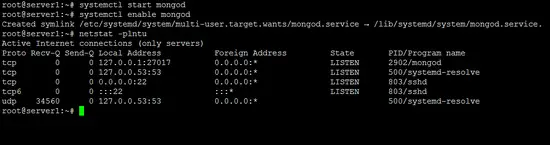
How To Install And Configure MongoDB On Ubuntu 18 04 LTS
Step 1 Installing MongoDB Ubuntu s official package repositories include MongoDB which means we can install the necessary packages using apt As mentioned in the introduction the version available from the default repositories is not the latest one To install the latest version of Mongo please follow this tutorial instead

Ubuntu 20 04 How To Install MongoDB on Ubuntu 20 04 By Mark Drake 18 04 How To Install MongoDB on Ubuntu 18 04 By Mark Drake 16 04 How to Install MongoDB on Ubuntu 16 04 By Mateusz Papiernik 14 04 How To Install MongoDB on Ubuntu 14 04 By Mateusz Papiernik 12 04 How To Install MongoDB on Ubuntu 12 04 By Etel Sverdlov Debian 9

To install MongoDB Community on your Ubuntu system these instructions will use the official mongodb org package which is maintained and supported by MongoDB Inc The official mongodb org package always contains the latest version of MongoDB and is available from its own dedicated repo Important

Step 1 Adding the MongoDB Repository MongoDB is already included in Ubuntu package repositories but the official MongoDB repository provides most up to date version and is the recommended way of installing the software In this step we will add this official repository to our server

Details Features plans and pricing availability limits known issues and more Support Get help with technical support and answers to frequently asked questions Latest Updates 13 March 2023 MongoDB 6 0 is now available in the control panel and via the API
Step 1 Installing RELATED MongoDB Step 2 Starting the MongoDB Service and Testing the Managed Database MySQL Redis Postgres on Step 3 Managing DigitalOcean the MongoDB Service Product Conclusion How To Set Up Multi Factor Authentication for SSH on Ubuntu 18 04 Tutorial How To Set Up Physical TUTORIAL Streaming Replication SCROLL TO TOP 1 Create the MongoDB droplet Log in your DigitalOcean Account and create your new MongoDB droplet based on the newest MongoDB image Choose Create Droplet One click apps Newest
To install a specific release you must specify each component package individually along with the version number as in the following example sudo apt get install y mongodb enterprise 7 mongodb enterprise database 7 mongodb enterprise server 7 mongodb mongosh 7 mongodb enterprise mongos 7 mongodb enterprise tools 7