Install Jupyter Notebook Linux Mint 20 Install Anaconda Python, Jupyter Notebook, Spyder on Ubuntu 18.04 Linux / Ubuntu 20.04 LTS - YouTube How To Set Up Jupyter Notebook with Python 3 on Ubuntu 20.04 | DigitalOcean How to Install Jupyter Lab/Notebook on Ubuntu 20/21/22 ? @CodeRedLinux - YouTube How To Install Jupyter Notebook In Ubuntu Linux - YouTube Opening Jupyter Notebook From Any Desired Location | by Bipin P. | Medium The Jupyter Notebook is an open source web application that allows you to create and share documents that contain live code equations visualizations and narrative text Install Project Jupyter on your Linux distribution Linux Mint 20 2 Linux Mint 21 KDE Neon 22 04 Ubuntu 19 04 Debian 12 Linux Mint 20 Linux Mint 20 1
I need to install jupyter notebook on two computers both Linux Mint 19 2 Tina On one computer I have installed it and run jupyter notebook I can t run the cell I click to run and nothing happens What does not connected mean On the second computer I run jupyter notebook and there is an error Upgrade your version of PIP by entering the command pip3 install upgrade pip3 or pip2 install upgrade pip2 depending on your version of Python in the terminal If you get an
Opening Jupyter Notebook From Any Desired Location | by Bipin P. | Medium How to convert Jupyter notebook to python One-click access to Jupyter notebooks online with noto ‒ Educational initiatives ‐ EPFL How to setup Jupyter & Python on Mac, Windows or Linux Tutorial - YouTube How To Set Up Jupyter Notebook with Python 3 on Ubuntu 20.04 | DigitalOcean Elegant Report How To Setup Jupyter Lab in 2022 | Data Science for Developers | 14 minutes tutorial - YouTube How To Set Up Jupyter Notebook with Python 3 on Ubuntu 20.04 | DigitalOcean BUG: Jupyter Notebook - Model training generated report data dissapears after exeuction is finished · Issue #103243 · microsoft/vscode · GitHub
Install Jupyter Notebook Linux Mint 20
 Install Jupyter Notebook Linux Mint 20
https://i.ytimg.com/vi/DY0DB_NwEu0/maxresdefault.jpg
Step 1 Activate Virtual Environment for Jupyter Installation on Ubuntu To begin the Jupyter Notebook installation start by activating the virtual environment you previously set up This step is crucial for maintaining an organized conflict free Python workspace Activate your virtual environment with the following command
Pre-crafted templates provide a time-saving solution for creating a varied variety of files and files. These pre-designed formats and designs can be made use of for various personal and expert tasks, including resumes, invitations, leaflets, newsletters, reports, presentations, and more, simplifying the content development process.
Install Jupyter Notebook Linux Mint 20

GitHub - mikeroyal/Linux-Mint-Guide: Linux Mint Guide
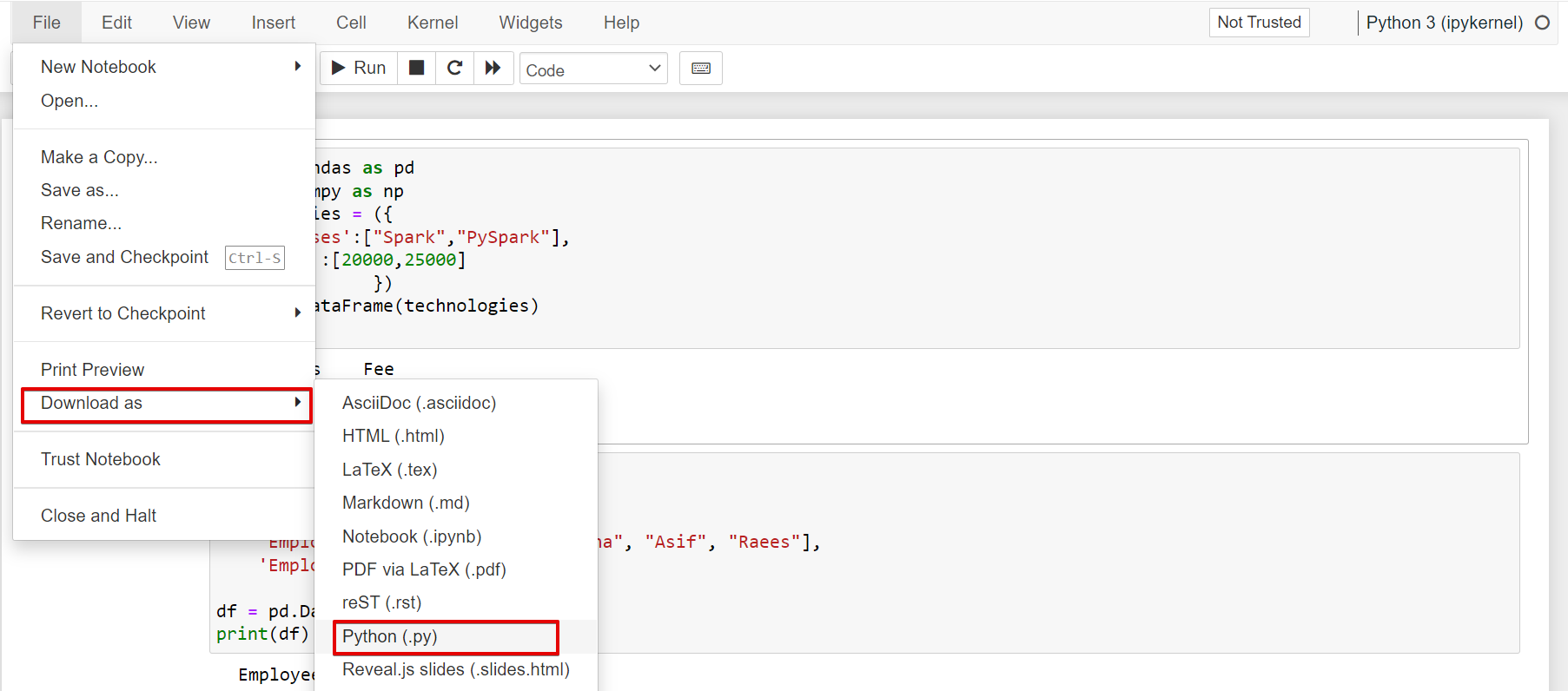
How to convert Jupyter notebook to python

One-click access to Jupyter notebooks online with noto ‒ Educational initiatives ‐ EPFL

How to setup Jupyter & Python on Mac, Windows or Linux Tutorial - YouTube
Elegant Report

How To Setup Jupyter Lab in 2022 | Data Science for Developers | 14 minutes tutorial - YouTube

To install Jupyter using pip we need to first check if pip is updated in our system Use the following command to update pip python3 m pip install upgrade pip After updating the pip version follow the instructions provided below to install Jupyter Command to install Jupyter pip3 install Jupyter
Package jupyter notebook Architecture all Version 6 0 3 2ubuntu0 1 Priority optional Section universe science Origin Ubuntu Maintainer Ubuntu Developers

Generally speaking the documentation of each tool is the place to learn about the best practices for how to install and use the tool Jupyter Notebook Interface The Jupyter Notebook interface is a Web based application for authoring documents that combine live code with narrative text equations and visualizations GitHub Repo Docs

4 2 reviews Install The Jupyter Notebook is a web application that allows you to create and share documents that contain live code equations visualizations and explanatory text The Notebook has support for multiple programming languages sharing and interactive widgets This package provides the jupyter subcommands notebook

I have installed pip3 by sudo apt install python3 pip And then pip3 install jupyterlab During installation errors ERROR jupyterlab pygments 0 1 2 has requirement pygments 3 2 4 1 but yo
Step 1 Update and Upgrade Packages First we always start our installations before we ensure our system is updated Run the following command to update the APT list of available packages and their versions Moreover use the upgrade command to actually install newer versions of the packages sudo apt update sudo apt y upgrade Step 1 Set Up Python To begin the process we ll install the dependencies we need for our Python programming environment from the Ubuntu repositories Ubuntu 20 04 comes preinstalled with Python 3 We will use the Python package manager pip to install additional components a bit later
Step 4 Create a virtual environment for launching Jupyter Once the requisite packages have been installed you need to create a directory that will serve as the code directory Inside this directory you will create a virtual environment and later use it to install Jupyter Notebook In our case we will create a directory called jupyter dir