Install Java 8 On Mac Using Homebrew How To Install Java 8 On Mac Installing Java 8 On Latest Mac OS X Download And Install Java 8 On Mac Jaxclever Install Java 8 On Ubuntu Step By Step Guide For Beginners DataFlair How To Install Java 11 On Mac Tutorials24x7 8 Install AdoptOpenJDK with Homebrew TAP brew install cask version Install Java 8 with Homebrew Tap brew install cask adoptopenjdk8 Install Java 11 with Homebrew Tap brew install cask adoptopenjdk11
First we need to install JEnv using homebrew run the following command brew install jenv Next ensure that jenv is listed as a command on your shell if you are using bash then run echo export PATH HOME jenv bin PATH bash profile echo eval jenv init bash profile If using zshrc then run the following 1 I m trying to use homebrew to install java8 I currently have java9 on my Mac I ve tried using brew tap caskroom versions brew cask install java8 but it appears that java8 is no longer in that directory Does anyone know what the path to java8 is installation homebrew Share Improve this question Follow asked Jun 7 2019 at 19 57 Adrian
8 Install Java 8 On Ubuntu 20 04 LTS November 2020 YouTube Jre 8u65 Macosx X64 Pkg File Nunobodley963 How To Install Java 8 In Ubuntu 16 04 BE OPEN SOURCE INSTALL JAVA ON LINUX STEP BY STEP SHRIPAL Install Java 8 On Amazon Linux 2018 03 Version Without Upgrading The Java 8 On A Mac With SQL Developer 4 1 ThatJeffSmith Install Java 8 Ubuntu Wuschools Download And Install Java 8 On Windows Downlinko
Install Java 8 On Mac Using Homebrew
 Install Java 8 On Mac Using Homebrew
https://1.bp.blogspot.com/-GRPs8PnB32M/XwG-vve1pJI/AAAAAAAACzc/h_qBfZFWVpo-n0vnOvbuGx6YuWXJUDDpQCLcBGAsYHQ/w1200-h630-p-k-no-nu/How%2Bto%2Binstall%2BJava%2B8%2Bon%2BMac%253F%2BInstalling%2BJava%2B8%2Bon%2BLatest%2BMac%2BOS%2BX%2B%2528HomeBrew%2BGuide%2529.png
To install OpenJDK on Mac running on Intel or M1 M2 ARM Apple Silicon chip you can make use of the brew install openjdk command but if you use it without any version of the lasted Java JDK will get installed which is JDK 18 as of September 2022 Installing Specific Version of OpenJDK using Brew Installing Java JDK 8 ONLY WORKS FOR Intel x86 64
Templates are pre-designed files or files that can be utilized for various functions. They can conserve time and effort by supplying a ready-made format and layout for creating various kinds of material. Templates can be used for individual or expert projects, such as resumes, invites, leaflets, newsletters, reports, presentations, and more.
Install Java 8 On Mac Using Homebrew
Java maven

Install Java 8 On Ubuntu 20 04 LTS November 2020 YouTube
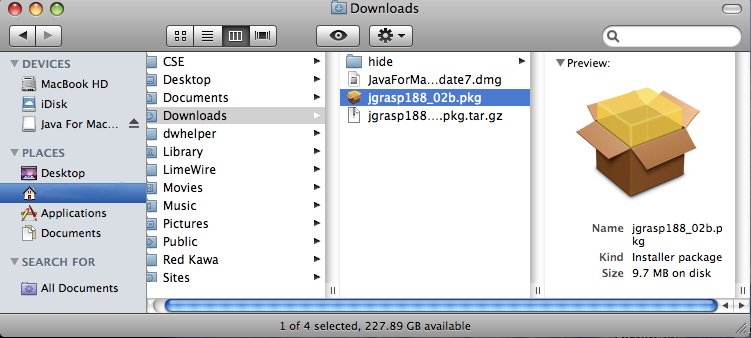
Jre 8u65 Macosx X64 Pkg File Nunobodley963

How To Install Java 8 In Ubuntu 16 04 BE OPEN SOURCE

Install Java 8 On Amazon Linux 2018 03 Version Without Upgrading The
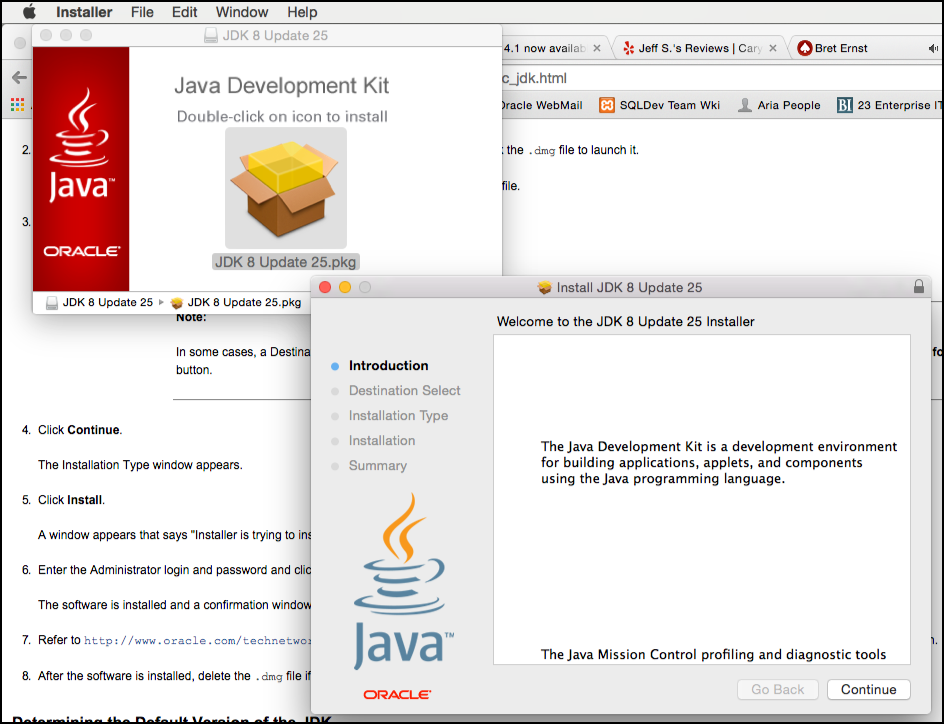
Java 8 On A Mac With SQL Developer 4 1 ThatJeffSmith
04 July 2023 How to Use Brew to Install Java on Mac development java In this article we show how to install Java on Mac using Homebrew and how to allow to switch between different versions such as Java8 Java11 Java13 and latest Java version Pre requisites Before we start make sure you have Homebrew installed on your Mac

3 Answers Sorted by 83 Install homebrew usr bin ruby e curl fsSL https raw githubusercontent Homebrew install master install Update homebrew if already installed brew update allow brew to lookup versions brew tap homebrew cask versions list available java versions brew search java
Homebrew install Java 8 OpenJDK on macOS Homebrew install a specified Java AdoptOpenJDK on macOS Manual install Java Early Access Builds on macOS Switch between different JDK versions P S At the time of writing the latest JDK GA is JDK 15 and the early access build is JDK 16 Note

1 min read Jul 5 2022 4 Macs are awesome For developers there is no better alternative on my opinion right now So I got a new Mac Book Pro with a M1 chip Despite it s beauty there are

Step 1 Install Homebrew The first step is to install Homebrew If you don t have it installed open the terminal and enter the following command bin bash c curl fsSL https raw githubusercontent Homebrew install HEAD install sh Step 2 Install Java Once Homebrew is installed you can use it to install Java
I ve had a manual install of JDK 8 on my Mac for quite a while mainly to run Clojure It was the typical download from the Oracle website then manually run the installer deployment As I move the management of more development tools from manual management over to homebrew I decided to use homebrew to manage my Java installation To install the latest version of Java on your Mac 1 Run the below brew update command to update Homebrew brew update Updating Homebrew 2 Next run the following command to search for the available java formula Homebrew uses formulas to manage packages and applications brew search java
Why installing Java 8 on an M1 Mac is a little weird I needed to install Java 1 8 a k a OpenJDK v8 on my MacBook Pro and it was more annoying than it should be I believe this to be because OpenJDK v8 is fairly old and I m using an M1 mac Anyway Eclipse took over AdoptOpenJDK my normal provider of Java and renamed the organization Adoptium