Install Grub Boot Loader Kali Linux How To Install The GRUB Bootloader For Kali Linux Systran Box How To Install The GRUB Bootloader For Kali Linux Systran Box Kali Linux Not Booting After Install Kali Linux Grub Boot Loader Not Kali Linux Installing The GRUB Boot Loader Systran Box Mengatasi Windows 10 Tidak Muncul Pada Loader GRUB Kali Linux Dual Install and open Drive for desktop To download Drive for desktop DOWNLOAD FOR WINDOWS DOWNLOAD FOR MAC
On your device go to the Apps section Tap Google Play Store The app will open and you can search and browse for content to download Tip If you use a work or school account you might not be able to use Drive for desktop or your organization might have to install it for you If you have questions ask your administrator On
Mengatasi Windows 10 Tidak Muncul Pada Loader GRUB Kali Linux Dual Kali Linux Installing The GRUB Boot Loader Systran Box How To Install Grub Loader In Kali Linux Systran Box Window Is Not Showing In Boot Loader When I Install Kali Linux In FIX GRUB BOOT LOADER KALI WINDOWS UBUNTU EASY WAY 2020 YouTube Kali Linux Installation Install GRUB Boot Loader Dialog Box Screenshot Update Grub Boot Loader Using Kali Linux 2021 1 In Dual Boot Mode And Update Grub Boot Loader Using Kali Linux 2021 1 In Dual Boot Mode And Grub Installation In Kali Linux Super User
Install Grub Boot Loader Kali Linux
 Install Grub Boot Loader Kali Linux
https://syscdn.systranbox.com/1661339191792.png
Open the quot Install Google Earth Pro pkg quot file and follow the installation process To open Google Earth Pro open your Applications folder and double click Google Earth Pro Note During the
Templates are pre-designed files or files that can be used for various purposes. They can save effort and time by providing a ready-made format and layout for developing different kinds of material. Templates can be used for personal or expert jobs, such as resumes, invitations, leaflets, newsletters, reports, discussions, and more.
Install Grub Boot Loader Kali Linux

Windows Option Not Available Grub Boot Loader Kali Linux Windows

Kali Linux Installing The GRUB Boot Loader Systran Box

How To Install Grub Loader In Kali Linux Systran Box

Window Is Not Showing In Boot Loader When I Install Kali Linux In
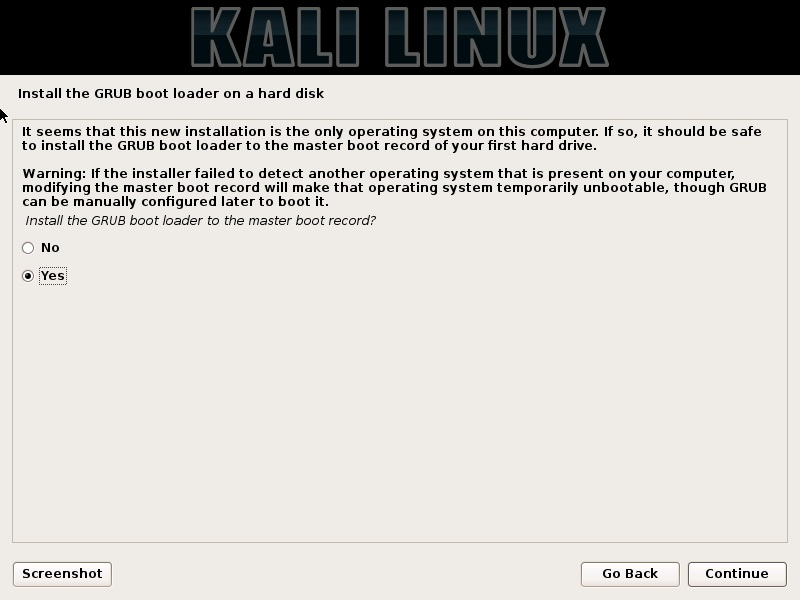
Kali Linux Installation Install GRUB Boot Loader Dialog Box Screenshot
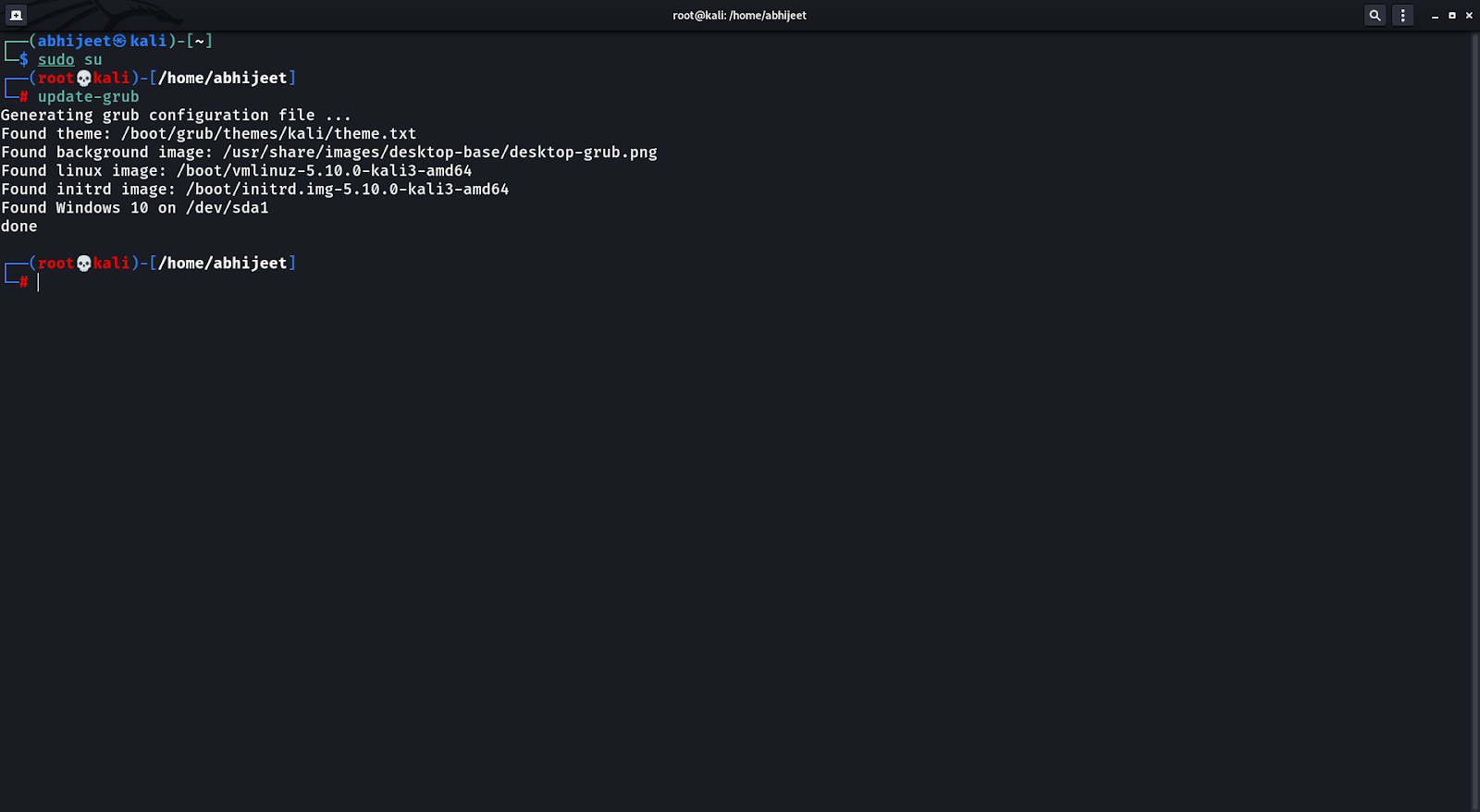
Update Grub Boot Loader Using Kali Linux 2021 1 In Dual Boot Mode And

To use Chrome on Mac you need macOS Big Sur 11 and up On your computer download the installation file Open the file named googlechrome dmg

Puedes descargar e instalar el navegador web Chrome sin coste econ 243 mico y usarlo para navegar por la Web C 243 mo instalar Chrome Importante Antes de descargarlo puedes comp

Vous pouvez t 233 l 233 charger et installer sans frais le navigateur Web Chrome puis l utiliser pour naviguer sur le Web

Install Chrome On your Android device open the Google Play Store app Or open Google Play Store In the search bar enter Chrome Tap Install To start browsing tap Open You can find

To install follow the on screen instructions If prompted enter your Apple ID password To start
[desc-11] [desc-12]
[desc-13]