Install Docker Swarm Centos 8 Nike Air Max 270 Gs Trainers Black Lime Ice Bright Crimson Sneaker Kinder Mini Pool Kaufen Online Gfk Garten Minipool Geht Auch Auf Dem Dach On Cloudventure Trailrunning Schuh Flare Mulberry BIKE24 K chenoberschrank In Wei Online Kaufen Installation Docker CE Centos 8 Integrateur Open Source ESXi VM Creation Create three VMs within ESXi with the following specifications 1 CPU 2GB RAM 16GB Storage Volume named 1mrkt docker controller 1mrkt docker node 1 1mrkt docker node 2 All
02 Install CentOS Stream 8 Initial Settings 01 Add User Accounts 02 Firewall and SELinux 03 Network Settings 04 Enable or Disable Services 05 Update CentOS System Configure Docker Swarm to create Docker Cluster with multiple Docker nodes On this example Configure Swarm Cluster with 3 Docker nodes like follows To verify that docker ce engine has been setup correctly run below docker command docker run hello world Docker has been installed successfully and running fine now we will install and configure portainer so that we can manage docker from web interface Install Portainer on CentOS 8 RHEL 8 for Docker Management Step 1 Download Portainer
Installation Docker CE Centos 8 Integrateur Open Source HD Ipad 6 Gen Wallpaper Pics Infrarot D rrautomat Kaufen F r Komfortables Und Leises D rren How To Install Latest Docker On Centos Fedora Redhat 7 Rennrad In Wei Kaufen Java Minecraft Server 1 20 Auf Raspberry Pi 4 Mit Docker Installieren Office Sophie Toe Post Sandals Gold Leather Sandalen Greensboro Swarm PNG Clipart Hintergrund PNG Play Getting Started With Docker Swarm Collabnix
Install Docker Swarm Centos 8
 Install Docker Swarm Centos 8
https://i8.amplience.net/i/office/3249709150_bv1.jpg?$newhighres$
To install docker in CentOS without getting a migraine try this command and see the magic unfold on your terminal screen sudo dnf install docker ce nobest You ll be prompted to import a GPG key make sure the key matches to 060A 61C5 1B55 8A7F 742B 77AA C52F EB6B 621E 9F35 before entering y
Templates are pre-designed files or files that can be used for different functions. They can conserve effort and time by offering a ready-made format and layout for creating different type of content. Templates can be utilized for individual or professional tasks, such as resumes, invites, leaflets, newsletters, reports, presentations, and more.
Install Docker Swarm Centos 8

How To Install Docker In CentOS OSTechNix

HD Ipad 6 Gen Wallpaper Pics

Infrarot D rrautomat Kaufen F r Komfortables Und Leises D rren
How To Install Latest Docker On Centos Fedora Redhat 7

Java Minecraft Server 1 20 Auf Raspberry Pi 4 Mit Docker Installieren

Office Sophie Toe Post Sandals Gold Leather Sandalen

Getting started with Swarm mode This tutorial introduces you to the features of Docker Engine Swarm mode You may want to familiarize yourself with the key concepts before you begin This tutorial uses Docker Engine CLI commands entered on the command line of a terminal window If you are brand new to Docker see About Docker Engine

For example create a web service containers and configure Swarm service Generally it is used a container image on a rgistry on all Nodes but on this example create container images on each Node to verify settings and accesses for Swarm Cluster FROM centos MAINTAINER ServerWorld admin srv world RUN dnf y install nginx RUN echo Nginx on

March 24 2021 In this tutorial we will show you how to set up a Docker Swarm cluster on CentOS 8 Docker is an open source tool that can be used to create deploy and run applications using a container Complete Story Previous article Building a container by hand using namespaces The mount namespace

If you look closely you will see that the installation skipped the latest version of docker ce as it did not meet the criteria Option 2 Install containerd io Package Manually Another option for installing Docker on CenOS 8 is to install the containerd io package manually in advance This workaround allows you to install the latest docker ce version
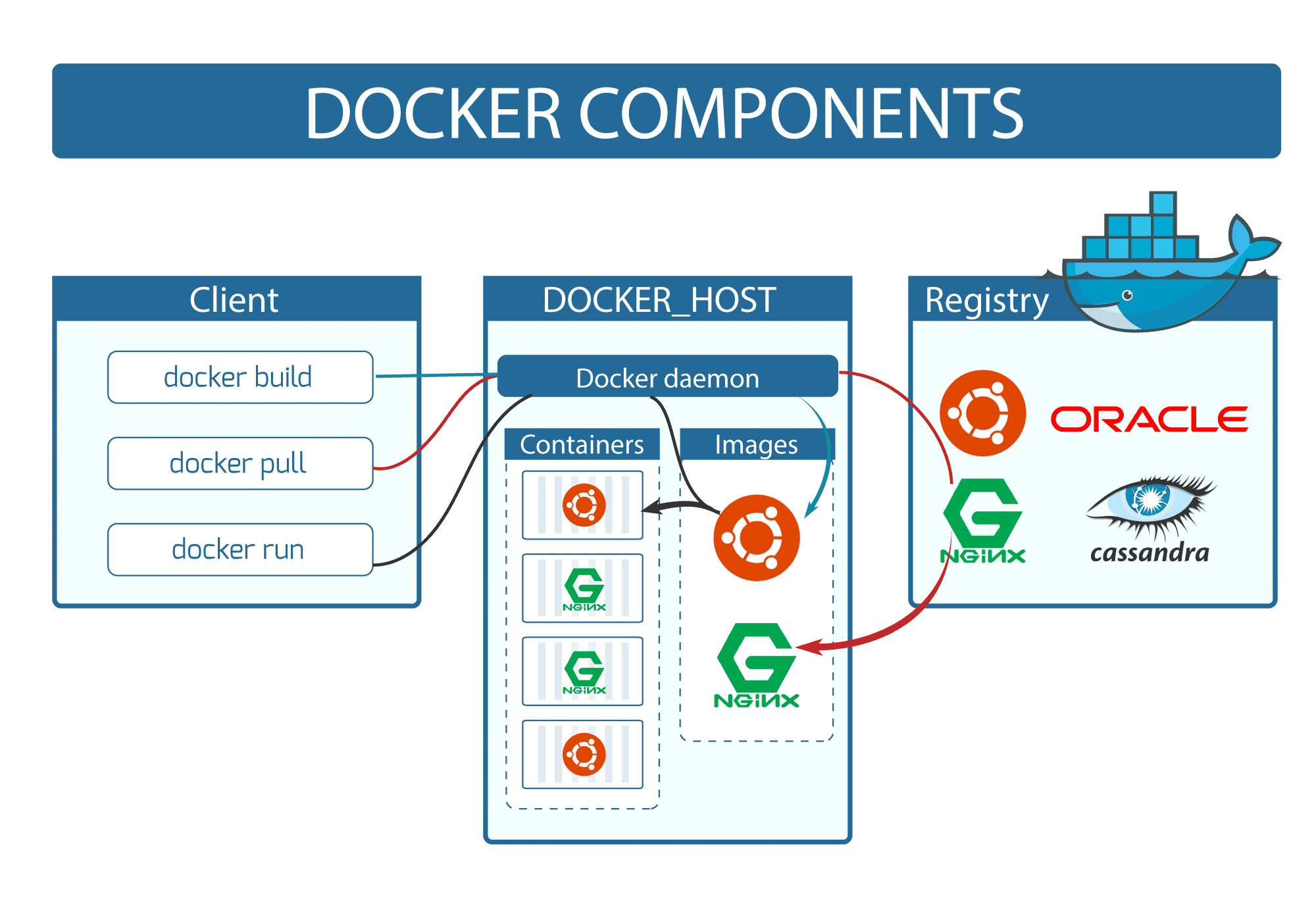
This section describes how to install Docker Engine on Linux also known as Docker CE Docker Engine is also available for Windows macOS and Linux through Docker Desktop For instructions on how to install Docker Desktop see Docker Desktop for Linux Docker Desktop for Mac macOS Docker Desktop for Windows
NAME ACTIVE DRIVER STATE URL SWARM DOCKER ERRORS centos docker digitalocean Running tcp 203 113 71 2376 v18 05 ce Step 4 Specify the Base OS When Creating a Dockerized Host This step shows you how to specify a base OS and version for the Dockerized Host being created with the digitalocean image flag Cloud Servers from 5 mo Intel Xeon Gold 6254 3 1 GHz CPU SLA 99 9 100 Mbps channel Try In this tutorial we will install Docker Docker compose and run a test container Docker installation on CentOS 8
This tutorial provides a starting point on how to install Docker create and run Docker containers on CentOS RHEL 8 7 but barely scratches the surface of Docker Step 1 Install and Configure Docker 1 Earlier versions of Docker were called docker or docker engine if you have these installed you must uninstall them before installing a newer docker ce version