Install Chrome Linux Command Line How To Install Google Chrome On Linux Prakashvemula How To Install Google Chrome On Ubuntu Using Command Line Terminal How To Install Chrome On Ubuntu Systran Box Panduan Install Google Chrome Di Fedora Linux Tanpa Terminal Umahdroid How To Install Chrome In Linux Redhat8 Ninjasquad Web Aug 23 2023 nbsp 0183 32 Method 1 Install Google Chrome Using GUI You need to visit the following url to grab the deb file Make sure you download 64 bit deb version there is no 32 bit version available gt Download Chrome Browser Fig 01 Download Google Chrome bit deb package for Ubuntu Linux Click on accept and install Next you will get
Web Jan 24 2019 nbsp 0183 32 It s not as straightforward as using apt get install chrome but it s not super complicated To install Google Chrome from the terminal get the DEB file using the wget command wget https dl google linux direct google chrome stable current amd64 deb Now you can use dpkg to install Chrome from the Web Jun 27 2023 nbsp 0183 32 You need a terminal emulator and superuser privileges to install Chrome on Ubuntu using the command line interface Visit Google s official website to verify the compatibility of your Ubuntu version with the Chrome installation package
How To Install Chrome In Linux Redhat8 Ninjasquad Linux Mint Google Chrome How To Install Chrome In Linux Redhat8 DNT C mo Instalar Y Usar Google Chrome En Un Sistema Linux Redessy How To Install Chrome On Kali Linux 2022 Using The Chrome deb File How To Install Chrome Browser Properly Via Command Line TechsGuide Opensuse Install Wireshark Command Line Expobpo How To Install Chrome In Linux Redhat8 How To Install Google Chrome On Linux Mint 19 2 Cinnamon Installing
Install Chrome Linux Command Line
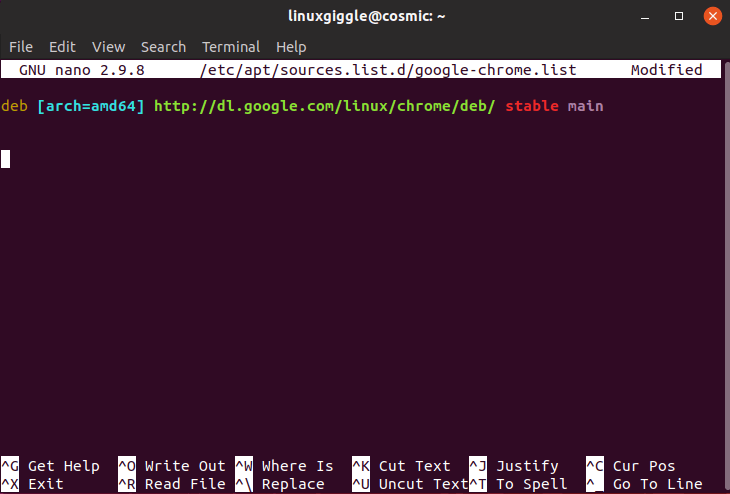 Install Chrome Linux Command Line
https://linuxgiggle.com/wp-content/uploads/2019/04/chrome-browser-ubuntu-18.04-command-line.png
Web Oct 1 2019 nbsp 0183 32 1 Download Google Chrome Open your terminal either by using the Ctrl Alt T keyboard shortcut or by clicking on the terminal icon Download the latest Google Chrome deb package with wget wget https dl google linux direct google chrome stable current amd64 deb 2 Install Google Chrome
Pre-crafted templates use a time-saving service for producing a diverse range of files and files. These pre-designed formats and designs can be made use of for different individual and professional projects, including resumes, invitations, leaflets, newsletters, reports, presentations, and more, streamlining the material creation procedure.
Install Chrome Linux Command Line
How To Install Google Chrome On Linux Beginner s Guide 2DayGeek
Linux Mint Google Chrome
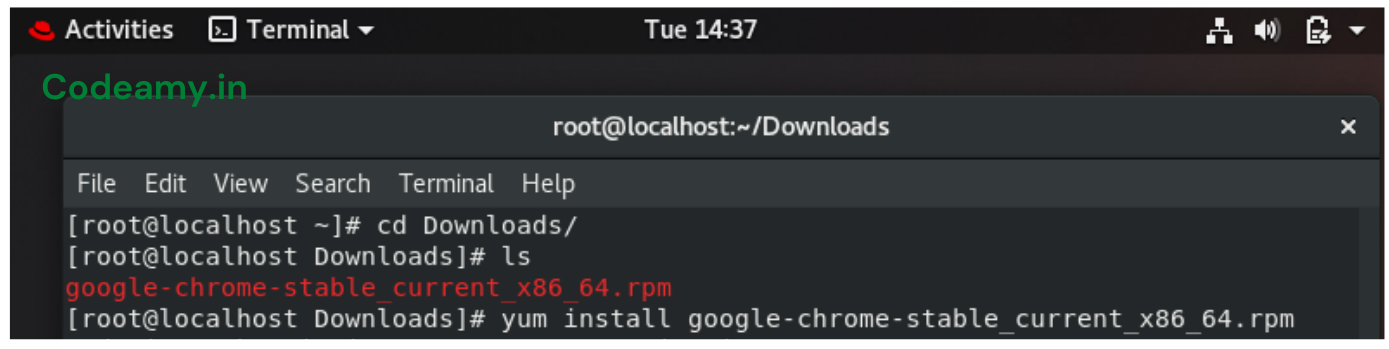
How To Install Chrome In Linux Redhat8 DNT

C mo Instalar Y Usar Google Chrome En Un Sistema Linux Redessy
How To Install Chrome Browser Properly Via Command Line TechsGuide
Opensuse Install Wireshark Command Line Expobpo

Web Dec 7 2023 nbsp 0183 32 Open a terminal and use the following commands to install Google Chrome on Debian based Linux distributions such as Ubuntu Debian Kali and Linux Mint wget https dl google linux direct google chrome stable current amd64 deb sudo apt install google chrome stable current amd64 deb

Web Nov 26 2023 nbsp 0183 32 1 Press Ctrl Alt T to open a terminal window 1 2 Update the package index To make sure your system is up to date run these two commands 2 Type sudo apt update and press the Enter key 3 Type sudo apt upgrade and press the Enter key 3 Install wget if you don t already have it

Web These are the instructions to install Chrome on a 64 bit Linux distribution as that architecture is the only one Chrome supports To install Google Chrome run the following sudo apt get install libxss1 libappindicator1 libindicator7 wget https dl google linux direct google chrome stable current amd64 deb sudo apt

Web Apr 24 2020 nbsp 0183 32 Perform the following steps to install Chrome browser on your Ubuntu system 1 Downloading Google Chrome Open your terminal either by using the Ctrl Alt T keyboard shortcut or by clicking on the terminal icon Use wget to download the latest Google Chrome deb package wget https dl google linux direct google chrome

Web Jun 9 2021 nbsp 0183 32 Quick Links Installing Google Chrome Graphically Installing Google Chrome with the Command Line Updating Google Chrome Google Chrome Everywhere Key Takeaways To install Google Chrome on Ubuntu Linux visit the Chrome download page select the 64 bit deb file for Debian Ubuntu and click quot Download and Install quot
Web Aug 13 2023 nbsp 0183 32 Check if you have added the Google Chrome repository to your system If not add it using the command sudo add apt repository quot deb arch amd64 http dl google linux chrome deb stable main quot Then update your system using sudo apt get update and try updating Google Chrome again with sudo apt get upgrade Web Aug 3 2022 nbsp 0183 32 1 Downloading the Key for Chrome Before we proceed install Google s Linux package signing Key This key will automatically configure the repository settings necessary to keep your Google Linux applications up to date wget q O https dl ssl google linux linux signing key pub sudo apt key add Google Chrome Key 2
Web Mar 17 2022 nbsp 0183 32 If you prefer to use the GUI instead of command line this is the section for you Follow the steps below to download Google Chrome from the official website and install it on Ubuntu 22 04 Start by opening Firefox or whatever your current default web browser is and navigate to the Google Chrome download page