How To Use Menu In Wordpress CNH 380000843 EBay How To Add A Page To The Menu In WordPress EASY Header Menu Submenu Editing An Existing WordPress Menu Item Easy WP Guide How To Use Mega Menu YouTube Photoshop CC 2019 EP 12 How To Use Menu Filter What is Navigation Menus Navigation Menus or simply Menus are a WordPress theme feature which allows users to create navigation menus by using built in Menu Editor located in WordPress admin area under Appearance Menus Navigation menus allow theme designers to let users create custom menus of their own
To do this create a new menu and do not assign a location to it Then go to Appearance Widgets and add a Navigation Menu widget to the widget area of your choice Write a title if you wish and then select the menu to be displayed in the widget Then click on Save to activate this new menu Crucial Factors for A User Friendly WordPress Menu When designing your WordPress menu consider the following factors to enhance usability Clear and concise menu labels Use descriptive and easily understandable labels for your menu items Opt for concise wording that clearly represents the content or section visitors can expect to find
Photoshop CC 2019 EP 12 How To Use Menu Filter How To Add A Page In WordPress WordPress 101 Tutorials How To Use Menu In Java Netbeans Java Swing JMenu JMenu Java Menu How To Edit A Menu In WordPress Webpopular How To Use Menu Strip In C C MenuStrip Menu Strip C MenuStrip 7 Best WordPress Mega Menu Plugins For 2022 Blog A mak I in Bilinmesi Gerekenler Murat Kotaman How To Open WordPress Menu Link In New Tab How To Use Menu In Wordpress
How To Use Menu In Wordpress
 How To Use Menu In Wordpress
https://i.ebayimg.com/images/g/PpwAAOSw1wBhVDJ1/s-l1600.jpg
Step 1 Create a New Menu in WordPress Once you ve made a navigational plan or sitemap you re ready to create your menus Within WordPress navigate to Appearance Customize then click on Menus If you don t have a menu set up yet you can simply select Create New Menu to get started
Templates are pre-designed files or files that can be used for numerous functions. They can save effort and time by supplying a ready-made format and layout for producing different kinds of material. Templates can be used for personal or professional projects, such as resumes, invitations, flyers, newsletters, reports, presentations, and more.
How To Use Menu In Wordpress

How To Use The File Menu In Ms Word 2010 In English YouTube
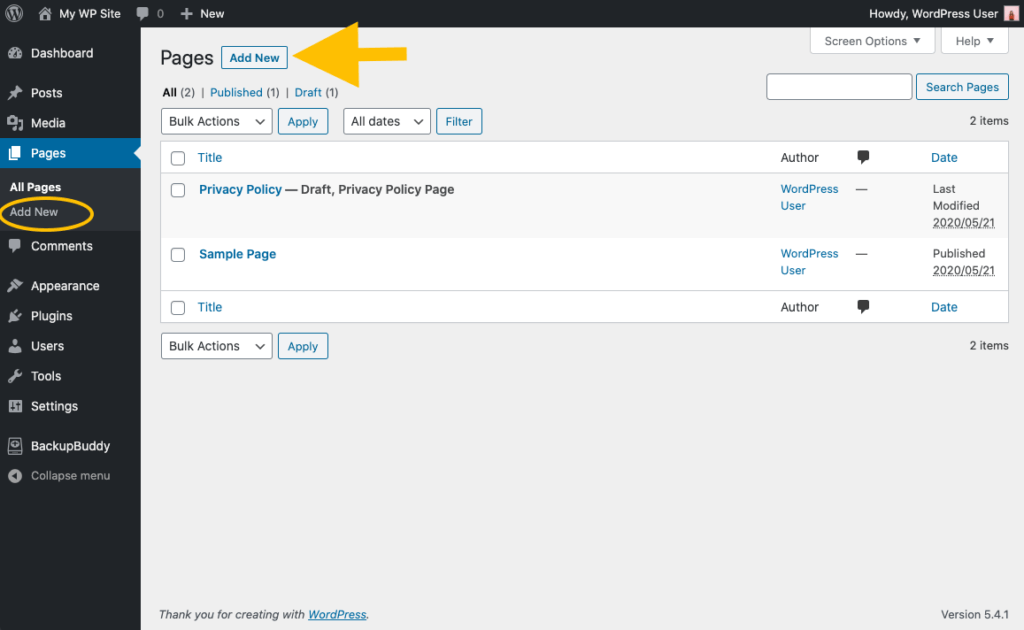
How To Add A Page In WordPress WordPress 101 Tutorials

How To Use Menu In Java Netbeans Java Swing JMenu JMenu Java Menu

How To Edit A Menu In WordPress Webpopular
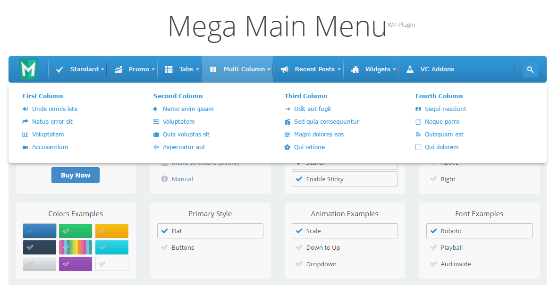
7 Best WordPress Mega Menu Plugins For 2022

Blog A mak I in Bilinmesi Gerekenler Murat Kotaman

To create a navigation menu you need to visit the Appearance Menus page in your WordPress admin dashboard Note If you don t see the Appearance Menus option on your site and see only Appearance Editor then that means your theme has Full Site Editing FSE enabled You can click here to skip ahead to the FSE section below

How to create a menu with the navigation block Learn WordPress Learn Home Tutorials How to create a menu with the navigation block How to create a menu with the navigation block Navigate your way around your website with the aid of the navigation block
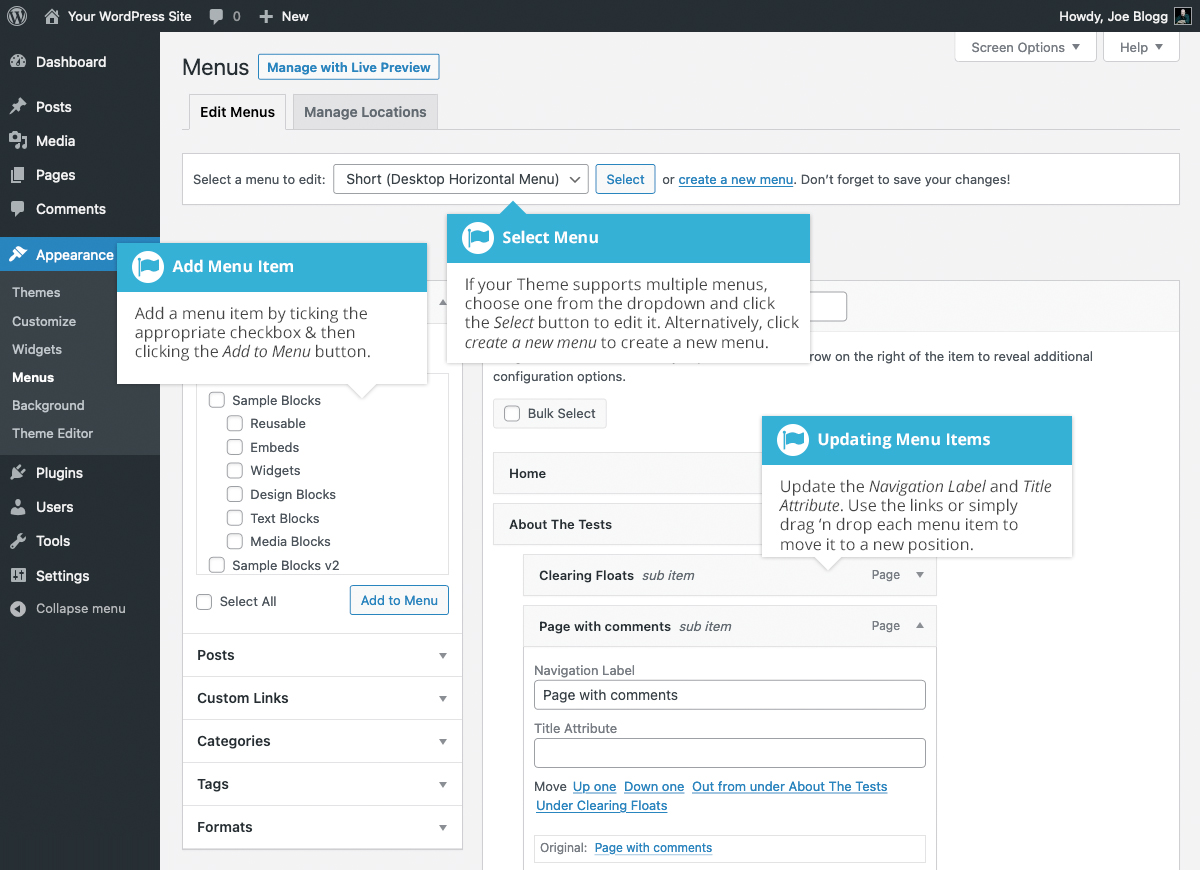
1 Defining a Menu 2 Adding Items to a Menu 3 Deleting a Menu Item 4 Customizing Menu Items 5 Creating Multi level Menus 6 Adding Your Menu to Your Site 7 Resources Defining a Menu You must define a menu before you can add items to it Login to the WordPress Dashboard

Creating a WordPress menu is a no nonsense process regardless of your level of expertise There are three main ways to get the job done use WordPress built in functionality install a suitable plugin or get your hands dirty with code Next we ll show you how to create a WordPress menu using all three approaches 1

In the section Add menu items select Custom Links and fill out the form Type the address of the link in the field URL In Link Text write the link s navigation label that will appear in the menu Press the button Add to Menu arrange the link s order in the menu and confirm the change with Save Menu
What Are Menus and How to Use Them in WordPress By Kaumil Patel WordPress Menus WordPress Tutorials Most menus are used as a method for building navigation within a WordPress site Usually a default menu will accompany your installation of the popular content management system Creating a custom navigation menu Arranging items in your custom menu Creating nested dropdown menus Adding categories to your menus Adding custom links to your menus Editing a menu item Removing a link from your menus Understanding theme locations for your menus Adding menus in sidebars and other widget ready areas 6 95 mo 2 64 mo
1 Using the Built in Menu Editor WordPress provides a built in menu editor that allows you to create dropdown menus without additional plugins or coding knowledge Follow these steps Start by logging into the backend of your WordPress site Go to Appearance Menus in your WordPress dashboard Click the Create Menu button