How To Use Aws Cli In Visual Studio Code Aws Cli Install Windows Vs Ubuntu Pocketpor How To Install And Configure AWS CLI In Windows YouTube AWS CLI Setup The AWS Command Line Interface NerdyElectronics Aws Configure File Tutorial Pics Learn AWS CLI An Overview Of AWS CLI AWS Command Line Interface Use the AWS Toolkit for Visual Studio to develop debug then deploy your NET web applications using a web application template Use Visual Studio to build and run your application locally before deploying to AWS Elastic Beanstalk Learn more AWS Lambda and Amazon API Gateway
The AWS CLI Configure extension allows you to quickly access AWS CLI information and docs from Visual Studio Code Features The extension adds commands for the following Open credentials file Open config file Open credentials config files Browse the online docs Show named profile mapped to default in credentials The AWS Toolkit for Visual Studio Code makes your AWS services and resources available directly from your VS Code integrated development environment IDE To get you started the following topics describe how to set up install and con gure the AWS Toolkit for Visual Studio Code Topics Installing the AWS Toolkit for Visual Studio Code
Learn AWS CLI An Overview Of AWS CLI AWS Command Line Interface How To Install And Configure The AWS CLI On Windows 10 YouTube How To Setup Amazon AWS CLI Command Line Interface On MacOS Or Linux How To Install AWS CLI On Linux Ubiq BI Why CLIs Suck and GUIs Are Better Okta Developer AWS CLI For Beginners The Complete Guide YouTube Aws Ec2 Describe Instances Filter Security Group Instalando E Utilizando O Azure Cli No Macos Com O Visual Studio Code How To Configure Aws Cli Reverasite
How To Use Aws Cli In Visual Studio Code
 How To Use Aws Cli In Visual Studio Code
https://azurelessons.com/wp-content/uploads/2021/05/How-To-Install-AWS-CLI.jpg
Using the AWS Toolkit for Visual Studio Code you can Test your code locally with step through debugging in a Lambda like environment Deploy your applications to the AWS Region of your choice Invoke your Lambda functions locally or remotely Specify function configurations such as an event payload and environment variables
Templates are pre-designed documents or files that can be used for different functions. They can save effort and time by offering a ready-made format and layout for producing various sort of content. Templates can be utilized for personal or professional jobs, such as resumes, invitations, leaflets, newsletters, reports, presentations, and more.
How To Use Aws Cli In Visual Studio Code

How To Start With Amazon Web Service Command Line First Lesson
How To Install And Configure The AWS CLI On Windows 10 YouTube
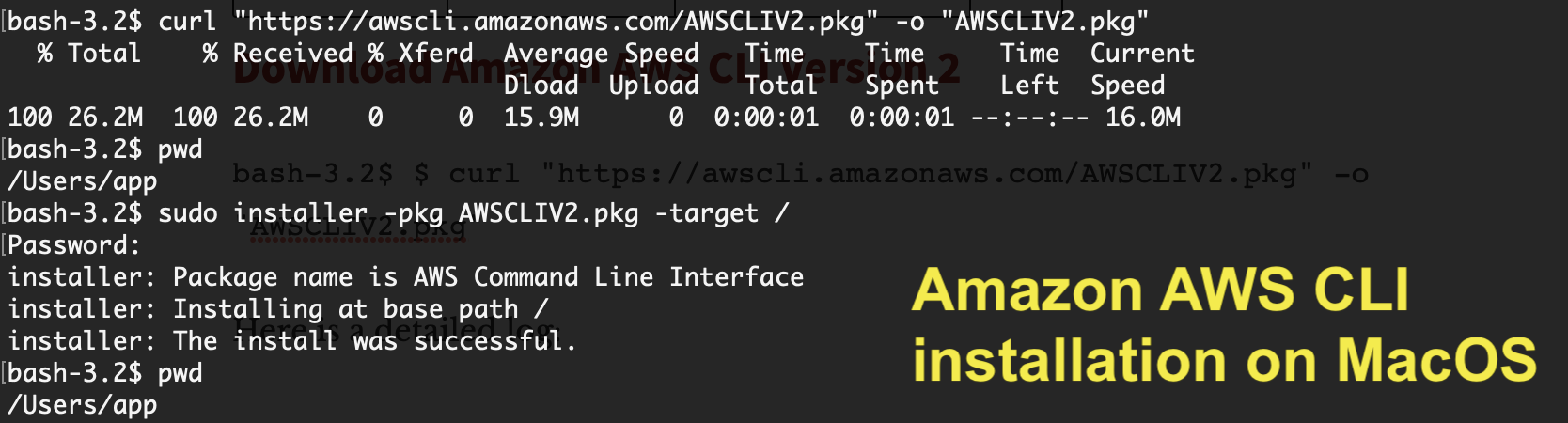
How To Setup Amazon AWS CLI Command Line Interface On MacOS Or Linux
How To Install AWS CLI On Linux Ubiq BI
AWS CLI For Beginners The Complete Guide YouTube

Aws Ec2 Describe Instances Filter Security Group

Setting up authentication There are 3 primary methods to authenticate with your AWS account from the AWS Toolkit for Visual Studio Code To learn more about each of these methods see the Authentication and Access topic in this User Guide

The AWS Toolkit for Visual Studio Code makes your AWS services and resources available directly from your VS Code integrated development environment IDE To get you started the following topics describe how to set up install and configure the AWS Toolkit for Visual Studio Code Topics Installing the AWS Toolkit for Visual Studio Code
The AWS Toolkit for Visual Studio Code is an open source plug in for the Visual Studio Code that makes it easier to create debug and deploy applications on Amazon Web Services With the AWS Toolkit for Visual Studio Code you will be able to get started faster and be more productive when building applications with Visual Studio Code on AWS
To install AWS Toolkit for Visual Studio 2019 from Visual Studio complete the following steps From the Main menu navigate to Extensions and choose Manage Extensions From the search box search for AWS Choose the Download button for Visual Studio 2017 and 2019 and follow the prompts

AWS Toolkit for Visual Studio Code is an extension available for Visual Studio Code using which we can directly communicate with the resources on Amazon within the code editor Pre requisites to start using AWS Toolkit for Visual Studio Code
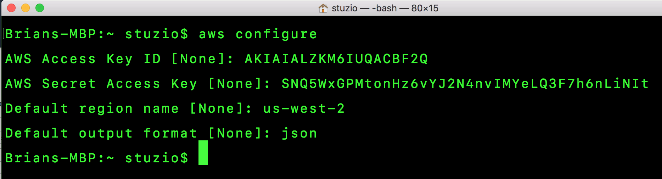
Before you can set up the AWS Toolkit for Visual Studio Code to authenticate with your AWS account you need to complete Step 1 Create your IAM user and Step 2 Get your access keys in the Authenticate using long term credentials topic in the AWS SDKs and Tools Reference Guide Note The following sections describe how to get started creating an AWS Serverless Application from the AWS Toolkit for Visual Studio Code using AWS Serverless Application Model AWS SAM and AWS CloudFormation stacks Prerequisites Before you can create or work with an AWS Serverless Application the following prerequisites must be completed Note
Step 1 Install AWS CLI The AWS Command Line Interface AWS CLI is an open source tool that enables you to interact with AWS services using commands in your command line shell A Visual Studio Code workspace is the collection of one or more folders that are opened in a VS Code window instance AWS Toolkit uses this location as the