How To Uninstall Npm Using Command Prompt How To Uninstall Npm Packages A Brief Guide To Node Package Manager NPM In Drupal Specbee How To Remove A Package From NPM The Complete Guide YouTube How To Install uninstall An Npm Package Renat Galyamov How To Uninstall Node And NPM From Windows Verkko To completely remove npm you need to perform the following steps Open your terminal or command prompt Check if you have any version of npm installed by typing npm
Verkko 8 jouluk 2023 nbsp 0183 32 Uninstalling NPM using apt Step 1 Open your terminal and check if the npm is installed using the below commands npm v Figure 1 npm Step 2 If Verkko Description This uninstalls a package completely removing everything npm installed on its behalf It also removes the package from the dependencies devDependencies
How To Uninstall Node And NPM From Windows How To Fix npm Err Missing Script Start How To Easily Uninstall NPM Package Tech Dev Pillar How To Uninstall Npm Package In Node JS And React JS Node Modules YouTube Uninstall Program From Command Prompt In Windows 10 BENISNOUS How To Install NPM Packages also Update And Uninstall HowToCreateApps How To Install Node js And NPM On Windows How To Uninstall Npm Packages And Dependencies From Node js CodeForGeek Node js How To Fix Npm Vulnerabilities And Moderate And High Manually
How To Uninstall Npm Using Command Prompt
 How To Uninstall Npm Using Command Prompt
https://i.morioh.com/f451aae738.png
Verkko 9 maalisk 2020 nbsp 0183 32 This step by step guide will show you how to install npm and master common commands in the Node Package Manager npm command line interface
Templates are pre-designed documents or files that can be used for various functions. They can conserve effort and time by offering a ready-made format and layout for producing different kinds of content. Templates can be used for personal or expert jobs, such as resumes, invites, leaflets, newsletters, reports, discussions, and more.
How To Uninstall Npm Using Command Prompt
Top 7 Ways To Force Uninstall Programs On Windows 10

How To Fix npm Err Missing Script Start
How To Easily Uninstall NPM Package Tech Dev Pillar

How To Uninstall Npm Package In Node JS And React JS Node Modules YouTube
How To Install NPM Packages also Update And Uninstall HowToCreateApps
How To Install Node js And NPM On Windows

Verkko 24 marrask 2022 nbsp 0183 32 1 This question already has answers here Message quot npm WARN config global global local are deprecated Use location global instead quot 24
Verkko To uninstall an unscoped global package on the command line use the uninstall command with the g flag Include the scope if the package is scoped Unscoped

Verkko Run npm cache clean force Uninstall from Programs amp Features with the uninstaller Reboot or you probably can get away with killing all node related processes from
Verkko 1 maalisk 2022 nbsp 0183 32 To remove a global package you need to attach the g flag to npm uninstall and then specify the name of the package The basic syntax for doing this is npm uninstall g package name To
Verkko To remove a package from your current Node project you use the npm uninstall command npm uninstall lt package name gt Code language Shell Session shell
Verkko 19 toukok 2022 nbsp 0183 32 npm cache clean force Step 2 After that you can verify the cache by using the below command npm cache verify Step 3 Now open control panel in Verkko 27 tammik 2022 nbsp 0183 32 Once you ve restarted your computer you should be able to run the following command to confirm that Node and NPM have been uninstalled node v
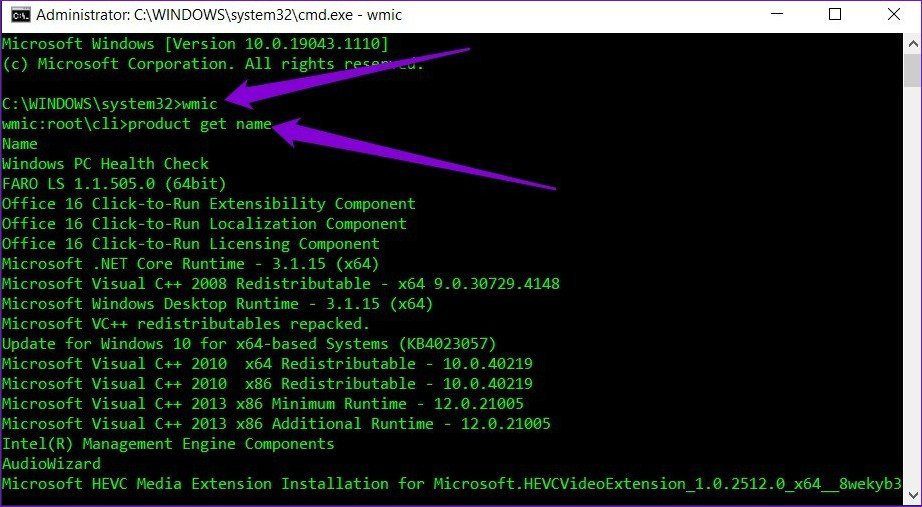
Verkko 16 jouluk 2021 nbsp 0183 32 Uninstall a program using Command Prompt At first type cmd in the Search box right click on Command Prompt option and press Run as administrator