How To Stop Excel From Automatically Changing Date Format How To Stop Excel Automatically Changing Numbers To Dates MATLAB And Easy Steps To Stop Excel From Changing Numbers To Dates Your Stat Formatting Stop Automatically Changing General To Dates In Excel Best Excel Tutorial How To Stop Excel From Doing Numbers E How To Stop Excel From Rounding Numbers Web Aug 31 2011 nbsp 0183 32 Find your file and click open Since Excel doesn t auto format txt it will then take you thru the wizard Makes sure the quot Delimited quot radio button is selected Click the quot next quot button Check the quot comma quot delimiter box and keep hitting the quot next quot button until you SEE but don t click on it the finish button
Web Jul 28 2016 nbsp 0183 32 1 The workaround for this would be to put an apostrophe in front of your quot Replace with quot value Just one more keystroke BTW Microsoft indicates that in Excel 2013 using the TEXT format will stop it from auto converting numbers to dates support office Stop automatically changing numbers to dates Share Web This tutorial demonstrates how to stop auto formatting numbers and changing them to dates in Excel and Google Sheets Stop Auto Formatting Numbers as Dates In Excel if you type in numbers that can be interpreted as dates they re automatically converted to
How To Stop Excel From Rounding Numbers How To Stop Excel From Jumping Cells When Scrolling 8 Easy Methods How To Stop Excel From Changing Numbers To Dates 5 Ways How To Stop Excel From Automatically Creating New Rows And Columns In How To Stop Excel From Changing Numbers Excel Spy Formatting Stop Automatically Changing General To Dates In Excel How Do I Stop Excel From Opening In Full Screen 4 Ways How To Stop Excel From Calculating 3 Simple Ways Excel Republic How To Stop Excel From Rounding 4 Easy Ways
How To Stop Excel From Automatically Changing Date Format
 How To Stop Excel From Automatically Changing Date Format
http://141.89.112.21/wp-content/uploads/2018/03/exceldate_vs1.png
Web Jun 3 2013 nbsp 0183 32 Go to Format menu at top of Excel Document click Format column cell or Row choose Date When date window opens choose desired formatting then each time you type a date it will format as desired As far as I know there is no way to turn off the formatting Unless the column row cell is formatted as Text
Templates are pre-designed files or files that can be utilized for numerous functions. They can save time and effort by offering a ready-made format and layout for producing different type of content. Templates can be used for individual or expert projects, such as resumes, invitations, flyers, newsletters, reports, discussions, and more.
How To Stop Excel From Automatically Changing Date Format
How To Stop Excel From Changing Numbers Excel Spy

How To Stop Excel From Jumping Cells When Scrolling 8 Easy Methods

How To Stop Excel From Changing Numbers To Dates 5 Ways
How To Stop Excel From Automatically Creating New Rows And Columns In

Formatting Stop Automatically Changing General To Dates In Excel
How Do I Stop Excel From Opening In Full Screen 4 Ways

Web In that case you can turn off automatic formatting for one cell or your whole workbook Move your mouse pointer over the text that was just automatically formatted and then click the AutoCorrect Options button that appears This button is tiny so look closely as you move the mouse pointer

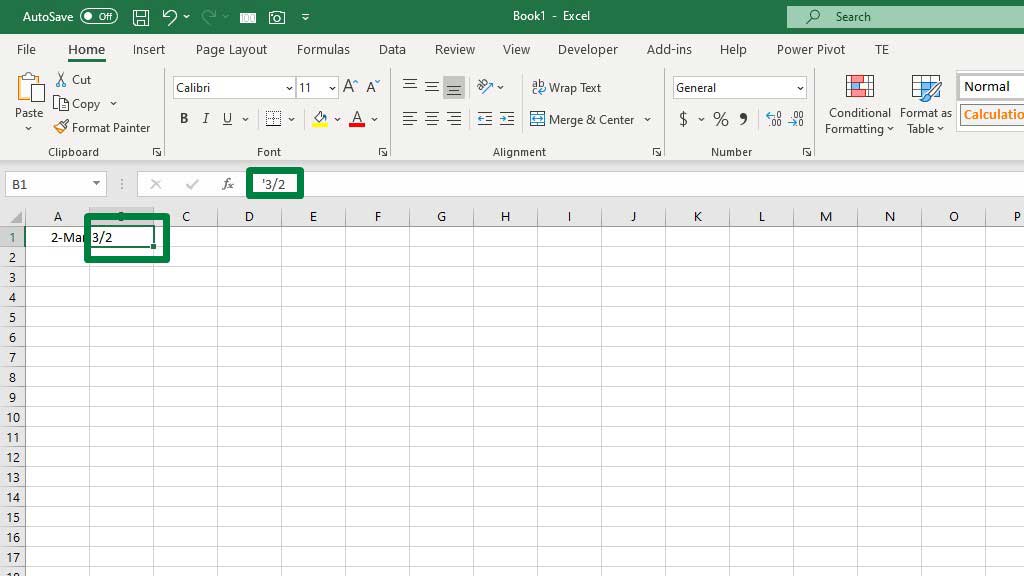
Web Stop Excel from entering dates automatically by changing numbers to dates You can format cells as text before you enter numbers Or if you have just a few numbers to work with enter a space before the number or an apostrophe

Web The only way to stop Excel from changing these numbers or text string into dates is by clearing letting it know that these are not numbers Let s see how to do this Change the format to text The easiest way to make sure Excel understands that it s not supposed to change a number to date is by specifying the format of the cell as Text

Web Use Kutools to change to convert it to a standard date format Add a leading space to turn off Excel date formatting Use 0 to turn off Excel date formatting The best way to stop excel date formatting is by using texts to let excel know that they are not numbers

Web Oct 10 2023 nbsp 0183 32 To prevent auto formatting just do the following Select the range where you ll have your special data It can be a column or a number of columns You can even select the entire worksheet press Ctrl A to do it straight away Right click on the range and select quot Format Cells quot or press Ctrl 1 Select Text in the Category list on the quot Number quot tab
Web Apr 8 2021 nbsp 0183 32 Excel keeps changing time or dates to incorrect format or completely Microsoft Community Ask a new question SH Shoya52 Created on April 6 2021 Excel keeps changing time or dates to incorrect format or completely wrong I m trying to create an ongoing sheet that includes dates and time Web Feb 2 2012 nbsp 0183 32 If you change your date setting in Control Panel the default date format in Excel will change accordingly If you don t like the default date format you can choose another date format in Excel such as quot February 2 2012 quot or quot 2 2 12 quot You can also create your own custom format in Excel desktop
Web Aug 12 2016 nbsp 0183 32 How do I turn off automatic date function in Excel Hi Excel turns entered data to dates if the format matches and does make sense Depending on the format of the cell it is a quot real quot date ie 12Aug2016 or an Excel number equivalent for that date ie 43786 What do I do to turn this off