How To Split Data Into Multiple Cells How To Split Data Into Multiple Columns In Excel 2016 YouTube How To Split Cells In Excel In 3 Easy Steps Split Cells In Multiple How To Split Data Into Multiple Worksheets Based On Column In Excel How To Split Data Into Multiple Columns In Excel In 2021 How To Split Execute Put Off Mission Excel Divide Data Into Columns Generalize Web Feb 3 2023 nbsp 0183 32 How to split multiple lines in a cell into multiple rows 1 Select the cell you want to split Move your cursor into the cell and click to select it If you have a column full 2 Open the Power Query feature Open the quot Data quot tab in your toolbar In the quot Get amp Transform Data quot Section you might
Web Split the content from one cell into two or more cells Select the cell or cells whose contents you want to split Important When you split the contents they will overwrite On the Data tab in the Data Tools group click Text to Columns The Convert Text to Columns Wizard opens Choose Delimited Web You can use the LEFT MID RIGHT SEARCH and LEN text functions to manipulate strings of text in your data For example you can distribute the first middle and last names from a single cell into three separate columns The key to distributing name components with text functions is the position of each character within a text string
Execute Put Off Mission Excel Divide Data Into Columns Generalize Split Data Into Different Columns In Microsoft Excel YouTube How To Split Data Into Multiple Columns In Excel Execute Put Off Mission Excel Divide Data Into Columns Generalize How To Split Data Into Multiple separated Worksheets In Excel YouTube How To Split Data Into Multiple Worksheets By Rows Count In Excel How To Split Data Into Multiple Worksheets Based On Column In Excel How To Split Data Into Multiple Worksheets By Rows Count In Excel Split Data Into Multiple Worksheets In Excel with Quick Steps
How To Split Data Into Multiple Cells
 How To Split Data Into Multiple Cells
https://i.ytimg.com/vi/QuKARrAUcq8/maxresdefault.jpg
Web Follow these steps Note A range containing a column that you want to split can include any number of rows but it can include no more than one column It s important to keep enough blank columns to the right of the selected column which will prevent data in any adjacent columns from being overwritten by the data that is to be distributed
Pre-crafted templates offer a time-saving service for producing a diverse range of files and files. These pre-designed formats and designs can be made use of for various personal and professional tasks, including resumes, invitations, flyers, newsletters, reports, presentations, and more, improving the content production procedure.
How To Split Data Into Multiple Cells

How To Split Data Into Multiple Columns In Excel
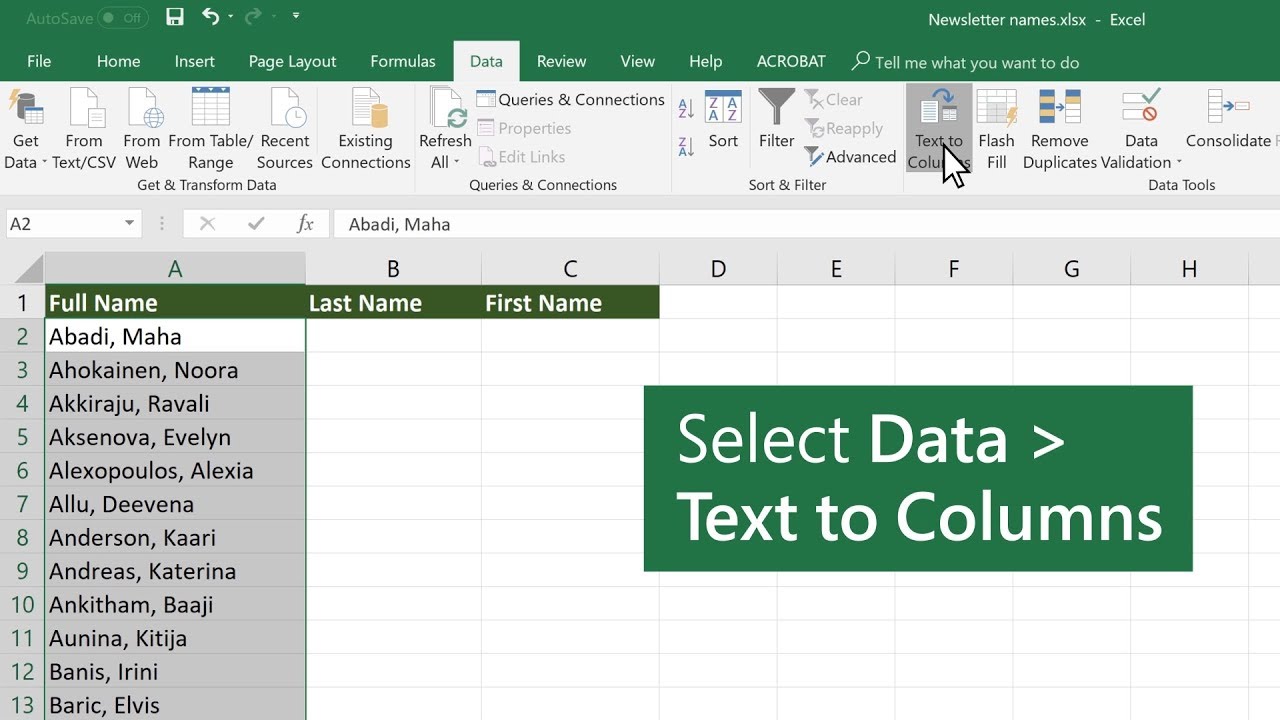
Split Data Into Different Columns In Microsoft Excel YouTube
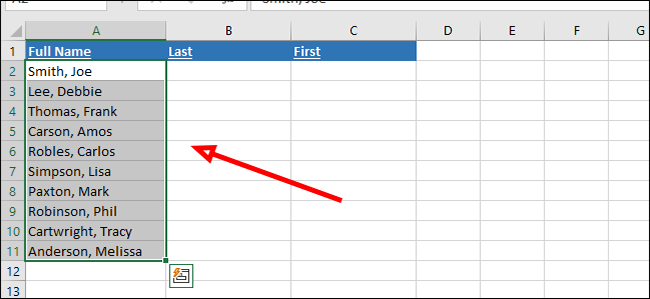
How To Split Data Into Multiple Columns In Excel
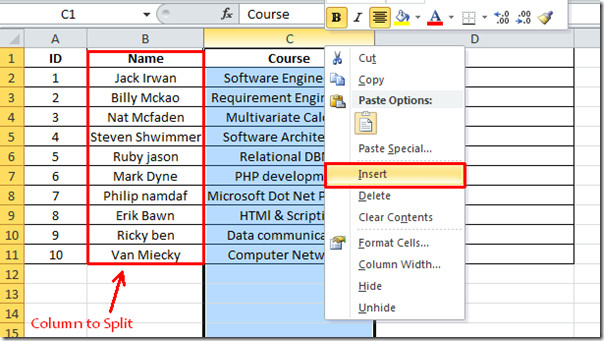
Execute Put Off Mission Excel Divide Data Into Columns Generalize
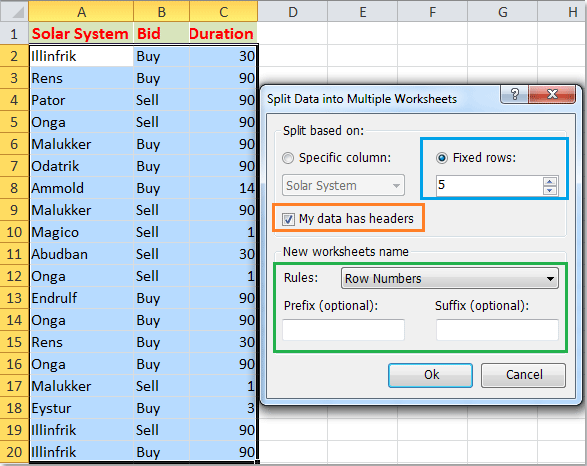
How To Split Data Into Multiple Worksheets By Rows Count In Excel

How To Split Data Into Multiple Worksheets Based On Column In Excel

Web Dec 8 2021 nbsp 0183 32 A quick way to split the values in your cells into multiple cells is by using Excel s Flash Fill feature This automatically extracts the values from your cells and puts them into separate multiple cells To use this feature you must be running Excel 2013 or later To show you how to use this feature we ll use the following spreadsheet

Web Split data into multiple columns Sometimes data is consolidated into one column such as first name and last name But you might want separate columns for each So you can split the Sales Rep first name and last name into two columns Select the quot Sales Rep quot column and then select Home gt Transform gt Split Column

Web How to Split Cells in Excel In this tutorial you ll learn how to split cells in Excel using the following techniques Using the Text to Columns feature Using Excel Text Functions Using Flash Fill available in 2013 and 2016 Let s begin Split

Web To split the contents of a cell into multiple cells use the Text to Columns wizard flash fill or formulas Split a Cell Use the following trick to quot split quot a cell in Excel 1 For example task B starts at 13 00 and requires 2 hours to complete Suppose task B starts at 13 30 We would like to split cell B3 and color the right half 2
Web Select the cell or column that contains the text you want to split Select Data gt Text to Columns In the Convert Text to Columns Wizard select Delimited gt Next Select the Delimiters for your data For example Comma and Space You can see a preview of your data in the Data preview window Select Next
Web May 26 2021 nbsp 0183 32 Using 4 Functions to Build our Formulas To split our Full Name column into First and Last using formulas we need to use four different functions We ll be using SEARCH and LEFT to pull out the first name Then we ll use LEN and RIGHT to Web Oct 4 2023 nbsp 0183 32 Step 1 Select the entire column you want to split the data from Go to the Data tab gt Click on Data Tools gt Select Text to Columns Step 2 The Convert Text to Columns Wizard appears In the Wizard Mark Delimited as Choose the file type that best describes your data Click on Next Step 3 Convert Text to Columns Wizard Step 2 of 3
Web Method 3 Use Flash Fill We can use Flash Fill to combine data as well as split data Type in manually the first Product Code into the cell by combining the Location Code and ID Press CTRL Enter to stay in the same cell From the