How To Run Python Script In Aws Cli How To Run Python Script In IDLE 3 Python Shell Command Prompt On Windows 11 YouTube Run A Python Script Inside A Virtual Environment In The Background Ahmedur Rahman Shovon How To Run Python Script In Terminal Mac Verpipe How To Run Python Script In Mac Plmvehicle How To Run Python Scripts Step By Step Guide 2023 Dive into this AWS EC2 and Python tutorial where we demonstrate how to set up an EC2 instance run Python scripts continuously using nohup and manage proce
Here is the order of places where boto3 tries to find credentials 1 Explicitly passed to boto3 client boto3 resource or boto3 Session 2 Set as environment variables 3 Set as credentials in the aws credentials file this file is generated automatically using aws configure in the AWS CLI Jul 3 2023 Running Python scripts on our local machines is often convenient and straightforward However there are instances where our machines may lack the necessary computing power or
How To Run Python Scripts Step By Step Guide 2023 How To Run A Python Script In Terminal Systran Box How To Run Python Script In Windows 7 Mand Prompt Tutorial Pics How To Run Python Script In Linux PythonPoint How To Run Python Script In Php Under Raspberry Pi Theydreamer A From Trend Oceans Vrogue Run Python In PowerShell Codeigo How To Run Python Script On Windows How To Run Python Script In Cmd Howto Techno How To Run Python Script In Cmd Howto Techno
How To Run Python Script In Aws Cli
 How To Run Python Script In Aws Cli
https://i.ytimg.com/vi/2x7SpwR6Zr0/maxresdefault.jpg
Python on AWS Tools docs and sample code to develop applications on the AWS cloud Tools Download the tools needed to run Python applications on AWS SDK for Python Simpli es use of AWS services by providing a set of libraries that are consistent and familiar for Python developers
Pre-crafted templates provide a time-saving service for producing a diverse variety of files and files. These pre-designed formats and designs can be made use of for various personal and expert tasks, including resumes, invitations, leaflets, newsletters, reports, presentations, and more, enhancing the content development procedure.
How To Run Python Script In Aws Cli

How To Run Python Script In Java Programming Language

How To Run A Python Script In Terminal Systran Box
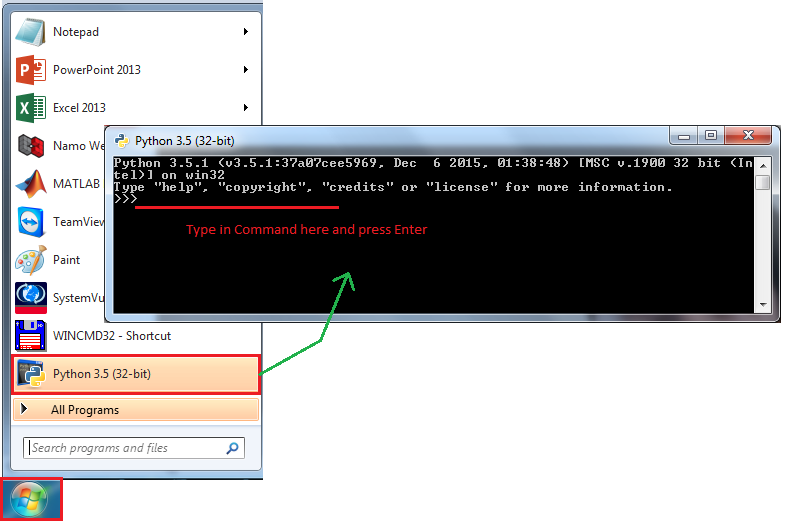
How To Run Python Script In Windows 7 Mand Prompt Tutorial Pics
How To Run Python Script In Linux PythonPoint
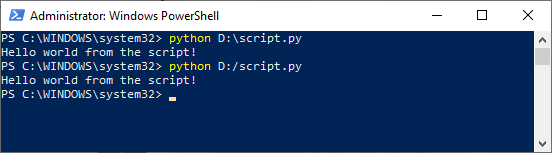
Run Python In PowerShell Codeigo

How To Run Python Script On Windows
Step 1 Getting started Step 2 Run shell scripts to view resource details Step 3 Send simple commands using the AWS RunShellScript document Step 4 Run a simple Python script using Run Command Step 5 Run a Bash script using Run Command Step 1 Getting started
Choose Run command In the Command document list choose AWS RunRemoteScript For Command parameters do the following In Source Type select GitHub In the Source Info box enter the required information to access the source in the following format

Run Python scripts on AWS directly from a CLI terminal Deploy Serverless Python functions to AWS Execute large scale Python computations using Dask clusters on AWS Coiled grew out of the OSS Dask project
1 Set up an AWS EC2 Instance 2 Access and use Python in the AWS Command Line Interface CLI 3 Run a Python program within AWS EC2 Instance Prerequisites AWS Account AWS Command Line Interface Ubuntu Server 20 24 Python Vim Step 1 Sign in to your AWS account Sign up for an AWS Account

You can run Python code in AWS Lambda Lambda provides runtimes for Python that run your code to process events Your code runs in an environment that includes the SDK for Python Boto3 with credentials from an AWS Identity and Access Management IAM role that you manage Lambda supports the following Python runtimes Identifier SDK
Runs the Python or PowerShell script provided using the specified runtime and handler Each aws executeScript action can run up to a maximum duration of 600 seconds 10 minutes You can limit the timeout by specifying the timeoutSeconds parameter for an aws executeScript step In this Video i show you how to setup your local development environment to interact with AWS from your local Pycharm without logging into AWS environment
Open your terminal and update the package list using sudo apt update Install Python3 by running sudo apt install python3 You can verify your Python installation by running python version in your terminal You should see a response with the Python version number 2 Installing Boto3 Now that Python3 is installed you can install Boto3