How To Remove Data Validation In Excel Mac How To Remove Data Validation In Microsoft Excel YouTube How To Remove Data Validation In Google Sheets YouTube Use Validation Lists In Excel To Control User Input My XXX Hot Girl Excel 5 Data Validation Cai Dat Rang Buoc Du Lieu Otosection How To Remove Data Validation Restrictions In Excel 3 Ways Hide error indicators in cells On the Excel menu click Preferences Under Formulas and Lists click Error Checking and then clear the Enable background error checking
22117 You can use data validation to restrict the type of data or values that users enter into cells This is an advanced topic on data validation For an introduction to data validation and how to validate a cell or a range On the Edit menu point to Find and then click Go To Click Special Select Data Validation To find all cells with data validation select All and then click OK To find cells that have
How To Remove Data Validation Restrictions In Excel 3 Ways Excel Data Validation How To Restrict Cell Fill In Excel MicrosoftExcel Clear Remove Data Validation In Excel Google Sheets Automate Excel How To Remove Data Validation In Excel 5 Ways ExcelDemy How To Remove Data Validation Restrictions In Excel 3 Ways How To Remove Data Validation In Excel 5 Ways ExcelDemy How To Remove Data Validation In Excel 5 Ways ExcelDemy How To Remove Blanks In Data Validation List Excel Video 2 Update V Learn YouTube How To Remove Data Validation Restrictions In Excel 3 Ways
How To Remove Data Validation In Excel Mac
 How To Remove Data Validation In Excel Mac
https://i.ytimg.com/vi/DYsnowBhQkE/maxresdefault.jpg
Windows macOS Web Try it Select the cell s you want to create a rule for Select Data Data Validation On the Settings tab under Allow select an option Whole Number to restrict the cell to accept only whole numbers
Pre-crafted templates provide a time-saving service for developing a diverse range of files and files. These pre-designed formats and designs can be utilized for numerous individual and expert projects, including resumes, invites, leaflets, newsletters, reports, discussions, and more, simplifying the material creation process.
How To Remove Data Validation In Excel Mac
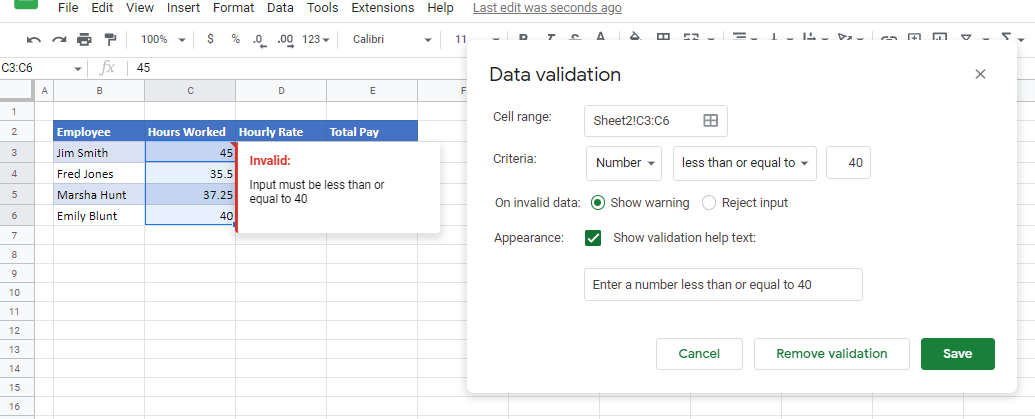
Clear Remove Data Validation In Excel Google Sheets Automate Excel
Excel Data Validation How To Restrict Cell Fill In Excel MicrosoftExcel
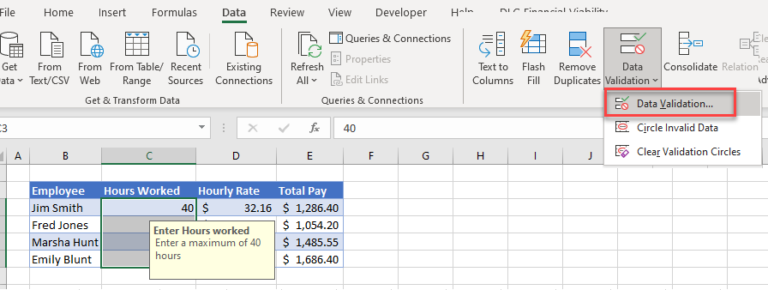
Clear Remove Data Validation In Excel Google Sheets Automate Excel

How To Remove Data Validation In Excel 5 Ways ExcelDemy

How To Remove Data Validation In Excel 5 Ways ExcelDemy

How To Remove Data Validation In Excel 5 Ways ExcelDemy
To add a drop down list of items to a cell or a group of cells select the target cells and do the following Open the Data
Step 1 Open Excel Open Excel on your Mac by clicking on the application icon Once Excel is open you can access the data validation tool in one of two ways

Entire Worksheet If you have more than one data validation in your worksheet you can remove them all at once Select the entire worksheet by clicking in

Removing Data Validation To remove Data Validation first select the cell that contains the drop down list Then in the Ribbon select Data Data Tools Data

Improve data quality with these easy to follow steps and tips Excel Data Validation and Conditional Formatting How to Remove Data Validation in Excel Learn how to
Windows macOS Web Edit a drop down list that s based on an Excel Table If you set up your list source as an Excel table then all you need to do is add or remove items from Oluwasegunfunmi ayodele Independent Advisor Replied on March 21 2023 Report abuse hi Steve o21 If the data validation dropdown is not showing in a cell in
1 Select the cell or range from which you want to remove data validation 2 Go to the Data tab in the Excel ribbon 3 Click on the Data Validation button in