How To Remove Access Denied How To Remove Access Denied Page 2 Windows 7 Help Forums Pin Batch File Or Cmd Admin To Taskbar In Windows 11 Rezfoods Resep Masakan Indonesia Install An Easy To Remove Access Panel YouTube Solved Re How To Remove Access Of Existing User Microsoft Power BI Community How To Remove Access Apps Permission From Google Gmail Account Remove Access In Google YouTube Web Jun 15 2015 nbsp 0183 32 Ask Question Asked 13 years 7 months ago Modified 26 days ago Viewed 1 0m times 242 I have a process that I can t kill with either Task Manager or Process Explorer I get the error quot Access denied quot The process isn t a Windows executable How can I kill it Is there some tool I could use to override this protection
Web Feb 25 2022 nbsp 0183 32 Select Task Manager Head to the Startup tab and look for your antivirus software Click the Disable button at the bottom right of the window Now you can check to see if your folder is Web How To EASILY Delete An Access Denied Folder In Windows 10 Tutorial In this Windows 10 tutorial I will be showing you how to delete a folder if you keep getting an error that is not allowing you
How To Remove Access Apps Permission From Google Gmail Account Remove Access In Google YouTube What Is Windows Update Medic Service WaaSMedicSVC exe How To Remove Access From Google Drive How To Guide How To Remove Access Permissions From All Folders sub folders On My Google Drive Quora How To Remove Access Permissions From Google Drive Of Links YouTube Whatsapp How To Remove PHPMyAdmin Error Mysqli real connect HY000 1045 Access Denied For User How To Remove Access From Google Drive How To Guide How To Remove Access To Files Or Attachments From A User Salesforce Developer Community
How To Remove Access Denied
 How To Remove Access Denied
https://www.sevenforums.com/attachments/general-discussion/338719d1486630887t-how-remove-access-denied-incredimail_screenshot_0007.jpg?s=39ade497802cd5c8bd47141f21293943
Web Feb 12 2023 nbsp 0183 32 Method 1 Change Owner of File Folder Access is Denied error most commonly occurs when you try to access a file without owning the necessary permissions You can rectify this by changing the owner of the file or folder in question
Pre-crafted templates offer a time-saving option for producing a varied series of files and files. These pre-designed formats and designs can be utilized for different individual and expert tasks, including resumes, invites, leaflets, newsletters, reports, discussions, and more, streamlining the material production process.
How To Remove Access Denied

Solved Re How To Remove Access Of Existing User Microsoft Power BI Community
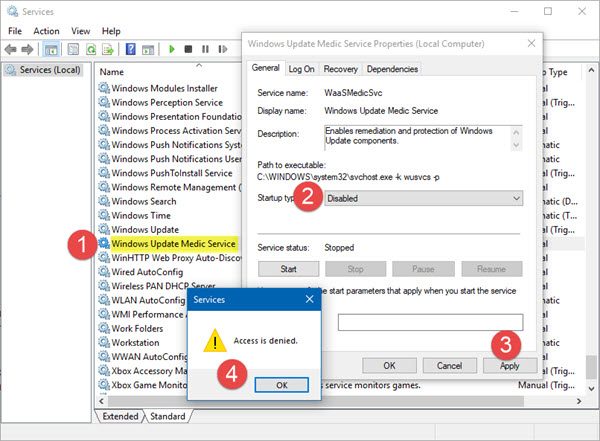
What Is Windows Update Medic Service WaaSMedicSVC exe

How To Remove Access From Google Drive How To Guide
How To Remove Access Permissions From All Folders sub folders On My Google Drive Quora

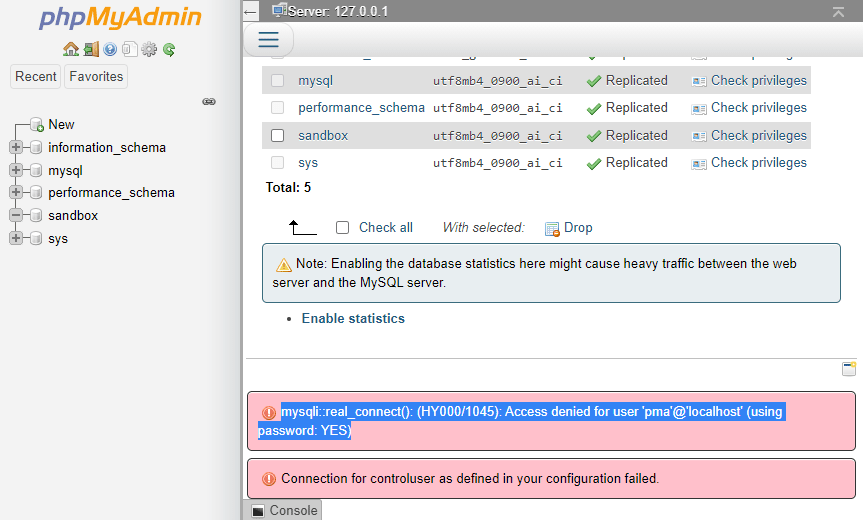
How To Remove PHPMyAdmin Error Mysqli real connect HY000 1045 Access Denied For User

Web Dec 8 2021 nbsp 0183 32 How to Fix quot Access Denied quot Errors on Windows 11 1 Set Your Account to Administrator In most cases the Access Denied errors can be fixed by making your user account the computer s administrator 2 Disable Your Third Party Antivirus Software 3 Check Your System s Permissions 4 Enable the

Web Jan 14 2022 nbsp 0183 32 If you do not have access to a file or folder it is possible the file is encrypted Try the following steps to check the same Right click the file folder and select the Properties option

Web You might be able to resolve this issue by restoring your ownership of the files and folders To take ownership of a file or a folder follow these steps You may not have the appropriate permissions Issues that you experience when you try to access files and folders may be related to permissions

Web Mar 21 2023 nbsp 0183 32 The most common fix to try when you see quot folder access denied quot is to take ownership of the folder through File Explorer Here s how to do this First right click the folder or file in question and select Properties On the resulting window switch to the Security tab Next click the Advanced button for more options

Web Nov 20 2022 nbsp 0183 32 Using Microsoft Process Explorer Tool 1 Download Microsoft Process Explorer from here https learn microsoft 2 Open the Process Explorer 3 Click on the Find menu select the Find handle or DLL option 4 In the new dialog enter the exact path of the file or folder you re unable to delete
[desc-11] [desc-12]
[desc-13]