How To Make Adobe Default Pdf Viewer How To Make Adobe Default PDF Viewer On Windows 10 11 3 Methods How To Make Adobe Default PDF Viewer On Windows 10 11 3 Methods How To Make Adobe Default PDF Viewer On Windows 10 11 3 Methods Windows 10 How To Make Adobe Reader Default PDF Viewer YouTube How To Make Adobe Default With Simple Steps EaseUS [desc-7]
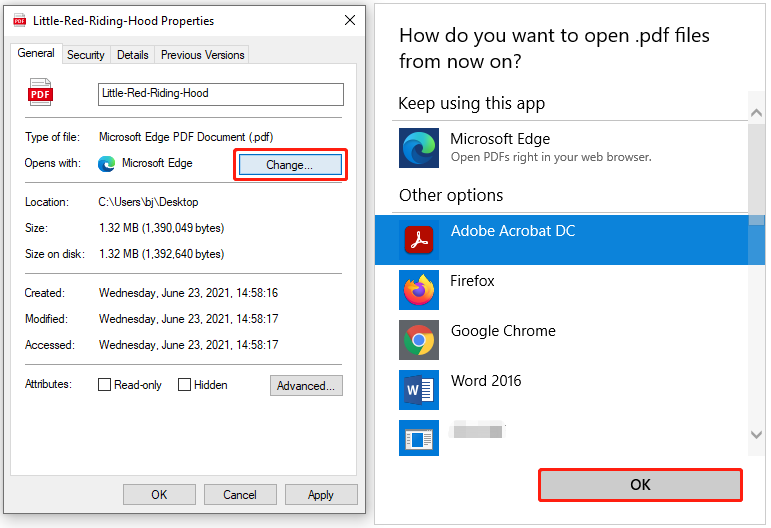
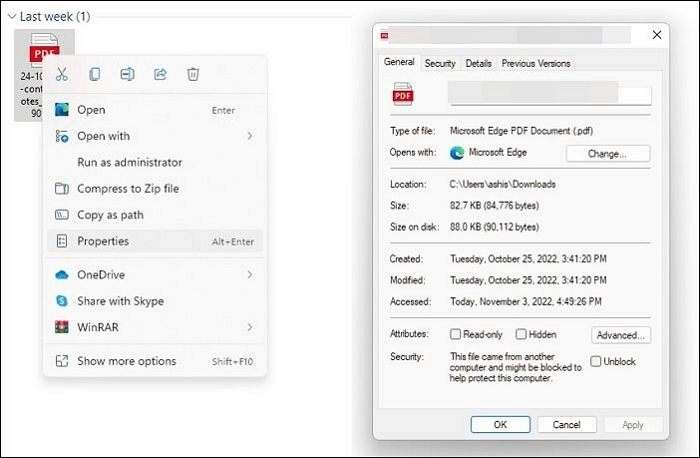
Web Sep 23 2019 nbsp 0183 32 In four easy steps you can make Acrobat DC or Acrobat Reader DC your default PDF program Right click the thumbnail of a PDF file and then choose Properties In the file s Properties dialog box click Change Do one of the following If you have Acrobat DC or both Acrobat DC and Acrobat Reader DC choose Adobe Acrobat DC and click OK [desc-8]
How To Make Adobe Default With Simple Steps EaseUS How To Make Adobe Reader Default PDF Viewer In Windows 11 YouTube Make Adobe Default Pdf Reader Windows 10 All Users Kumusli How To Make Adobe Default Pdf Reader Windows 10 Hromcoins Error Fume Incident Event How To Set Adobe As Default Pdf Reader Warlike Jabeth Wilson Bog How To Set Up Acrobat Reader As Default How To Make Adobe Acrobat Your Default Pdf Reader Mac Kurtlc How To Set Adobe Acrobat Reader As The Default PDF Viewer On Windows 11 How To Set Adobe As Default Pdf Reader Mac Fourbetta
How To Make Adobe Default Pdf Viewer
 How To Make Adobe Default Pdf Viewer
https://www.partitionwizard.com/images/uploads/articles/2021/09/how-to-make-adobe-default/how-to-make-adobe-default-1.png
[desc-9]
Templates are pre-designed files or files that can be used for various functions. They can save time and effort by supplying a ready-made format and layout for producing different kinds of material. Templates can be used for personal or expert jobs, such as resumes, invites, leaflets, newsletters, reports, discussions, and more.
How To Make Adobe Default Pdf Viewer
How To Make Adobe Default With Simple Steps EaseUS

How To Make Adobe Reader Default PDF Viewer In Windows 11 YouTube

Make Adobe Default Pdf Reader Windows 10 All Users Kumusli
How To Make Adobe Default Pdf Reader Windows 10 Hromcoins
Warlike Jabeth Wilson Bog How To Set Up Acrobat Reader As Default

How To Make Adobe Acrobat Your Default Pdf Reader Mac Kurtlc
Web May 23 2023 nbsp 0183 32 Steps to make Acrobat Reader or Acrobat your default PDF program Right click the thumbnail of a PDF file and then choose Properties In the file s Properties dialog box click Change Do one of the following In the Properties dialog box click OK Now the PDF files open in Acrobat Reader or
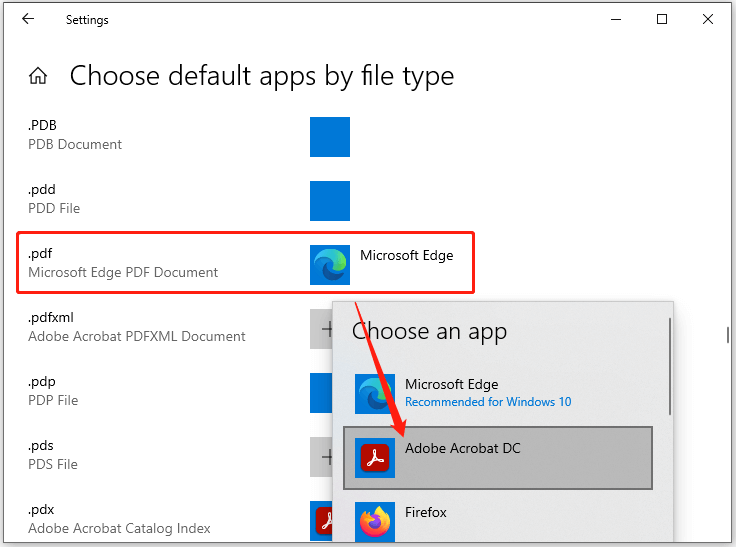
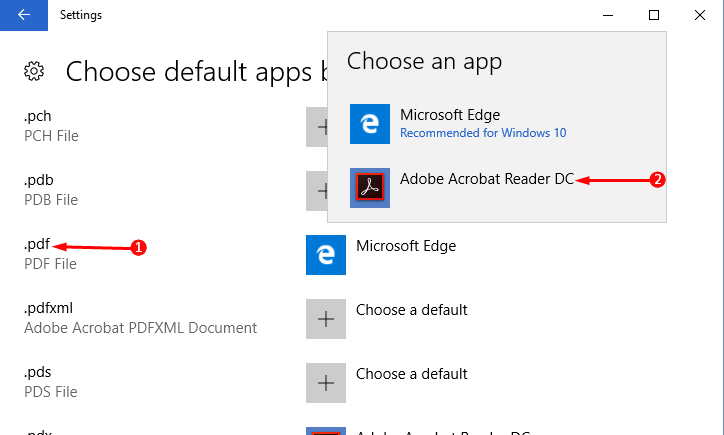
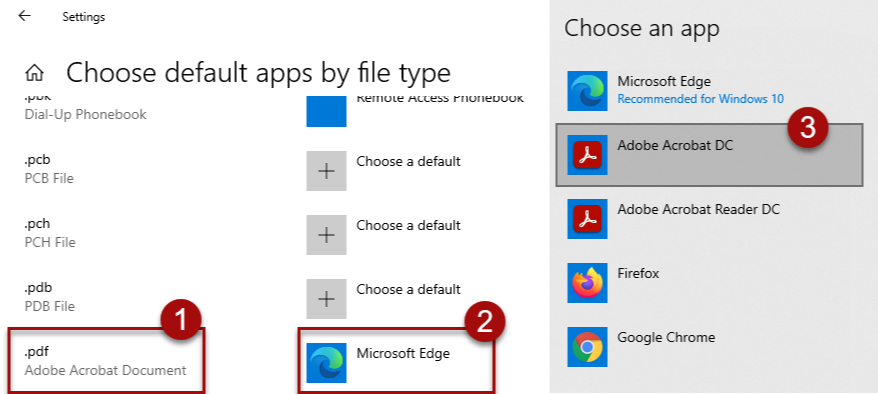
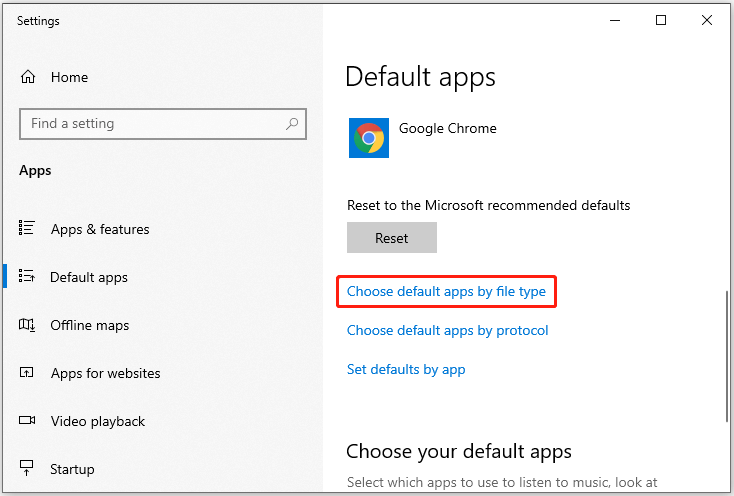
Web May 22 2023 nbsp 0183 32 Windows Settings App 1 Click the search button It s either a magnifying glass or a circle to the right of the Start menu 2 Type default app into the search bar A list of matches will appear 3 Click Default app settings 4 Scroll down and click Choose default app by file type 5 Scroll
Web How to Change Default PDF Viewer from Microsoft Edge to Adobe Find the PDF you want to view and right click on the thumbnail In the menu that comes up click Properties In the first subsection of the dialogue box that appears look for Opens with This will display which PDF viewer is set

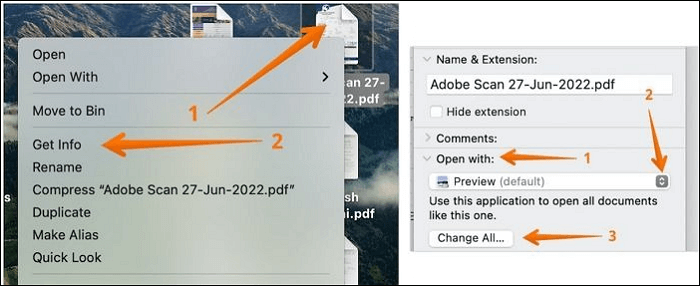
Web Frequently asked questions How to make the most of your PDFs Whether you re using a Windows or Mac operating system your computer will automatically open a PDF with its own default app These apps will vary for Windows and macOS users
Web Sep 5 2023 nbsp 0183 32 Key Takeaways Microsoft Edge is the default web browser and PDF reader in Windows 10 but it is a basic PDF reader You can change the default PDF reader through the Settings app File Explorer or Control Panel Press Windows i to open the Settings app then navigate to Apps gt Default Apps gt Choose
[desc-11] [desc-12]
[desc-13]