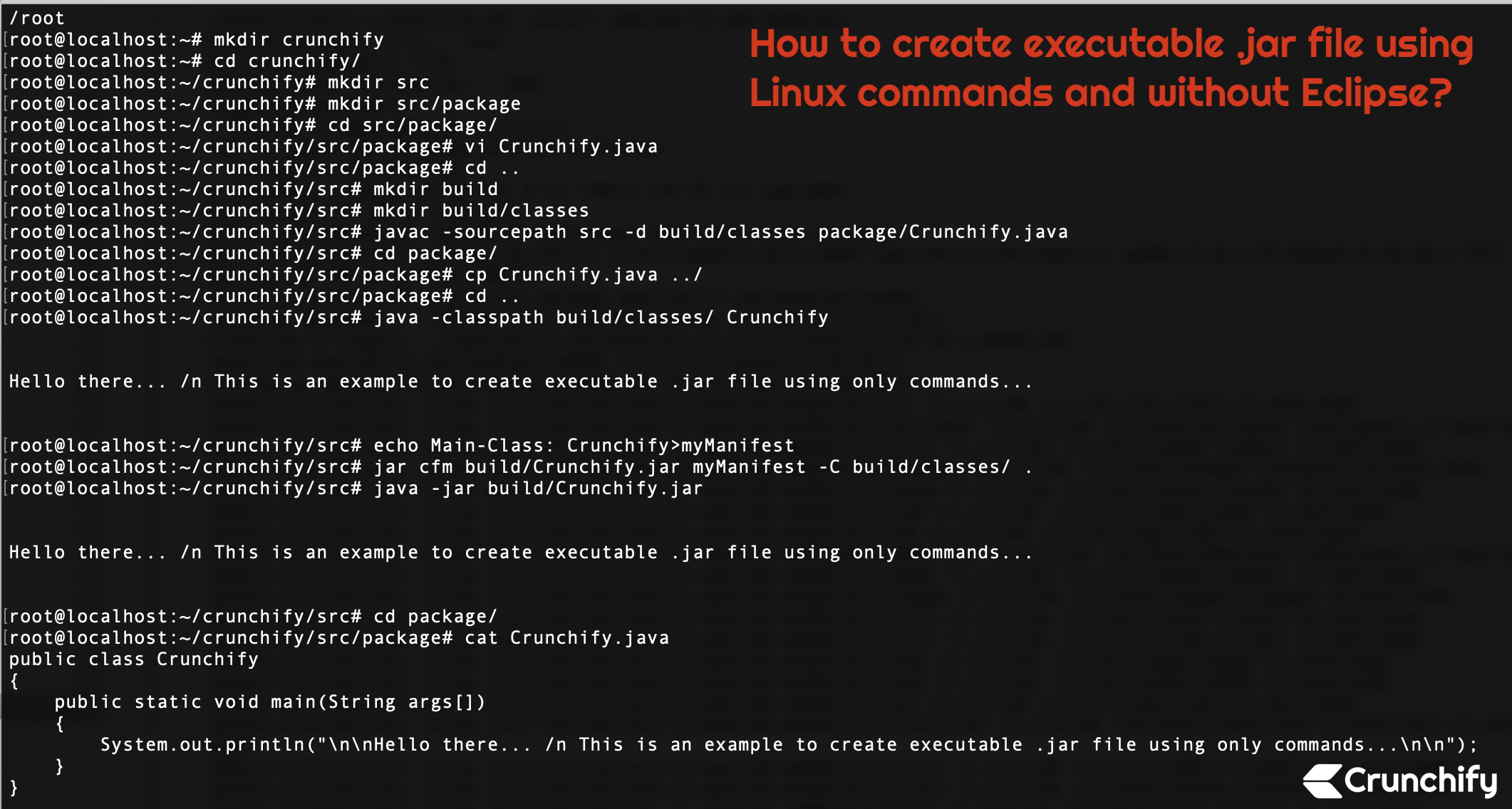
How To Make A File Executable In Linux Chmod How To Create Executable jar File Using Linux Commands And Without Eclipse Shortcut Crunchify How To Create Executable File Symbolic Linux Systran Box How To Create Executable In Python Fedingo How To Make A File Executable In Linux 2023 Guide Beebom How To Make A Binary File Executable In Linux Systran Box To create an executable file first create a file i e text sh open it in any text editor to write inside the script After that save exit the editor Then make it executable by adding permission with the syntax chmod u x test sh Now you have an executable file You can test by running it using test sh
43 One thing I plan to be doing is writing painfully simple Perl scripts and I d like to be able to run them without explicitly calling Perl from the terminal I appreciate that to do this I need to grant them execute permissions Doing this with chmod is easy enough but it also seems like a slightly laborious extra step Running an Executable Once a file is executable you can run it from the terminal If the file is in your current directory you d typically prefix it with as in my script sh How to Make a File Executable Let s walk through the steps to make a file executable in Linux Here are the step by step procedure 1 Create or Identify Your File
How To Make A Binary File Executable In Linux Systran Box How To Make A File Executable In Kali Linux Systran Box How To Make Sh File Executable In Linux Systran Box How To Make A File Executable In Linux FOSS Linux Cara Membuat File misalnya Skrip sh Dapat Dieksekusi Sehingga Dapat Dijalankan Dari Terminal How To Make A File Executable In Linux Terminal How To Make A File Executable In Linux How To Run A Binary Executable In Linux CertSimple Solved How Can I Make A TeX File Executable 9to5Science
How To Make A File Executable In Linux Chmod
 How To Make A File Executable In Linux Chmod
https://crunchify.com/wp-content/uploads/2019/03/How-to-create-executable-Jar-file-using-Linux-commands-and-without-Eclipse.png
The chmod command in Linux is used to modify the permissions and access mode of files and directories These are the permissions that control who can read write and execute the file We have discussed two types of modes for specifying permission symbolic and octal mode In symbolic mode one uses letters and operators to specify the permission
Templates are pre-designed files or files that can be used for various purposes. They can conserve time and effort by offering a ready-made format and design for developing various type of content. Templates can be used for individual or expert projects, such as resumes, invites, flyers, newsletters, reports, discussions, and more.
How To Make A File Executable In Linux Chmod
How To Make A Bash Script File Executable In Linux

How To Make A File Executable In Kali Linux Systran Box

How To Make Sh File Executable In Linux Systran Box
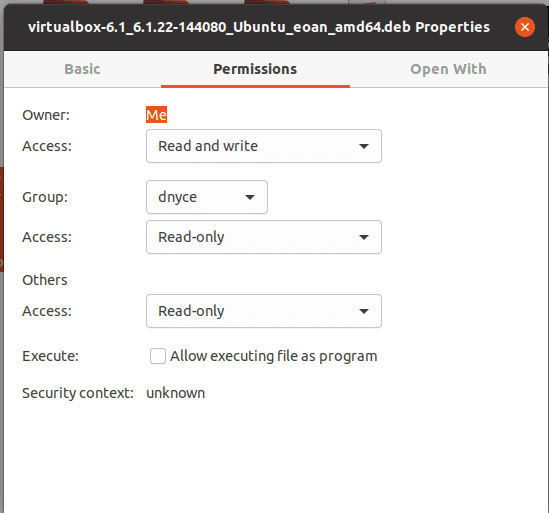
How To Make A File Executable In Linux FOSS Linux

How To Make A File Executable In Linux Terminal

How To Make A File Executable In Linux

The Linux chmod command is used to control file permissions allowing you to specify who can access files search directories and run scripts Linux file permissions can be set on a user by user basis or applied to every member of a group The chmod command uses a syntax of who what and which to set permissions

For example to get read write execute by owner read execute by group and execute by anybody you would add 400 200 100 040 010 001 to give 751 Share Improve this answer Follow edited Jan 24 2013 at 15 32

To make the file executable for all users in your Linux system use this syntax chmod x file name OR chmod a x file name For example to make the file test sh executable for all users use this command chmod x test sh OR chmod a x test sh Make the File Executable for the Owner

1 It is not a duplicate because I have asked specifically about making it application x executable The other question just asks for opening sh file in terminal Ziyaddin Sadygly Aug 14 2017 at 11 31 Add a comment 4 Answers Sorted by 590 You can mark the file as executable chmod x filename sh You can then execute it like this

Ubuntu Centos Debian Commands Series Donate Chmod Command in Linux File Permissions Published on Sep 16 2019 10 min read Contents Linux File Permissions Using chmod Symbolic Text Method Numeric Method Using a Reference File Recursively Change the File s Permissions Operating on Symbolic Links Changing File Permissions in Bulk Conclusion Share
The simplest way to use chmod to make a file executable is to type it followed by x and the file s absolute path chmod x path to file Just like that the file will become executable This will make the file executable for everyone not just you The x option specifically sets the execute permission on a file allowing it to be run as a program For example to make a script executable by every user on the system you can use the following command chmod x script sh Then run the script directly script sh Note that the sign here translates to add permission
To make the file executable we will use the chmod command as demonstrated below chmod x greetings Afterward we only need to call this greetings file in the following manner to access its content greetings The expected output should be similar to the following hello FossLinux user welcome to this tutorial session