How To Install Nodejs In Visual Studio Code Mengembangkan Node js Dengan Visual Studio Code Azure Microsoft Learn How To Run JavaScript In Visual Studio Code Visual Studio Code Node js JavaScript On Azure Microsoft Learn Best Visual Studio Code Extensions Korearety Visual Studio Code Install Rubocop Uservse Web Result If you re interested in using VS Code for your Node js web development classes you can get started with the Node js and JavaScript Education Extension Pack that contains Charles favorite extensions extensions for real time collaboration and more Node js and JavaScript Extension Pack Unsure which extensions to
Web Result In this tutorial we ll show you how to install Node JS and Visual Studio Code We ll also cover some basic concepts such as node js applications and modules Web Result Jan 20 2023 nbsp 0183 32 Go to the Visual Studio downloads page to install it for free If you need to install the workload and already have Visual Studio go to Tools gt Get Tools and Features which opens the Visual Studio Installer Choose the ASP NET and web development workload then choose Modify npm
Visual Studio Code Install Rubocop Uservse Visual Studio Code Vs Pycharm Fasassets Visual Studio Code T l charger Top 10 Best C Ides For Mac Vrogue Select Matching Element rename HTML Tag In Visual Studio Code Gang Of My Java Setup In Visual Studio Code Programming Languages Learning Logic Apps Standard Managed Connections In Visual Studio Code Crumbs Best Ways To Optimizing Your Visual Studio Code In 2022 CodingSutra Visual Studio Code Change The Terminal In Visual 9to5Tutorial Debug Node Js In Visual Studio Code Tutorial For Beginners Vrogue
How To Install Nodejs In Visual Studio Code
 How To Install Nodejs In Visual Studio Code
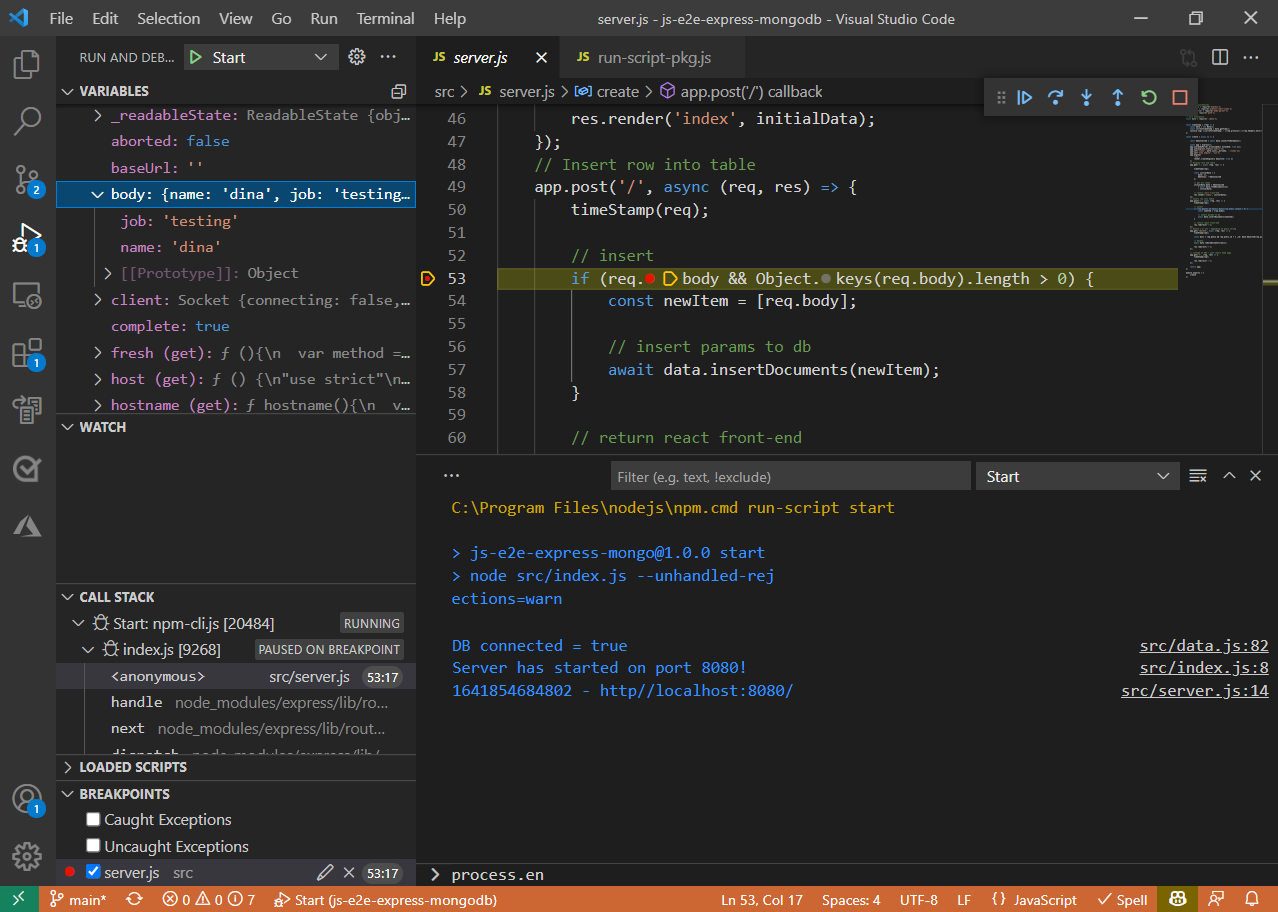
https://learn.microsoft.com/id-id/azure/developer/javascript/media/node-howto-e2e/visual-studio-code-pause-breakpoint-execution.png
Web Result Feb 10 2022 nbsp 0183 32 How to develop and debug Node js with Visual Studio Code Article 02 10 2022 3 contributors Feedback In this article Prepare your environment Clone project Install dependencies Navigate the project files and code Show 5 more Learn the steps to developer and debug your JavaScript Node js project
Pre-crafted templates provide a time-saving option for developing a diverse variety of documents and files. These pre-designed formats and designs can be made use of for numerous individual and professional projects, including resumes, invites, flyers, newsletters, reports, presentations, and more, simplifying the content development procedure.
How To Install Nodejs In Visual Studio Code

How To Set Java Home Environment Variable In Microsoft Visual Studio

Visual Studio Code Vs Pycharm Fasassets

Visual Studio Code T l charger Top 10 Best C Ides For Mac Vrogue

Select Matching Element rename HTML Tag In Visual Studio Code Gang Of

Logic Apps Standard Managed Connections In Visual Studio Code Crumbs
Best Ways To Optimizing Your Visual Studio Code In 2022 CodingSutra

Web Result Oct 10 2018 nbsp 0183 32 By J Steven Perry Updated November 18 2021 Published October 10 2018 This tutorial shows you 3 different ways to install the Node js runtime and the Node js package manager npm from the Node js download page via Homebrew for MacOS installation and through the Node js Version Manager
Web Result Mar 2 2022 nbsp 0183 32 Windows normally recommends that the programs be installed in the Program Files folder in a folder of their own in our case we are installing Node js so the nodejs folder is our go to place For the sake of simplicity let s follow the wizard s suggestions and use C Program Files nodejs as the destination folder

Web Result Visual Studio Code has support for the JavaScript and TypeScript languages out of the box as well as Node js debugging However to run a Node js application you will need to install the Node js runtime on your machine n To get started in this walkthrough install Node js for your platform The Node Package Manager is
Web Result How to install Node js Node js can be installed in different ways This post highlights the most common and convenient ones Official packages for all the major platforms are available at https nodejs download One very convenient way to install Node js is through a package manager In this case every operating

Web Result Jan 1 2024 nbsp 0183 32 Step 1 Download and Install Node js Step 2 Download and Install Visual Studio Code Installing on Windows and MacOS Installing on Linux Step 3 Configure Visual Studio Code to use Node js 3 1 Open Visual Studio Code 3 2 Create a new file 3 3 Write your first javascript code Step 4 Install additional
Web Result Oct 12 2020 nbsp 0183 32 To efficiently develop Node js applications you need a good code editor Let s take a tour of Visual Studio Code and discover 5 extensions you can Web Result Get started building Node js apps in Visual Studio using built in project templates Alternatively use the command line scaffolding tools you are already familiar with to generate your project and import it into Visual Studio with just a few clicks IntelliSense Understand your code
Web Result 169 2024 Google LLC In this post we will see How to install and Use Visual Studio Code on Windows 10 VS Code runs on Mac Linux and Windows See Requirements for the supported