How To Insert Multiple Rows Between Cells In Excel How To Insert Rows With Data Repeated In Excel Dubois Givat1997 Insert Multiple Rows And Columns Between Data In E 3 3 18 Free Download Tell Excel How Many Rows To Insert Vuebeach How To Insert Multiple Rows In Excel How To Quickly Insert Multiple Blank Rows Or Columns In Excel At Once Select the entire rows Hold down the Alt key and press I then R on your keyboard Alt I R Alt I is the access key combination for Insert Alt I R is the access key combination to insert row or rows You can insert multiple rows by just pressing keys on your keyboard
Excel will immediately insert multiple rows between your data Tip When you need to insert a large number of rows in Excel you can use the Name Box to quickly select the required range For example to insert 50 new rows starting from row 100 type 100 150 in the Name Box and press Enter How to insert multiple rows in Excel 1 Select the row below where you want the new rows to appear 2 Right click on the highlighted row and then click Insert in the context menu
How To Quickly Insert Multiple Blank Rows Or Columns In Excel At Once How To Insert Multiple Rows In Microsoft Excel How To Insert Multiple Rows In Excel 4 Fast Ways With Shortcuts Excel How Many Rows Have Two Values Lasopajk Excel 13 How To Insert A Hyperlink In Excel Sheet Youtube Riset How To Add Multiple Rows Or Columns On Microsoft Excel Sheet Tech Pistha 12 Examples Use Go How To Insert Multiple Rows In Excel inc Excel Insert Row Shortcut Excel At Work Lock Cells With Formulas In Excel 2016 Snobamboo How To Add Multiple Rows In Excel 16 24 Swagpag
How To Insert Multiple Rows Between Cells In Excel
 How To Insert Multiple Rows Between Cells In Excel
https://www.simonsezit.com/wp-content/uploads/2021/10/16.2-how-to-insert-multiple-rows-in-Excel.png
The easiest way to insert multiple rows in Excel is to use the Insert menu options Follow these steps to do this Step 1 Select the rows where you want to insert the new blank rows To easily do this just select the first few cells and use the shortcut Shift Space to select entire rows
Pre-crafted templates offer a time-saving option for creating a varied series of documents and files. These pre-designed formats and designs can be made use of for different personal and expert projects, including resumes, invitations, flyers, newsletters, reports, presentations, and more, enhancing the material production process.
How To Insert Multiple Rows Between Cells In Excel
Keep All Text When Merging Cells In Excel Nationalholden

How To Insert Multiple Rows In Microsoft Excel

How To Insert Multiple Rows In Excel 4 Fast Ways With Shortcuts
Excel How Many Rows Have Two Values Lasopajk
How To Add Multiple Rows Or Columns On Microsoft Excel Sheet Tech Pistha 12 Examples Use Go
How To Insert Multiple Rows In Excel inc Excel Insert Row Shortcut Excel At Work

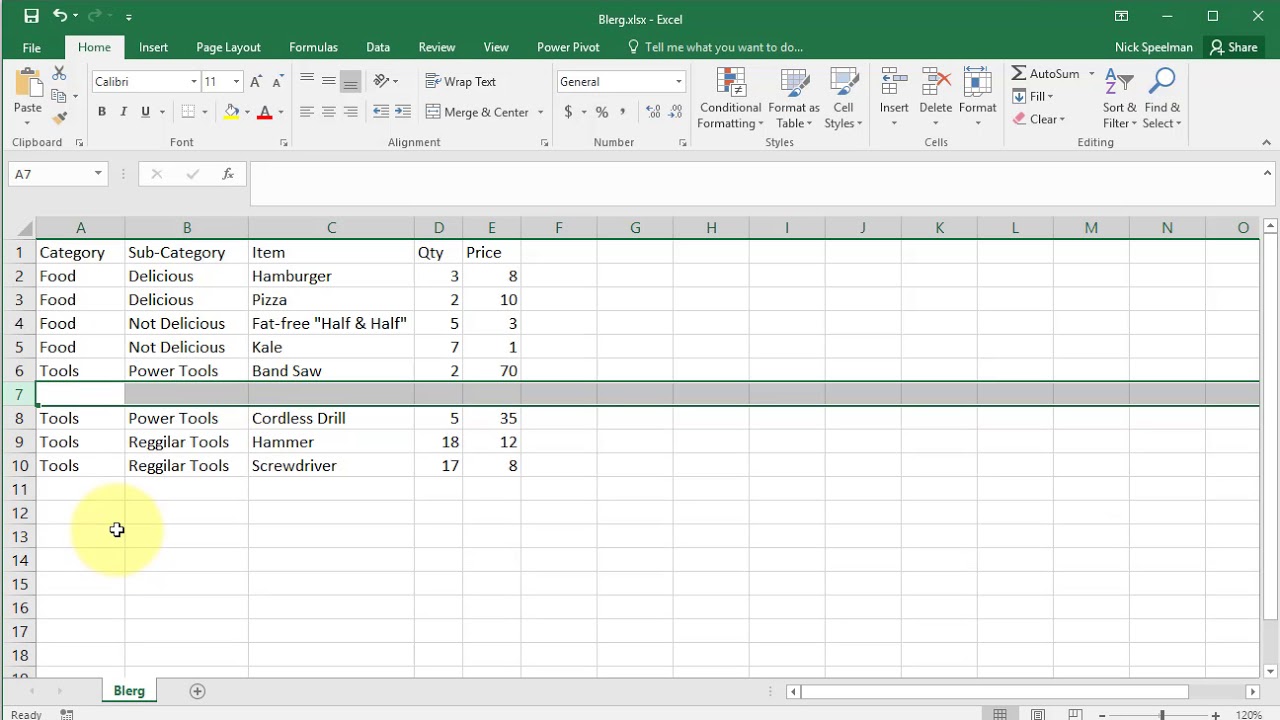
Right click one of the selected rows and from the menu that opens select Insert You will see a small Insert box on your screen In this box enable the Entire Row option and click OK And instantly Excel will add the specified number of rows to your spreadsheet
To insert multiple rows in Excel using the Ribbon Select multiple rows on the worksheet by dragging over the row headings or click the first row heading and Shift click the last row heading Click the Home tab in the Ribbon Click Insert in the Cells group A drop down menu appears
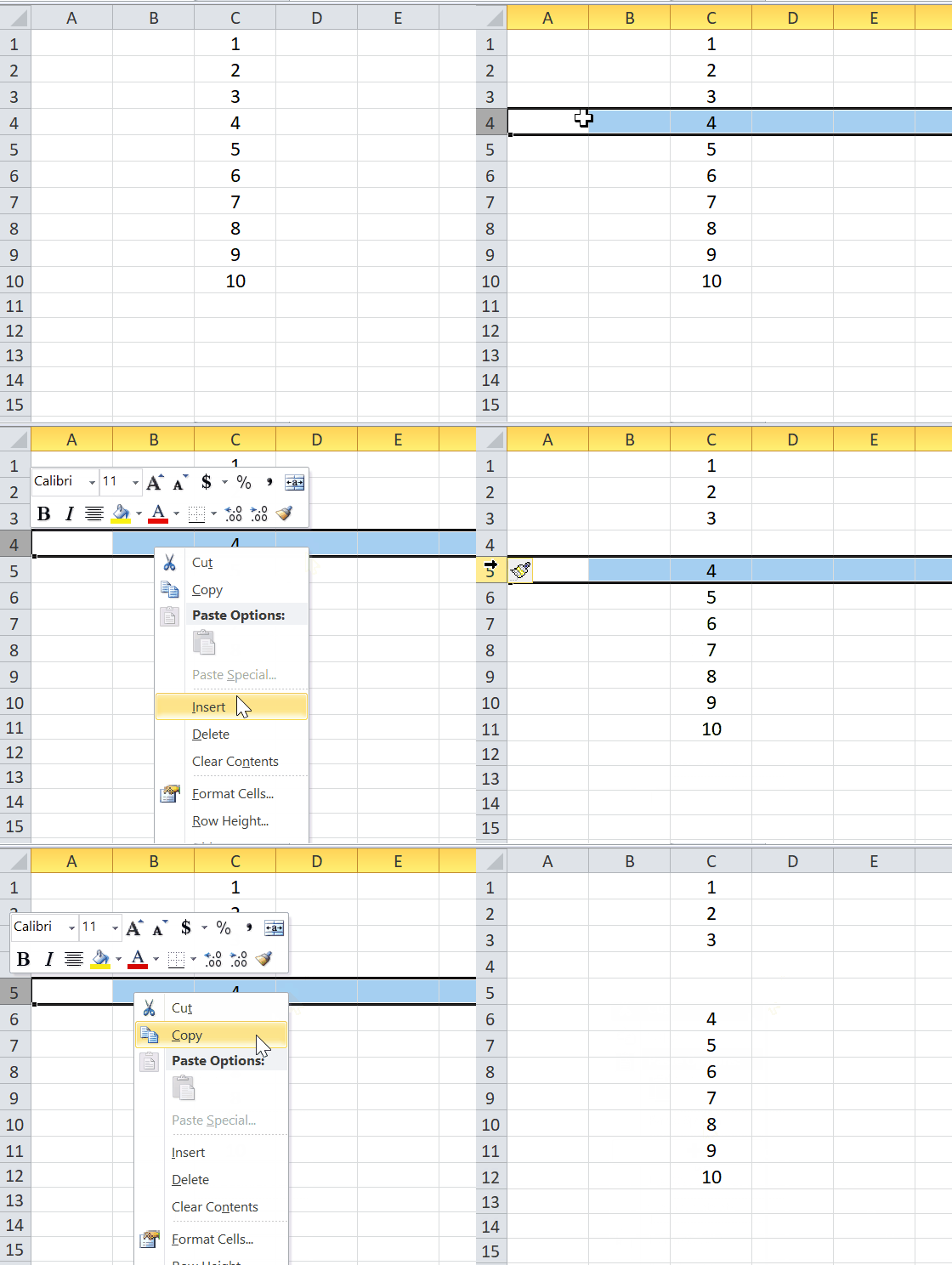
Inserting multiple rows in between data in excel Hi I have 140 rows of data and I want to insert 6 lines between each row of data is there a quick way of doing this I want to copy and paste the data from the 140 rows into another data table which is set out with Row 1 6 for example for each row of data Original Data

In this article I will discuss how you can use an Excel formula to insert rows between data Often working with Microsoft Excel we need to insert single or multiple rows in our dataset I will describe two easy methods to add blank rows between Excel data Table of Contents Expand

Using Mouse Keyboard super trick Using Insert Copied Cells Option Method 1 Using Keyboard Shortcuts You can insert multiple rows in Excel using more than one keyboard shortcut Here is the first one Select the cell above which you want to insert multiple rows in Excel Press Shift Space bar to select the entire row
In this tutorial we ll be looking at the simplest way how to insert multiple rows in Excel at once Let s have a look now Don t miss out a great opportunity Below are the steps to insert blank rows between existing rows Insert a blank column to the left of the dataset To do this right click on the column header of the left most column and click on Insert Enter the text HelperColumn in A1 you can use any text you want Enter 1 in cell A2 and 2 in cell A3
Once the rows are inserted we can use the F4 key to repeat the last action and insert as many rows as needed Top 4 Useful Methods to Insert Rows in Excel Discussed with an Example Method 1 Using INSERT option Method 2 Using Excel Short Cut Shift Space Bar Method 3 Using the Name Box Method 4 Using the Copy Paste