How To Import Pygame In Vs Code Juggling With PyGame Replit Docs How To Use Pygame With Sublime Text To Create A Simple Game What Is Mark Down Python On Windows For Beginners Microsoft Learn Solved How To Import Pygame In Visual Studio Code 9to5Answer How To Install Pygame In Visual Studio Code Coding Campus Web 2 Answers Sorted by 1 If you are working with virtual environments make sure you are on the environment where pygame is installed when you run your code Share Improve this answer Follow answered Feb 27 2020 at 11 47 Kellem Negasi 151 3
Web Dec 24 2022 nbsp 0183 32 0 00 18 28 How to install and set Pygame on vscode by PukaTech PukaTech 124 subscribers Subscribe 402 27K views 8 months ago pygame python vscode Hello there In this video I will show you Web Getting pygame imported and initialized is a very simple process It is also flexible enough to give you control over what is happening Pygame is a collection of different modules in a single python package Some of the modules are written in
How To Install Pygame In Visual Studio Code Coding Campus How To Install Pygame In Visual Studio Code Coding Campus How To Install Pygame In Visual Studio Code Coding Campus How To Install Pygame In Visual Studio Code TechObservatory PyGame Set Mouse Cursor From Bitmap GeeksforGeeks Iza Th Ugled Pygame Car Game Topsailhumanesociety Solved Import Pygame Sys From Pygame locals Import Import Chegg How To Install PyGame On Windows 11 Thecoderworld Why Does It Say That Module Pygame Has No Init Member ITCodar
How To Import Pygame In Vs Code
 How To Import Pygame In Vs Code
https://docimg.replit.com/images/tutorials/07-pygame/07-03-upload-png-sprite.png
Web Sep 1 2023 nbsp 0183 32 In this video I ll show you how you can install pygame and setup pygame in visual studio code so you can create amazing games using PyGame in Visual Studio Code Install PIP How
Templates are pre-designed files or files that can be used for various functions. They can conserve effort and time by providing a ready-made format and layout for developing various kinds of material. Templates can be used for individual or expert projects, such as resumes, invites, flyers, newsletters, reports, discussions, and more.
How To Import Pygame In Vs Code

Python How Do You Import Pygame In Sublime Text 4 On Windows 10 Tech Help Notes
How To Install Pygame In Visual Studio Code Coding Campus

How To Install Pygame In Visual Studio Code Coding Campus
How To Install Pygame In Visual Studio Code TechObservatory
Iza Th Ugled Pygame Car Game Topsailhumanesociety

Solved Import Pygame Sys From Pygame locals Import Import Chegg

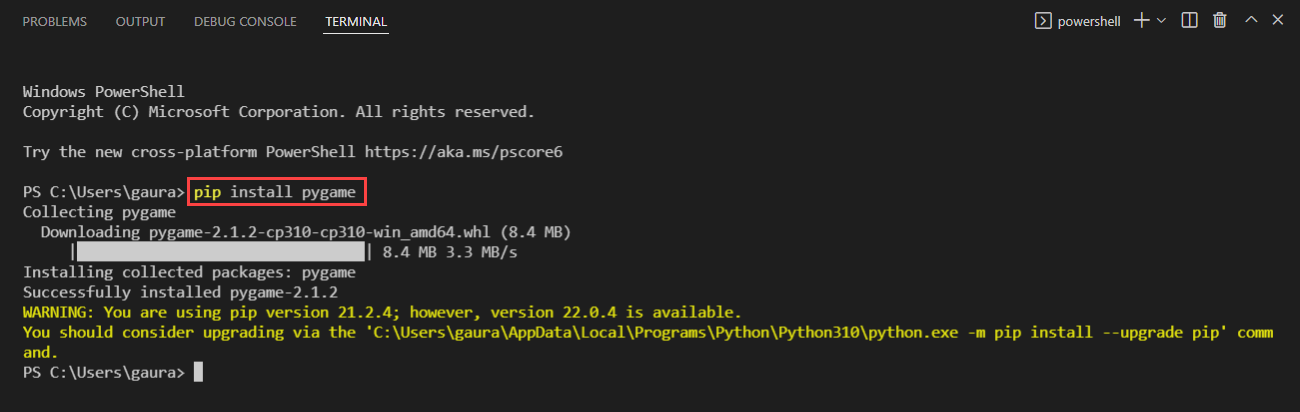
Web How to Install Pygame in Visual Studio Code Step 1 Download Python Download and install Python from python downloads with default configurations Head over to Step 2 Install Pygame To install Pygame through VS Code follow these steps From the top level View menu select Step 3 Create

Web Dec 7 2019 nbsp 0183 32 i can t import pygame in visual studio code I installed Pygame Snippets in my Visual Studio Code and then i wrote import pygame i always got an error import pygame ModuleNotFoundError No module named pygame I looked for any ways how to fix it at the web but nothing helped me

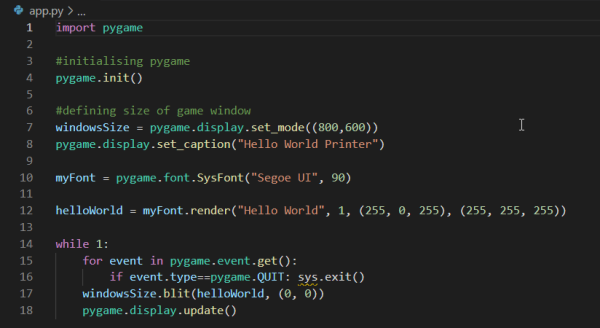
Web Feb 18 2022 nbsp 0183 32 You can test your pygame with this code that will open up a blank pygame window import pygame WIDTH HEIGHT 800 600 WIN pygame display set mode WIDTH HEIGHT def main run True while run for event in pygame event get if event type pygame QUIT run False pygame quit if

Web Mar 6 2021 nbsp 0183 32 LexicalScoped 564 subscribers Subscribe 81K views 2 years ago Python to PyGame Tutorials This video is a quick quot how to set up quot for making pygame games in windows using visual studio code
Web Oct 6 2021 nbsp 0183 32 You can execute this code to verify which python interpreter you are using import sys print sys executable Then you can switch the python interpreter to which you have installed the packages or you need to activate the environment before you want to install the package in order to install the package to the right place
[desc-11] [desc-12]
[desc-13]