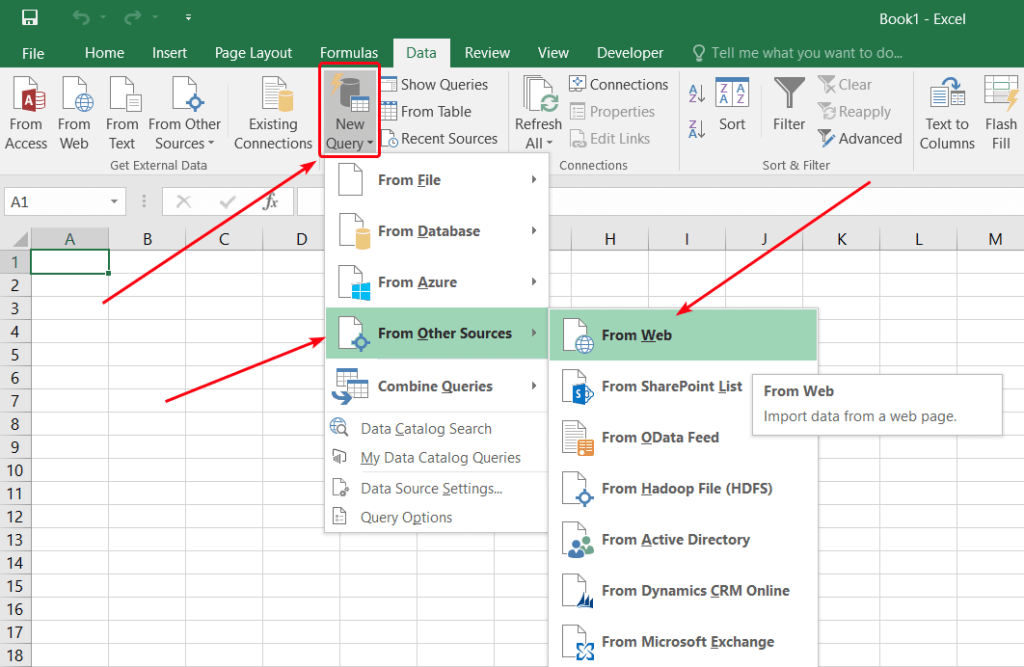
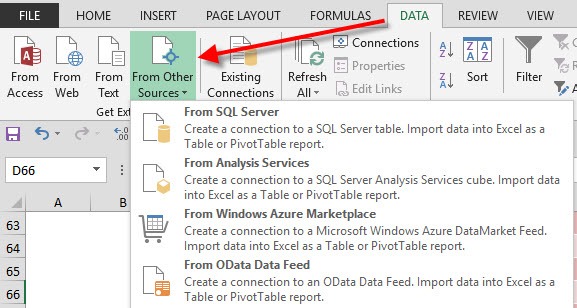
How To Import Data Into Excel Pivot Table How To Import Data In Excel From Notepad Riset How To Import Data Into Excel From Another Excel File 2 Ways How To Import Html Table Into Excel 2016 YouTube Import Data Into Excel Online How To Import Data In Excel VBA Excel Examples Verkko Click Home gt From Data Service if the data is from Microsoft Azure Marketplace or an OData data feed Click Home gt Get External Data gt From Other Sources to choose
Verkko Format your data as an Excel table select anywhere in your data and then select Insert gt Table from the ribbon If you have complicated or nested data use Power Query to Verkko Here are the three basic steps to get multiple tables into the PivotTable Field List Step one import related tables from a database Import from a relational database like Microsoft SQL Server Oracle or Access
How To Import Data In Excel VBA Excel Examples Import Excel Worksheet Into Excel Worksheets For Kindergarten How To Import Data Into Excel And Check For Errors YouTube The Text Reads Use External Data Source Pivottable On A Green And Black CTrader CSV Data Import Tool ClickAlgo External Data Source To Import Data Into An Excel Pivot Table Import Data Into Excel Step By Step Guide To Import Data In Excel How To Import Data Into Excel 2013 For Dummies YouTube How To Import Web Data Into Excel Hindi Live Data
How To Import Data Into Excel Pivot Table
 How To Import Data Into Excel Pivot Table
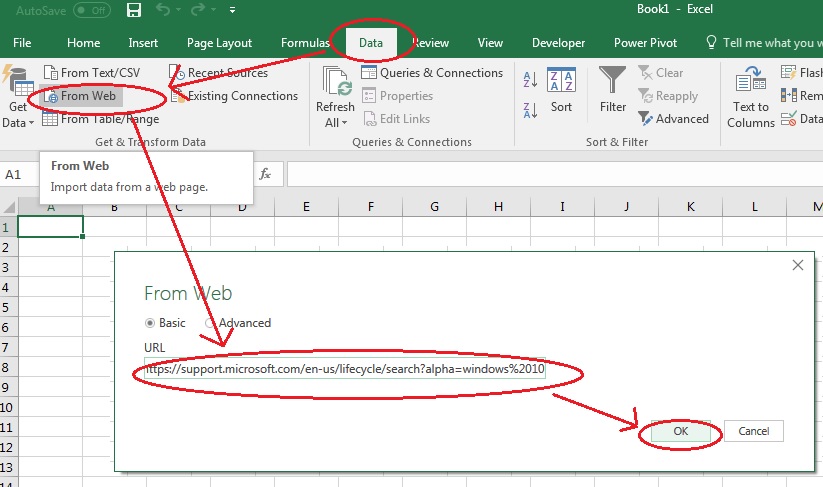
https://blog.coupler.io/wp-content/uploads/2022/02/1-import-web-excel-1024x667.png
Verkko You can simply use the External Data Sources feature in your Pivot Table and Excel will magically import the data for you You can import data into your Pivot Table from the following data sources
Pre-crafted templates offer a time-saving service for producing a diverse series of documents and files. These pre-designed formats and designs can be made use of for different individual and expert projects, including resumes, invitations, flyers, newsletters, reports, presentations, and more, streamlining the content production procedure.
How To Import Data Into Excel Pivot Table
Can You Save A Csv File In Excel BEST GAMES WALKTHROUGH
Import Excel Worksheet Into Excel Worksheets For Kindergarten

How To Import Data Into Excel And Check For Errors YouTube

The Text Reads Use External Data Source Pivottable On A Green And Black
External Data Source To Import Data Into An Excel Pivot Table
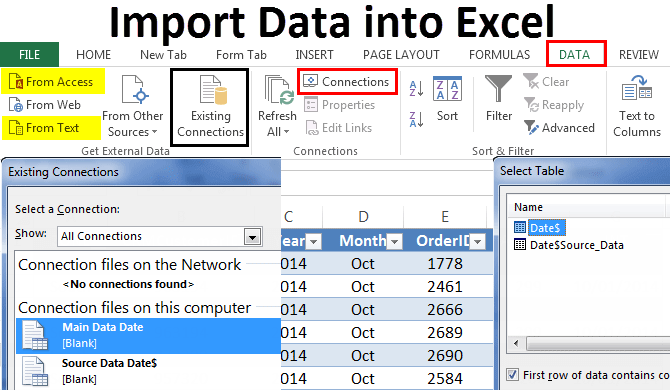
Import Data Into Excel Step By Step Guide To Import Data In Excel

Verkko The Data Model is discussed in more detail later in this tutorial Select the PivotTable Report option which imports the tables into Excel and prepares a PivotTable for

Verkko 19 jouluk 2017 nbsp 0183 32 Well NO You can simply use the External Data Sources feature in your Pivot Table and Excel will magically import the data for you You can import
Verkko 20 syysk 2019 nbsp 0183 32 When you find data you want to include in a pivot table such as data included in a pivot table tutorial copy the sample
Verkko How to Add Data to a Pivot Table in Excel We can Add data to a PivotTable in excel with the Change data source option Change data source is located in Options or Analyze depending on our version
Verkko 31 elok 2023 nbsp 0183 32 Steps Download Article 1 Open your pivot table Excel document Double click the Excel document that contains your pivot table It will open 2 Go to
Verkko 1 helmik 2022 nbsp 0183 32 If you want to dive right in and create your own pivot table instead go to the Insert tab and pick quot PivotTable quot in the ribbon You ll see a window appear for Verkko May 28 2021 09 49 PM Rockychap Changed the set up of Pivot 1 and added dynamic GETPIVOTDATA formulae in the Report section I think this is what you wanted to
Verkko 15 helmik 2021 nbsp 0183 32 Pivot Tables are both incredibly simple and increasingly complex as you learn to master them They re great at sorting data and making it easier to