How To Go Back To Command Line In Git Bash Bitperfect Change Directory Signtews Aliens Colonial Marines Helmet Camera Orcz The Video Games Wiki Sigvald Is Back To Command The Forces Of Slaanesh Board Game Today Setting The Default Boot Target To Command Line In Linux Systran Box How To Go Back In The Linux Command Line Systran Box Web Mar 21 2022 nbsp 0183 32 This isn t an answer to your question but if this is specific to git commit messages you can omit m lt message gt and git will open a text editor and allow you to type your message there committing when you save and exit The editor it uses is the GITEDITOR env var which can be set in a bashrc
Web Git Bash At its core Git is a set of command line utility programs that are designed to execute on a Unix style command line environment Modern operating systems like Linux and macOS both include built in Unix command line terminals This makes Linux and macOS complementary operating systems when working with Git Web Jun 19 2018 nbsp 0183 32 Simple we can just move the branch pointer Git supplies the reset command to do this for us For example if we want to reset master to point to the commit two back from the current commit we could use either of the following methods git reset 9ef9173 using an absolute commit SHA1 value 9ef9173 or
How To Go Back In The Linux Command Line Systran Box How To Install Strings On Linux Systran Box Supervillain Kane Is Back With A Message Welcome Back To Command Conquer SoyaCincau Comando Rdiff backup No Linux Com Exemplos Acervo Lima Joint Effects Targeting System JETS Leonardo DRS L3Harris Drones Helping California Firefighters Connectskies Medic na Prechladnutie Klub Git Alias List Kr sna ena D fajme Stevard Use Stata 12 Command Vseranow Connect To Postgres From Command Line In Windows Database Tutorials
How To Go Back To Command Line In Git Bash
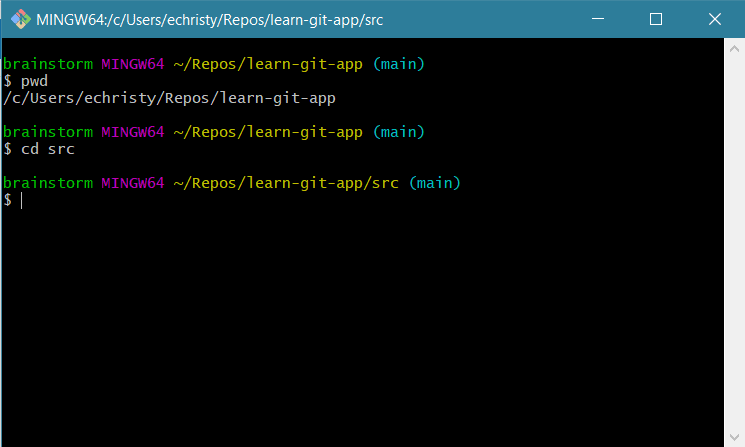 How To Go Back To Command Line In Git Bash
https://brainstormcreative.co.uk/wp-content/uploads/git-bash-change-folder-or-directory.png
Web 1 Answer Sorted by 0 just use cd in git bash command prompt Share Improve this answer Follow answered Apr 13 2020 at 6 36 Saragada Ramesh 191 2 5 Add a comment Your Answer By clicking Post Your Answer you agree to our terms of service and acknowledge that you have read and understand our privacy policy and code of conduct
Templates are pre-designed documents or files that can be used for various functions. They can save time and effort by providing a ready-made format and layout for creating different type of content. Templates can be utilized for personal or professional projects, such as resumes, invitations, flyers, newsletters, reports, presentations, and more.
How To Go Back To Command Line In Git Bash
Dumfries Triangle Volunteer Fire Department Prince William County VA

How To Install Strings On Linux Systran Box
Supervillain Kane Is Back With A Message Welcome Back To Command Conquer SoyaCincau
Comando Rdiff backup No Linux Com Exemplos Acervo Lima

L3Harris Drones Helping California Firefighters Connectskies
Medic na Prechladnutie Klub Git Alias List Kr sna ena D fajme Stevard

Web Mar 6 2016 nbsp 0183 32 When using Git Bash I type the command git log It shows me all the logs But now I want to do a second command So I hold the down arrow to get to the bottom of the logs and it just says END How do I get to the next line so

Web To change your directory in git bash to that specific path you can use this command cd c user myUsername basically you have to replace backslash with standard slash or otherwise if you simply want to go to the parent directory you can use

Web Feb 23 2014 nbsp 0183 32 ctrl c should do it You ll get the gt sign if you entered a double quote but didn t close it For instance you can make a multi line commit comment like this But yea you can just hit ctrl c if you change your mind and just want to cancel the command

Web Feb 25 2010 nbsp 0183 32 History of visited directories in BASH The cd command works as usual The new feature is the history of the last 10 directories and the cd command expanded to display and access it cd or simply pressing ctrl w shows the history

Web Chapters 2nd Edition 1 4 Getting Started The Command Line The Command Line There are a lot of different ways to use Git There are the original command line tools and there are many graphical user interfaces of varying capabilities For this book we will be using Git on the command line
Web Getting a Git Repository You typically obtain a Git repository in one of two ways You can take a local directory that is currently not under version control and turn it into a Git repository or You can clone an existing Git repository from elsewhere Web Jul 20 2023 nbsp 0183 32 215 2 3 8 2 You don t really when a git aware shell has a directory that contains a git repo selected it will always show you information about the branch and whatnot git is not a command you quot enter exit quot but instead every git command you run starts with git its not like starting an interactive session like you might with ftp or telnet
Web All you have to do is switch back to your master branch However before you do that note that if your working directory or staging area has uncommitted changes that conflict with the branch you re checking out Git won t let you switch branches It s best to have a clean working state when you switch branches