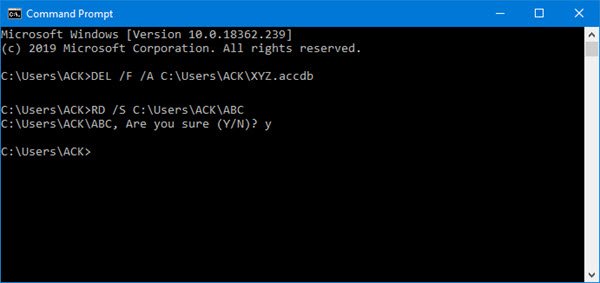
How To Delete Temp Folder From Command Prompt How To Delete Temp FILE Using RUN Command Temp File YouTube How To Find And Delete Temporary Files On Mac 2023 How To Delete Temporary Files In Windows 10 Via Command Prompt How To Delete Folder From Command Prompt CMD In Windows 10 8 1 7 Smart Enough YouTube How To Delete Temporary Files Using Command Prompt TutorialPandit Completely delete a folder in Windows using command line Asked 10 years 11 months ago Modified 5 years 7 months ago Viewed 390k times 67 I need to delete one folder containing other folders and files inside I tried del and rmdir commands but sometimes they fail with some error lines PATH The directory isn t empty
The first reason for not deleting a folder is used by this command line to delete all files and subfolders of the specified folder but not the folder itself Select Save As and file name delete temp bat Save as type All files and click the Save button It works on any kind of account administrator or a standard user Just run it 95 This question does not show any research effort it is unclear or not useful Save this question Show activity on this post I would like to delete all files and subfolders in a batch file in Windows 7 and keep the top folder Basically emptying the folder What s the command line instruction for that command line Share Improve this question
How To Delete Temporary Files Using Command Prompt TutorialPandit How To Delete Files Folders And Subfolders In Command Prompt Delete All Cached And Temporary Files From Computer How To Delete Temporary Files In Windows How To Delete Temp Junk Files In Windows 10 With One Click PowerShell ISE YouTube How Do I Create A New Folder In Windows 10 Persouth How To Clean System Junk Windows 10 Identitysubtitle Steps To Fix Cmd Prompt To Delete Folder Format Pulse How To Delete A Subscription On Youtube Lifescienceglobal
How To Delete Temp Folder From Command Prompt
 How To Delete Temp Folder From Command Prompt
https://i.ytimg.com/vi/_OEshL7GNPU/maxresdefault.jpg
Firstly go to Settings Windows key I System In the next page click on Storage and choose the local drive that you want to cleanup Now scroll down if you have to and click on Temporary files If you don t see Temporary files listed select Show more categories
Templates are pre-designed files or files that can be used for various functions. They can save effort and time by offering a ready-made format and layout for producing various kinds of material. Templates can be used for personal or expert tasks, such as resumes, invitations, leaflets, newsletters, reports, presentations, and more.
How To Delete Temp Folder From Command Prompt
Make Sure Your Temp Folder Is Valid How To Fix This Error
How To Delete Files Folders And Subfolders In Command Prompt

Delete All Cached And Temporary Files From Computer

How To Delete Temporary Files In Windows

How Do I Create A New Folder In Windows 10 Persouth

How To Clean System Junk Windows 10 Identitysubtitle

Delete Folders with Command Prompt on Windows 10 Various Uses of the Del Command Delete Files with Command Prompt on Windows 10 To delete files not folders from Command Prompt on Windows 10 you can use the built in del command This command helps you remove the specified files from your PC

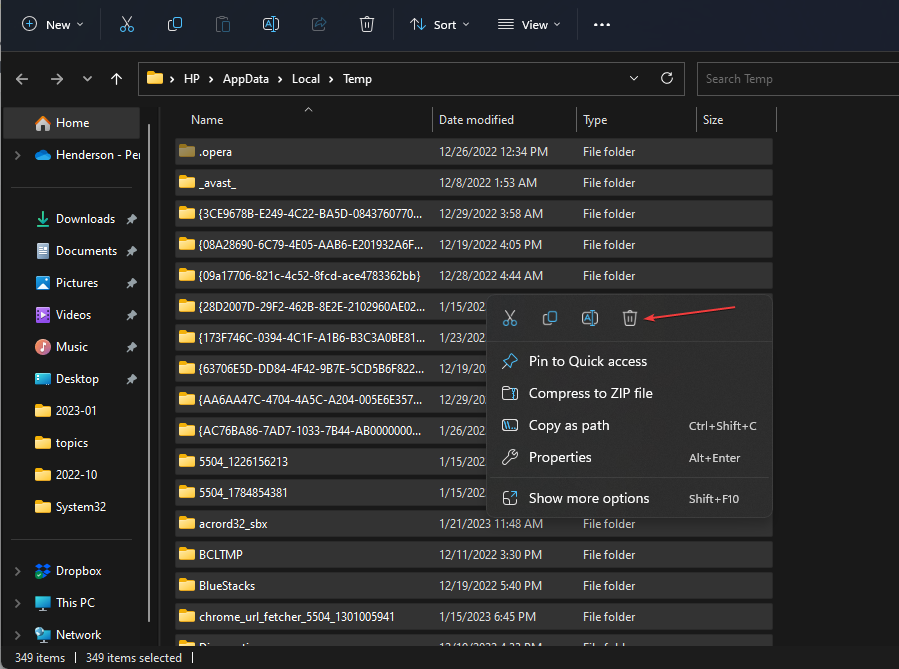
Delete all the temporary files and folders you ve selected either using the Delete key on your keyboard or the Delete button from the Home menu Depending on your version of Windows and how your computer is configured you might be asked to confirm that you wish to Delete Multiple Items
How to Delete Temporary Files in Windows Before you can delete the temporary files on your machine you need to locate them Here is how you can find the Temp folder in Windows 11 as well as earlier versions of the OS 1

The Temp folder is located at C Users YourUserName AppData Local Temp In essence Temp files are not bad per se for the smooth functioning of your system It includes logs system cache and other disposable items Here s a brief list of the type of temporary files you will find in the Temp folder on your Windows 11 PC Windows Update Cleanup

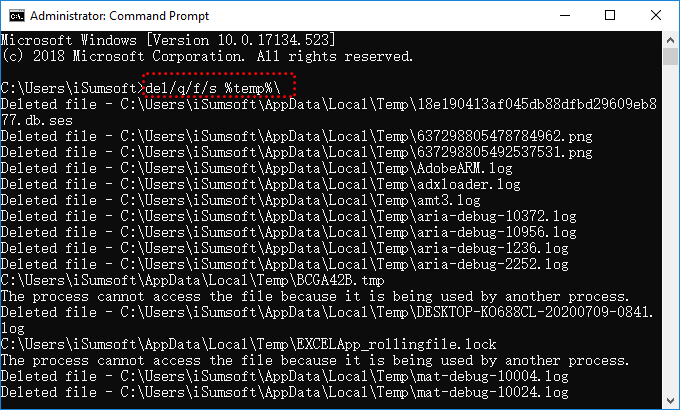
To clean the Temp folder from the Command Prompt use the command del q f s TEMP Temporary files or Temp files are files that are used during other major processes like installing an app updating the OS etc Once the process is completed the files become useless
Press the Windows R keys to open the Run command From the menu select Run In the text field type in temp and click OK Select all the temporary files by pressing the Ctrl A buttons then Step 1 Press Windows key R to open the Run command Then type temp in the search field and press OK Type temp and press OK Step 2 Now select all local temp files using ctrl A and then press delete Select all files and press delete 3 Deleting local temp files using Prefetch
Key Takeaways To clear temporary files on Windows 10 open the Start Menu search for Disk Cleanup and launch it Select the temporary files you d like to delete and hit OK Alternatively open the Settings app then navigate to System Storage Temporary Files and click Remove Files Windows temp files as the name implies are