How To Cut And Paste In Powershell Hindi Worksheets For Kindergarten Office 365 SSO Setup As Service Provider Help Authx How To Copy From PowerShell To Notepad What Is Mark Down Download Free Software How To Cut And Paste In Vista Bloggingca Uninstall Windows 10 Apps For All Users Using PowerShell You can use the following keyboard shortcuts to customize the view in Windows PowerShell ISE They are accessible from all the panes in the application Action Keyboard Shortcut Go to Command v2 or Console v3 and later Pane CTRL D Go to Output Pane v2 only CTRL SHIFT O Go to Script Pane
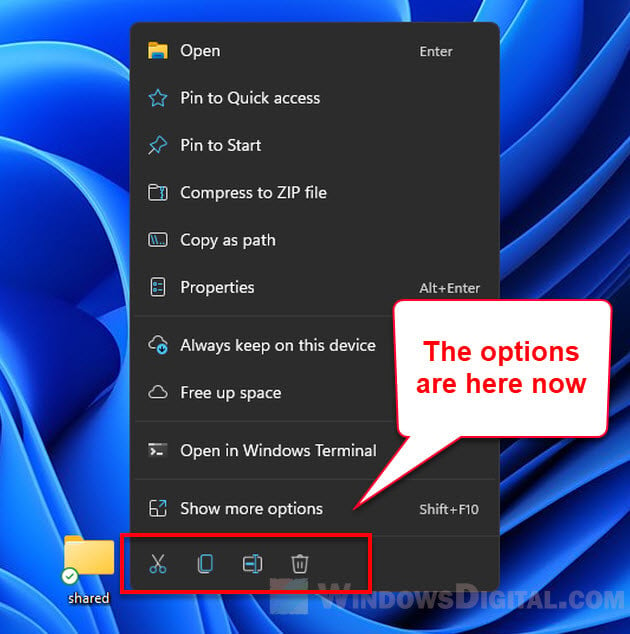
The Copy Item cmdlet copies an item from one location to another location in the same namespace For instance it can copy a file to a folder but it can t copy a file to a certificate drive This cmdlet doesn t cut or delete the items being copied The particular items that the cmdlet can copy depend on the PowerShell provider that exposes the item Click on the PowerShell icon in the top left of the PowerShell window Expand Edit and select Paste There are some other useful tools hidden away up there too Photo Credit Joe Olson via Compfight cc james 28 October 2014 Miscellaneous PowerShell A brief explanation of how to paste text into PowerShell
Uninstall Windows 10 Apps For All Users Using PowerShell How To Copy And Paste On PowerShell In Windows Copy And Paste Keyboard Shortcuts C mo Copiar Y Pegar Contenido A Trav s Del Portapapeles En PowerShell TecnoTraffic Cut And Paste Worksheets For Preschool Free Preschool How To Copy An Image To Cut On Cricut Best Design Idea How To Cut And Paste Transpose In Excel Vz jomn tatistika Na Pokraji Powershell String Contains Sada Il Dospelos Strong Random Password Generator Microsoft Powershell VGeek Tales From Real IT System
How To Cut And Paste In Powershell
 How To Cut And Paste In Powershell
https://freepreschool.in/wp-content/uploads/2020/07/Cut-and-Paste-Worksheet_page-0003-1086x1536.jpg
The simplest way to test small PowerShell scripts you find is to use the old copy and paste method as outlined below First copy and paste the contents of the PowerShell script to place it in your clipboard buffer Then from the PowerShell console right mouse click on the PowerShell icon in the upper left hand corner
Pre-crafted templates offer a time-saving option for developing a varied variety of documents and files. These pre-designed formats and designs can be made use of for numerous personal and professional projects, including resumes, invitations, flyers, newsletters, reports, discussions, and more, simplifying the content development process.
How To Cut And Paste In Powershell

Powershell Replace Text In File Spizza Pizza Restoran
How To Copy And Paste On PowerShell In Windows
Copy And Paste Keyboard Shortcuts

C mo Copiar Y Pegar Contenido A Trav s Del Portapapeles En PowerShell TecnoTraffic
How To Copy An Image To Cut On Cricut Best Design Idea
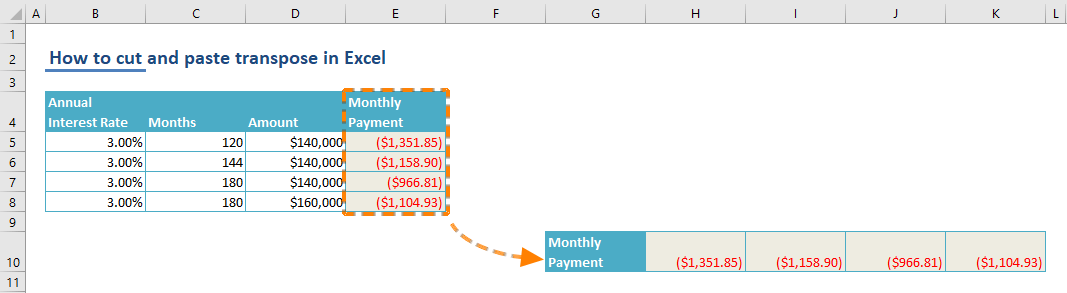
How To Cut And Paste Transpose In Excel
To enable and use copy and paste in PowerShell in Windows you need to follow the steps below Type PowerShell in the search box on your taskbar and click on the search result to open the PowerShell window The newly opened PowerShell window can be seen in the following figure

1 How can I delete all the contents of one folder present in C drive and copy it in another new folder present in different drive say F Example C drive window users temp make it empty move all the content in F drive Temp backup powershell 2 0 Share Improve this question Follow edited Sep 16 2019 at 11 54 Ansgar Wiechers

Windows PowerShell 5 1 introduced two built in cmdlets that allow you to copy and paste text and or files from the Windows Clipboard from the PowerShell command line In order to copy text data to the clipboard execute the following command Set Clipboard Value Test clipboard or use a pipe Get Process Set Clipboard

How To Copy Paste Content via Clipboard in PowerShell By Kent Chen August 14 2019 0 We use copy paste almost every day through many of the applications we use I even use Win V a lot more since Windows 10 introduced the new clipboard history feature

The PowerShell copy to clipboard has been made possible using the Get Clipboard and Set Clipboard These cmdlets allows you to use PowerShell to copy to the clipboard and to intelligently paste from the clipboard too For a full breakdown of the cmdlets check out the detailed help PS51 Get Help Set Clipboard Detailed PS51 Get Help Get
Load the 2nd file into a generic list and use the Insert method to insert the found line into the target collection then save that to your file Lee Dailey Feb 7 2022 at 6 21 Thanks for help Lee can you explain me with an example Juan Camilo Cometa Feb 7 2022 at 6 24 Press CTRL R and type a few letters that you remember from the previous command and PowerShell will show you any matches Interactive Editing Shift Enter Let s say you copy paste a PowerShell 1 liner from some GitHub gist page
6 Answers Sorted by 5 Finally in Windows 10 Unfortunately Microsoft resists to add SHIFT INSERT For regedit nuts Windows Registry Editor Version 5 00 HKEY CURRENT USER Console 1 enable improved conhost features ForceV2 dword 00000001 Use wrapped text selection