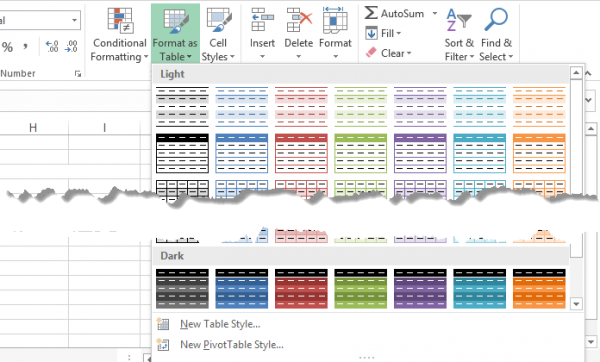
How To Create Tabular Format In Excel PowerPoint Tables Table Templates PPT Tables SlideUpLift 1 How To Use A Tabular Format In Excel MS Excel Tips How To Create A Tabular Form Power Bi Matrix Tabular Format Kesilpan How To Sort Data In A Table Microsoft Excel EduTaxTuber Web Feb 2 2021 nbsp 0183 32 Select the range of cells in your spreadsheet that you want to convert to a table and open the quot Home quot tab Click the quot Format as Table quot drop down box in the ribbon and choose the style you d like to use Create a Basic Table If the color of the table isn t a concern you can simply insert a basic table
Web Aug 21 2023 nbsp 0183 32 You can use the Format as Table command to create a table Select a cell inside your data Go to the Home tab Select the Format as Table command in the Styles section Select a style option for your table Check the option for My table has headers Press the OK button Web Select Home gt Format as Table Choose a style for your table In the Create Table dialog box set your cell range Mark if your table has headers Select OK Want more Overview of Excel tables Video Create and format an Excel table Total the data in an Excel table Format an Excel table Resize a table by adding or removing rows and columns
How To Sort Data In A Table Microsoft Excel EduTaxTuber What Is A Tabular Form Quora Ryb Gen Chronick Tabular Datos En Excel Guma Na Pen ze P davn Jm no Mm CV In Tabular Form 18 Tabular Resume Format Templates Wisestep Tabular Form Bank Info Inputgram Blog How To Create A Pivot Table In Excel Darelomaximum How To Create Custom Report In Tabular Format YouTube How To Show Pivot Table In Tabular Form Brokeasshome
How To Create Tabular Format In Excel
 How To Create Tabular Format In Excel
https://slideuplift.com/wp-content/uploads/edd/2020/06/corporate-tabular-format-powerpoint-template-768x576.jpg
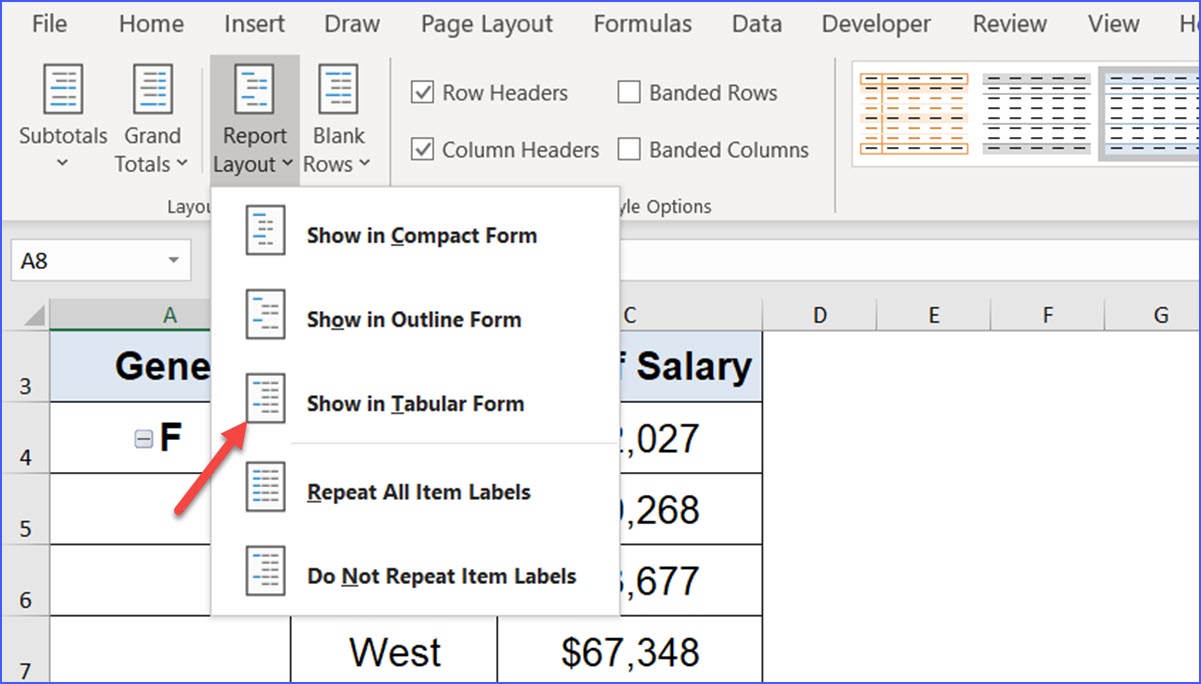
Web To change the layout of a PivotTable you can change the PivotTable form and the way that fields columns rows subtotals empty cells and lines are displayed To change the format of the PivotTable you can apply a predefined style banded rows and conditional formatting Windows Web Mac
Pre-crafted templates offer a time-saving solution for creating a varied series of documents and files. These pre-designed formats and layouts can be used for various individual and expert tasks, including resumes, invitations, flyers, newsletters, reports, presentations, and more, simplifying the material production procedure.
How To Create Tabular Format In Excel
Convert Tabular Format Into Excel Data Table Step By Step Tutorial
What Is A Tabular Form Quora
Ryb Gen Chronick Tabular Datos En Excel Guma Na Pen ze P davn Jm no Mm
CV In Tabular Form 18 Tabular Resume Format Templates Wisestep
Inputgram Blog
How To Create A Pivot Table In Excel Darelomaximum
Web Windows macOS Web Select a cell within your data Select Home gt Format as Table Choose a style for your table In the Create Table dialog box set your cell range Mark if your table has headers Select OK Want more Overview of Excel tables Video Create and format an Excel table Total the data in an Excel table Format an Excel table

Web You can also change the format for an existing table by selecting a different format Select any cell within the table or range of cells you want to format as a table On the Home tab click Format as Table Click the table style that you want to use
Web Oct 10 2013 nbsp 0183 32 Use a tabular format in Excel with help from a Microsoft Certified Applications Specialist in this free video clip Expert Jesica Garrou Filmmaker Patrick Russell Series Description
Web Create a table in Excel Microsoft Support Excel training Tables Create a table Next Charts Try it You can create and format a table to visually group and analyze data Select a cell within your data Select Home gt Format as Table Choose a style for your table In the Format as Table dialog box set your cell range

Web Click the Insert tab in the ribbon Click on the Table option it s in the Tables group This will open the Create Table dialog box Confirm the range mentioned in the dialog box In case it has picked up the wrong range or you want to change it manually you can do it
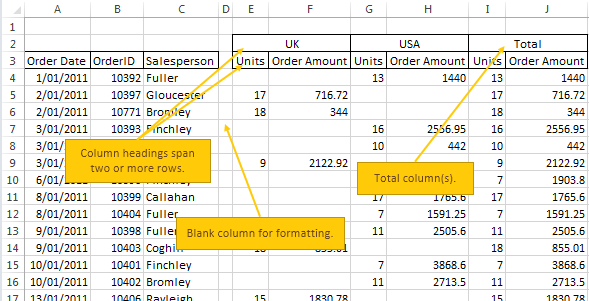
Web Aug 30 2015 nbsp 0183 32 Create a Pivot Table Select all your data CTRL A Go to INSERT and select PivotTable Select Tabular Form Click on the Pivot Table and go to DESIGN Select from Report Layout the option Show in Tabular Form Remove subtotals for a pure Tabular layout Repeat this step for each Subtotal row Click on the Subtotal DESIGN Deselect Web Dec 19 2018 nbsp 0183 32 List of locations is in 1 sheet under column 1 Column 1 Location 1 Location 2 Location 3 List of people is in a separate sheet under column 1 Column 1 Person 1 Person 2 Person 3 I would like to output to a new sheet in this tabular format so that I can use with additional data in other columns in a pivot table
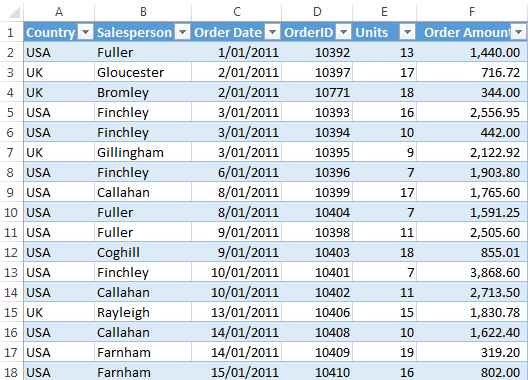
Web May 30 2022 nbsp 0183 32 When working with data in Excel one should store data in Excel tables in a tabular data format when possible Microsoft Excel is designed to work best with tabular data which is true for Pivot Tables Power Pivot Excel Tables and dashboards This post will discuss Excel tables and tabular data