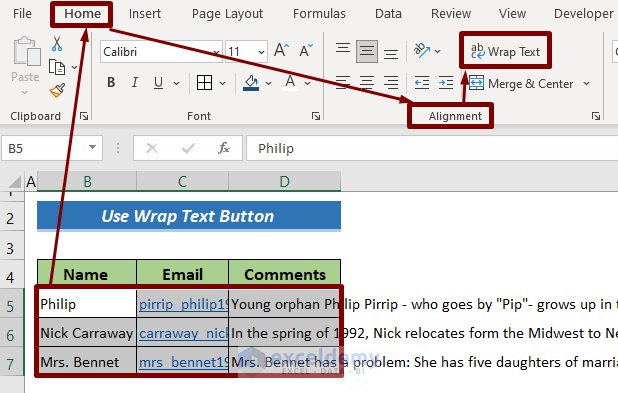
How To Create Multiple Lines In Excel Cell Keep All Text When Merging Cells In Excel Nationalholden Plot Multiple Lines In Excel How To Create A Line Graph In Excel With Multiple Lines YouTube How To Write Multiple Lines In Excel Cell Add Two Line In Excel Cell MS Excel Tutorial How To Write Multiple Lines In An Excel Cell Cum Acumulare Moderat How To Plot Line Chart In Excel Aplauze Verdict Catalog Web Put multiple lines of text in one cell with formatting cell as wrap text 1 Right click the cell you want to put multiple lines then click Format Cells See screenshot 2 In the Format Cells dialog box check the Wrap text box under the Alignment tab and then click the OK button
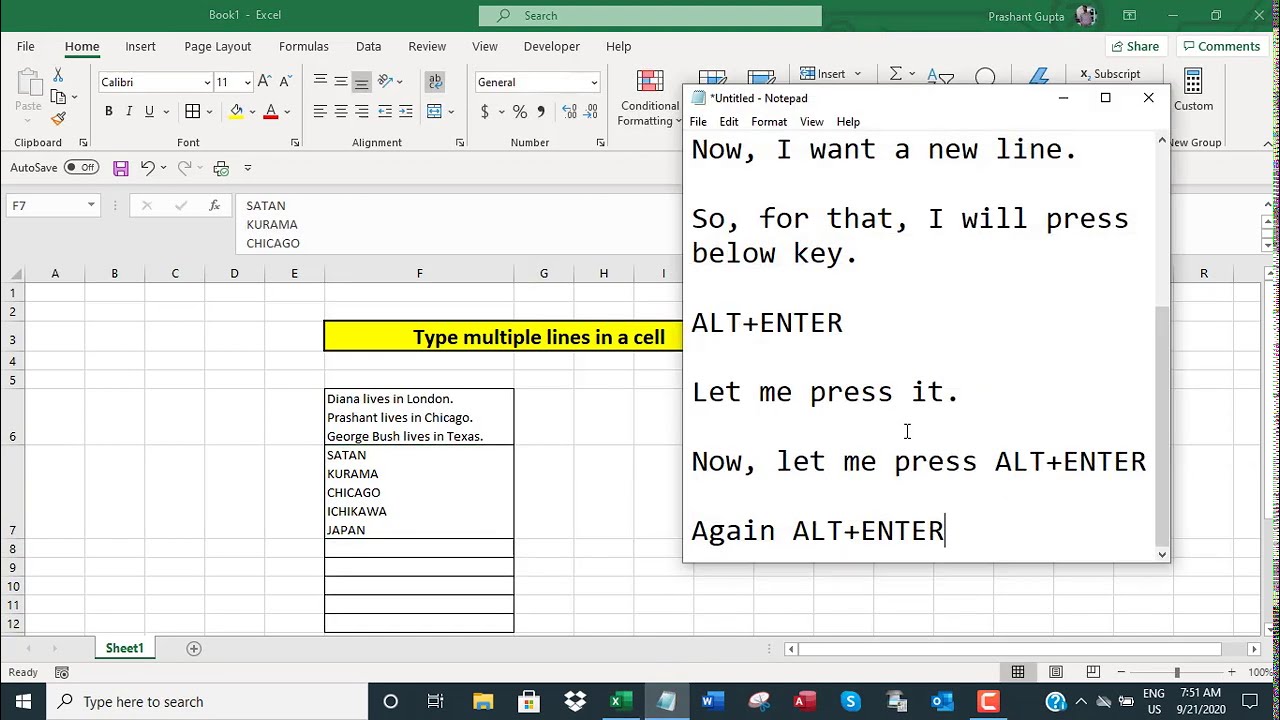
Web Jan 26 2021 nbsp 0183 32 In this video I demonstrate how to type multiple lines in a single cell You have probably discovered that if you press ENTER in a cell Excel takes you out of the cell instead of letting you Web To start a new line of text or add spacing between lines or paragraphs of text in a worksheet cell press Alt Enter to insert a line break Double click the cell in which you want to insert a line break Click the location inside the selected cell where you want to break the line Press Alt Enter to insert the line break Need more help
Cum Acumulare Moderat How To Plot Line Chart In Excel Aplauze Verdict Catalog How To Plot Multiple Lines In Excel With Examples Statology CLOUD HOT GIRL How To Create Multiple Lines Of Text In One Cell In Excel Printable Forms Free Online Neapix blogg se April 2022 How To Put Multiple Lines In Excel Cell 2 Easy Ways ExcelDemy How To Enter Multiple Lines In A Single Cell In Excel Add Multiline In One Cell Excel Shorts Create Multiple Pie Charts In Excel Using Worksheet Data And VBA Simple Tableau Line Graph With Multiple Lines Highcharts Chart Scientific Excel New Line In Cell inc How To Wrap Text In Excel Excel At Work
How To Create Multiple Lines In Excel Cell
 How To Create Multiple Lines In Excel Cell
https://i.ytimg.com/vi/d-oHNUvKfPU/maxresdefault.jpg
Web May 20 2023 nbsp 0183 32 Method 1 Using the Alt Enter Key Combination The Alt Enter key combination is an old but effective trick to add multiple lines in a cell Click on the cell where you want to insert multiple lines Type the first line Press and hold the Alt key Press the Enter key to go to a new line within the same cell
Pre-crafted templates offer a time-saving solution for producing a diverse variety of documents and files. These pre-designed formats and layouts can be utilized for numerous personal and expert jobs, consisting of resumes, invitations, flyers, newsletters, reports, discussions, and more, enhancing the material production process.
How To Create Multiple Lines In Excel Cell
How To Put Multiple Lines In Excel Cell 2 Easy Ways ExcelDemy

How To Plot Multiple Lines In Excel With Examples Statology CLOUD HOT GIRL

How To Create Multiple Lines Of Text In One Cell In Excel Printable Forms Free Online

Neapix blogg se April 2022

How To Enter Multiple Lines In A Single Cell In Excel Add Multiline In One Cell Excel Shorts
Create Multiple Pie Charts In Excel Using Worksheet Data And VBA
Web Oct 2 2023 nbsp 0183 32 1 Put Multiple Lines in Excel Cell Using ALT ENTER Key In our dataset we see that we need several line breaks to view our text at a glance Just follow the steps below to insert more than one line in Excel cell Steps Put your cursor in the text where you want to insert a new line

Web Edit a cell and type what you want on the first quot row quot Press one of the following depending on your OS Windows Alt Enter Mac Ctrl Option Enter Type what you want on the next quot row quot in the same cell Repeat as needed

Web Apr 17 2023 nbsp 0183 32 1 Click on the cell where you need to enter multiple rows of text 2 Type the first line of text 3 Press the Alt Enter keys which will add a separate line allowing you to start typing the next line of text within the same cell 4 Repeat the process of pressing Alt Enter to insert as many lines as needed 5

Web Oct 2 2023 nbsp 0183 32 How to Make Two Lines in One Cell in Excel 4 Easy Methods 1 Insert Line Break to Make Two Lines in One Cell We can make two lines in Excel by inserting a line break 2 Wrap Text to Make Two Line in One Cell in Excel We can make two lines in one cell in Excel by using a built in 3 Line
Web May 20 2023 nbsp 0183 32 Step by Step Guide to Create Multiple Lines in One Cell in Excel Step 1 Select the Cell First select the cell in which you want to insert multiple lines Step 2 Start Typing Your Text Begin typing your text as usual Step 3 Add Line Breaks Once you reach the point where you want to add a
[desc-11] [desc-12]
[desc-13]