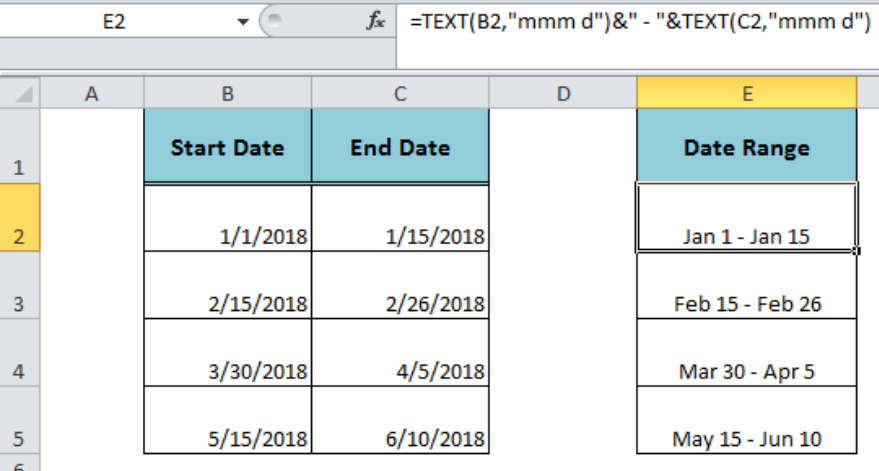
How To Create Date Range In Excel Create Date Range From Two Dates Excel Formula Exceljet Excel Formula For Dates Manage Your Data And Time Efficiently Unlock How To Create Chart With Dynamic Date Range In Excel 2 Easy Ways How To Use IF Formula For Date Range In Excel 6 Methods ExcelDemy Date Range In Excel Using Formula For Start End Date Web Dec 21 2023 nbsp 0183 32 How to Create Date Range in Excel Here we have a dataset containing the start and end dates of some events in Excel We can show the date range for each event in a single cell using the TEXT function To do that we used the following formula TEXT C5 quot dd mmm quot amp quot quot amp TEXT D5 quot dd mmm quot Date Range in Excel 6 Ideal
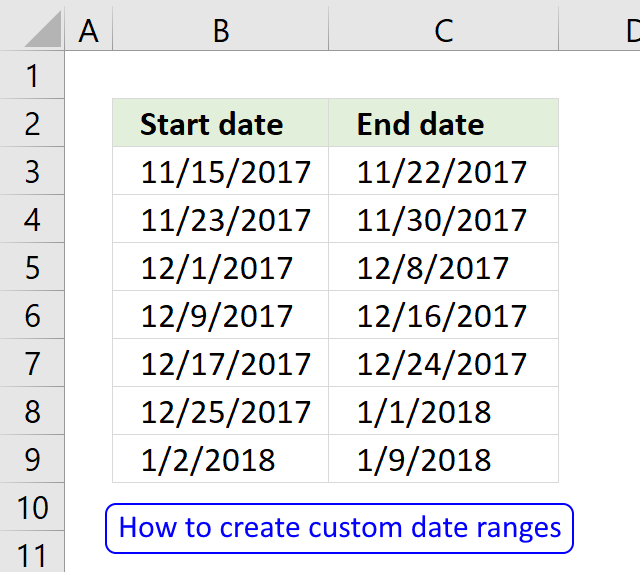
Web How to create date ranges in Excel Author Oscar Cronquist Article last updated on March 11 2024 Question I am trying to create an excel spreadsheet that has a date range Example Cell A1 1 4 2009 1 10 2009 Cell B1 1 11 2009 1 17 2009 Cell C1 1 18 2009 1 24 2009 How do I create a formula to do this Web May 3 2023 nbsp 0183 32 The Excel DATE function returns the serial number that represents a certain date It has the following arguments DATE year month day Where Year represents the year of the date Month an integer representing the month of the year from 1 January to 12 December Day an integer corresponding to the day of the month from 1 to 31
Date Range In Excel Using Formula For Start End Date How To Create Date Ranges In Excel How To Insert Current Date And Time In Microsoft Excel How To Use The Excel DATE Function How To Use COUNTIF For Date Range In Excel 6 Suitable Approaches How To Create A Formula In Excel For Dates How To Use The DATE Function In Microsoft Excel TechWorld This How To Insert Dates In Excel Riset Date Formula In Excel How To Use Date Formula In Excel
How To Create Date Range In Excel
 How To Create Date Range In Excel
https://exceljet.net/sites/default/files/styles/original_with_watermark/public/images/formulas/create date range from two dates.png
Web Use date and time functions to create formulas that return serial numbers display a specific date or time or that calculate the difference between dates or times
Templates are pre-designed files or files that can be used for various functions. They can conserve effort and time by supplying a ready-made format and layout for developing various type of material. Templates can be utilized for personal or expert jobs, such as resumes, invites, leaflets, newsletters, reports, discussions, and more.
How To Create Date Range In Excel

How To Use The Excel DATE Function Exceljet
How To Create Date Ranges In Excel

How To Insert Current Date And Time In Microsoft Excel

How To Use The Excel DATE Function
How To Create A Formula In Excel For Dates

How To Use The DATE Function In Microsoft Excel TechWorld This
Web Mar 24 2024 nbsp 0183 32 To create a date range follow these simple steps Enter the in cell B1 or any other cell Refer to cell A1 where you have the starting date of the range Use the sign to add days to today s date Specify the number

Web To create a dynamic date range formula in Excel you can use a combination of functions such as TODAY OFFSET and advanced formula combinations These functions will allow the formula to automatically update based on the current date or a user specified range

Web Mar 14 2023 nbsp 0183 32 The tutorial shows how you can leverage the new SEQUENCE function to quickly generate a list of dates in Excel and use the AutoFill feature to fill a column with dates workdays months or years Until recently there has been just one easy way to generate dates in Excel the AutoFill feature

Web Select a cell Choose the cell where you want the start date to appear Enter the formula In the selected cell type DATE year month day replacing year month and day with the specific values for your start date Using the DATE function to create an end date

Web Mar 21 2023 nbsp 0183 32 The main function to calculate dates in Excel DATE function Get current date and time TODAY returns today s date NOW returns the current date and time Convert dates to from text DATEVALUE converts a date in the text format to date format TEXT converts a date to a text value Retrieve dates in Excel
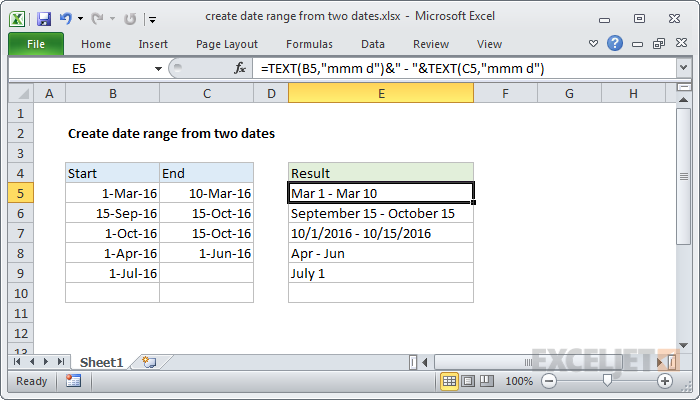
Web Select the fill handle at the lower right corner of the cell hold down and drag to fill the rest of the series Fill handles can be dragged up down or across a spreadsheet Use the Fill command Select the cell with the first date Then select the range of cells you want to fill Select Fill gt Series gt Date unit Web Create date range from two dates Summary To display a date range in one cell based on dates in different cells you can use a formula based on the TEXT function In the example shown the formula in cell E5 is TEXT B5 quot mmm d quot amp quot quot amp TEXT C5 quot mmm d quot Generic formula TEXT date1 quot format quot amp quot quot amp TEXT date2 quot format quot Explanation
Web Feb 6 2023 nbsp 0183 32 Create Date Range We can concatenate join two dates stored as text using the amp operator TEXT B3 quot m d yyyy quot amp quot to quot amp TEXT C3 quot m d yyyy quot This is useful for an event start and end date but what if the second date