How To Create A Dynamic Table In Excel Without Pivot Table Pivot Table On Excel Summarize Data Stack Overflow How To Build A Pivot Table In Excel Excel Me How To Create A Pivot Table For Data Analysis In Microsoft Excel Riset Apply Conditional Formatting To Excel Pivot Table Excel Unlocked Data Source Reference Is Not Valid In Excel Pivot Table Solved 1 In Excel I would like to generate a dynamic table based on the values in some other cell I have never done this before so I don t know the terminology or the techniques involved I m also not sure if Excel is able to accomplish what I want it to Here s what I d like to do 1 I enter a value into the cell next to Sum here it s 100
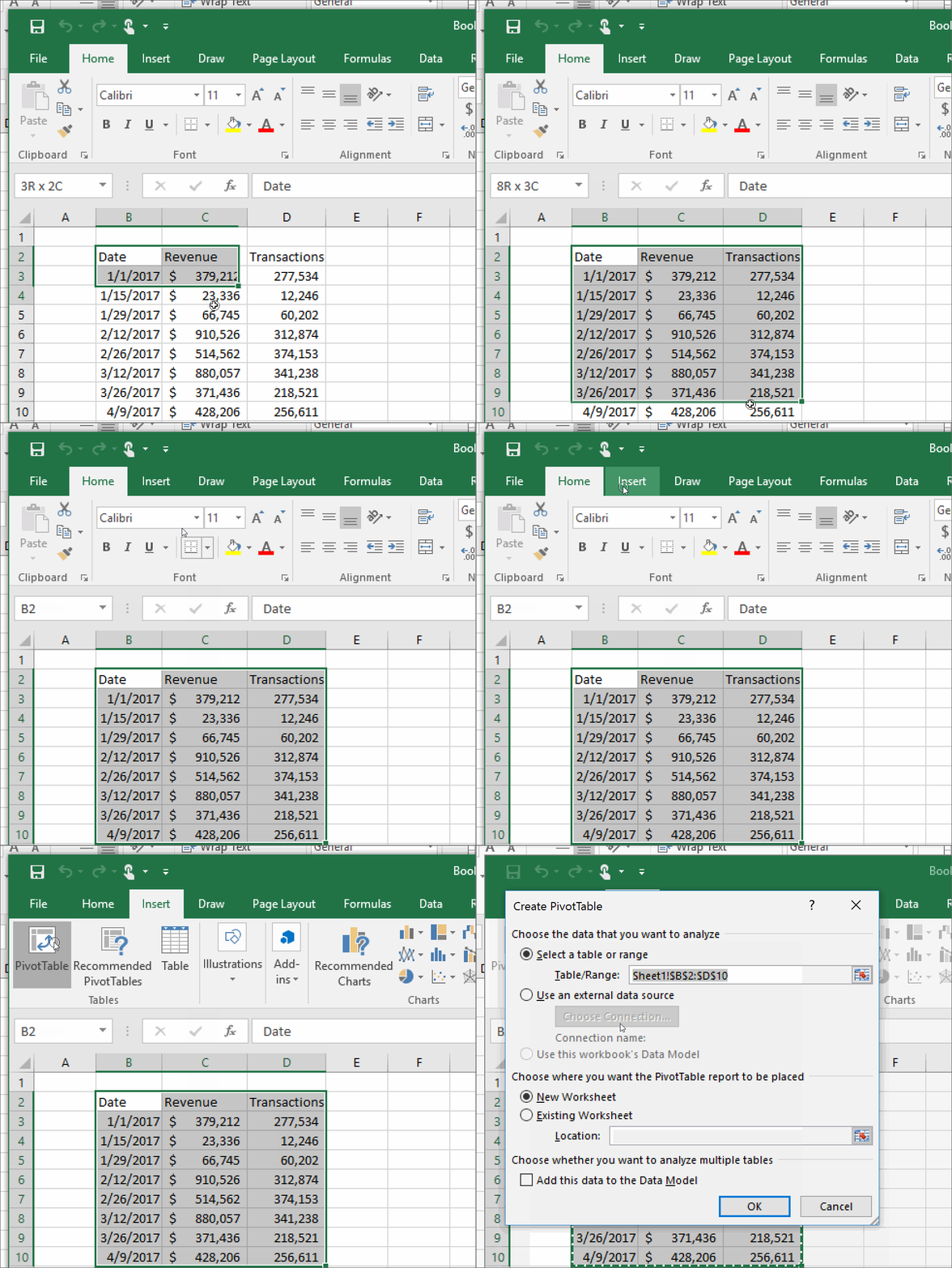
Firstly select the whole dataset including the header row and select Insert Table from the ribbon Then in the appeared tab write the cell range for the table if not selected earlier Also put a tick mark on My table has headers Press OK Now we have prepared the table Let s make it dynamic The first step in creating a Pivot Table is to organize your data in a list of rows and columns Make sure that there is a heading in every column and check that there are no rows that are completely blank In the screen shot below the data is set up correctly and has these features every cell in the list headings in row 3 is filled
Data Source Reference Is Not Valid In Excel Pivot Table Solved How To Create A Pivot Table In Excel Pixelated Works How To Create A Pivot Table In Excel To Slice And Dice Your Data Riset How To Sort A Pivot Table In Excel Step by Step 2023 How To Move A Pivot Table In Excel Pivot Tables Excel For Dummies Two Birds Home How Do I Summarize Data In Excel Without Pivot Table Brokeasshome How To Collapse All Pivot Table Fields In Excel SpreadCheaters How To Use Slicer In Excel Without Pivot Table Basics Of Excel JJ
How To Create A Dynamic Table In Excel Without Pivot Table
 How To Create A Dynamic Table In Excel Without Pivot Table
https://i.stack.imgur.com/HKMcJ.png
We can create a dynamic Pivot Table in Excel by copying and pasting a new set of data directly below the data table Afterward we will refresh the Pivot Table to include the new data This is better than the OFFSET function used in earlier Excel versions The steps below will walk through the process
Pre-crafted templates offer a time-saving option for developing a diverse variety of documents and files. These pre-designed formats and designs can be made use of for different personal and expert projects, including resumes, invitations, flyers, newsletters, reports, discussions, and more, simplifying the content production process.
How To Create A Dynamic Table In Excel Without Pivot Table
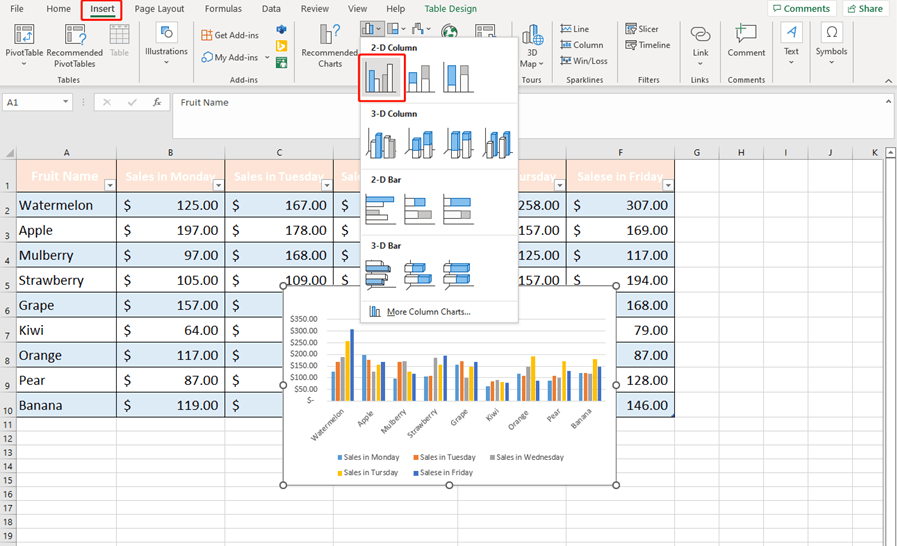
How To Create Dynamic Table In Excel My Microsoft Office Tips

How To Create A Pivot Table In Excel Pixelated Works

How To Create A Pivot Table In Excel To Slice And Dice Your Data Riset

How To Sort A Pivot Table In Excel Step by Step 2023
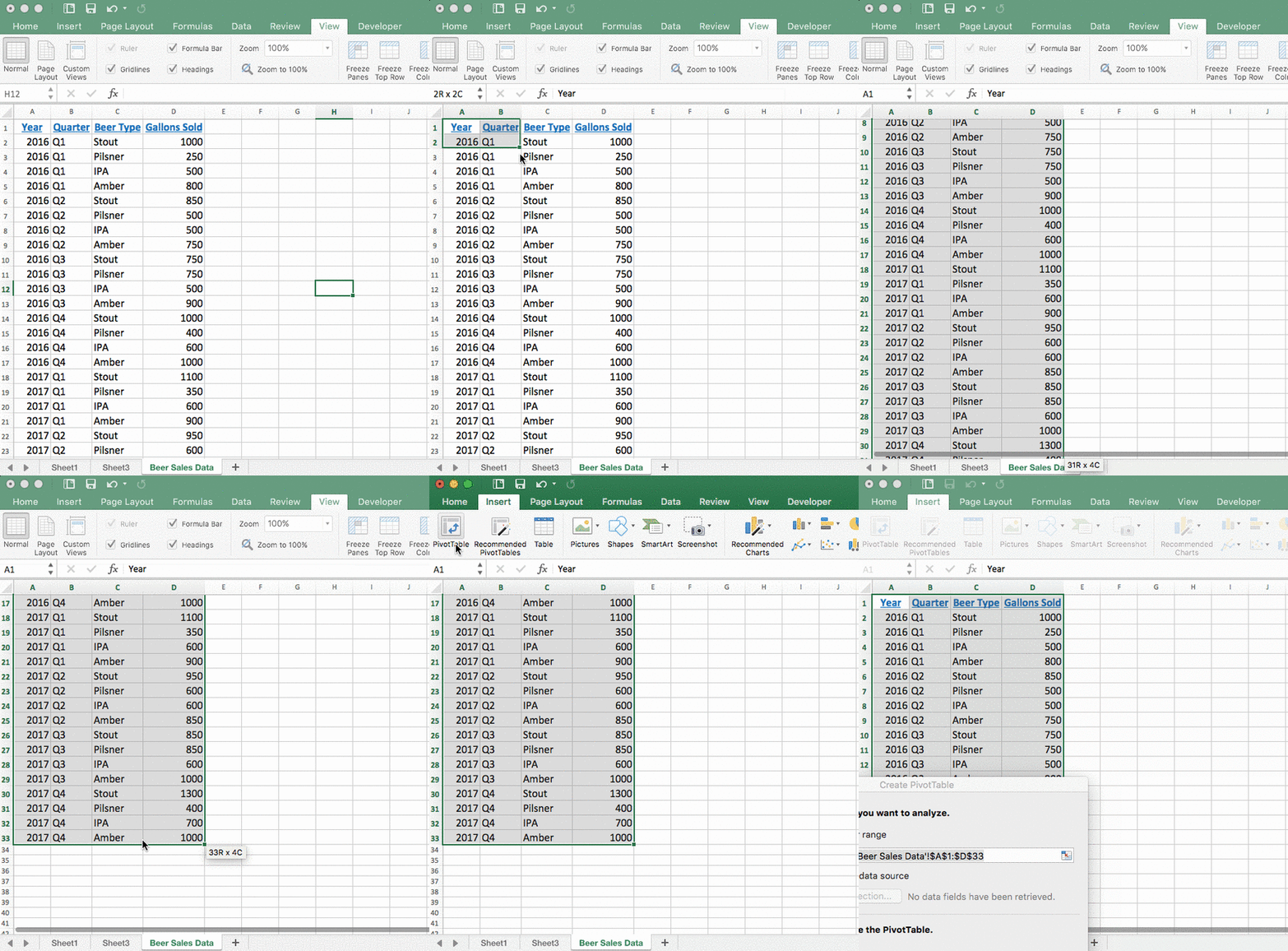
Pivot Tables Excel For Dummies Two Birds Home

How Do I Summarize Data In Excel Without Pivot Table Brokeasshome

How To Create Dynamic Tables In Excel Using Tables Applying table format for data structure will make the data sources dynamic For instance we have the following data in an Excel spreadsheet To summarize the above data let us apply the pivot table

Example 1 Using Tables to create Dynamic Tables in Excel Using tables we can build a Dynamic Table in Excel and base a pivot over the Dynamic Table We have the following data When we create a pivot table with this data range from A1 E6 and then insert new data in dataset row 7 it will not reflect in the PivotTable
1 Select the source data range click Formulas Name Manager See screenshot 2 In the Name Manager window click the New button to open the Edit Name dialog In this dialog you need to Enter a name for the range in the Name box Copy the below formula into the Refers to box
Format your data as an Excel table select anywhere in your data and then select Insert Table from the ribbon If you have complicated or nested data use Power Query to transform it for example to unpivot your data so it s organized in columns with a single header row Need more help

To create a dynamic pivot table in Excel you need to follow a series of steps that involve organizing your data setting up the pivot table adding and configuring fields and using pivot table options for dynamism
I have 80 Countries and i need to create lots of Pivot tables also need to make sure about the range of the pivot table every week After refreshing the pivot i am seeing few countries wont sort properly Also I need only Top 10 Countries and supplies for all the countries Any idea to summarize this data without the pivot table There are two basic ways to create dynamic tables in Excel 1 Using Pivot Table and 2 Using Formulas You can download this Dynamic Tables Excel Template here Dynamic Tables Excel Template Dynamic Tables in Excel Using Pivot Table I have a sales table for the month of Jan This sales data includes Date Month Sales Person and Sales Value
Now that we have created a dynamic range let s see how it improves our pivot table Step 1 Click the Insert tab and select PivotTable Step 2 In the Table Range bar enter the name of our dynamic range Data Step 3 Tick Existing Worksheet Step 4 Click the bar for Location bar then click cell F3