How To Check Java Version In Intellij Terminal How To Check Java Version In Windows 10 YouTube How To Check Java Version In Cmd In Windows 10 Java For Learn How To Check Java Version In Windows 10 In Just Two Steps Pricebaba Windows How To Check What Version Of Java I Have Installed Unix How To Check Java Version In Linux Coolxfiles Here are steps to change java version in Intellij idea Go to File Project Structure If you prefer keyboard shortcuts Windows Ctrl Shift Alt S Mac CMD Following pop up will be displayed in intellij Navigate to Project Setting SDK and add JDK If you have already configured JDK then select the JDK
Windows 10 JAVA HOME environment is set to 1 8 221 Project SDK is set to java version 1 8 Open terminal in Idea 2019 1 and check java version it will be similar to JAVA HOME and version of Java used in project Open terminal in Idea 2019 2 and check java version terminal will use bundled java version instead of JAVA HOME and version of The Terminal saves tabs and sessions when you close the project or IntelliJ IDEA It preserves tab names the current working directory and even the shell history To close a tab click on the Terminal toolbar or press Ctrl F4 Press Alt 0 and Alt 0 to switch between active tabs Alternatively you can press Alt 0 to see the list of
How To Check Java Version In Linux Coolxfiles How To Check Java Version In Cmd In Mac Java For Learn Why Do I Have Java 11 In Intellij Terminal Stack Overflow How To Check Java Version In Windows 10 11 How To Change The Java Version In An Intellij Project Baeldung Set How To Check Java Version In Cmd In Windows 10 Java For Learn Check Java Version LinuxConfig How To Verify Java Version And Java Installation RefreshJava How To Check The Version Of Java In Cmd How To Check Version
How To Check Java Version In Intellij Terminal
 How To Check Java Version In Intellij Terminal
https://i.ytimg.com/vi/VIu4rEV-IOM/maxresdefault.jpg
1 Check your PATH environment variable outside of Intellij Also check JAVA HOME Align all of that with the JDK you actually want to use It is generally easier if everything command line IDE points to the same JDK if applicable Zabuzard Feb 22 2022 at 9 54
Pre-crafted templates offer a time-saving option for creating a varied variety of documents and files. These pre-designed formats and layouts can be made use of for various individual and professional jobs, consisting of resumes, invites, leaflets, newsletters, reports, presentations, and more, streamlining the content development procedure.
How To Check Java Version In Intellij Terminal
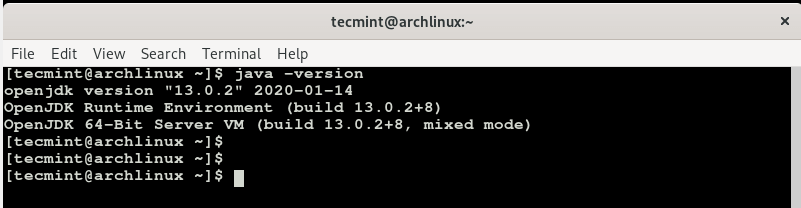
How To Check Java Version In Linux Fozgreen

How To Check Java Version In Cmd In Mac Java For Learn

Why Do I Have Java 11 In Intellij Terminal Stack Overflow

How To Check Java Version In Windows 10 11

How To Check Java Version In Cmd In Windows 10 Java For Learn

Check Java Version LinuxConfig

Via keyboard shortcut For OSX we press For Windows we press Ctrl Shift Alt S Then we ll see a popup dialog appear that looks similar to this Under the Project SDK section we ll be able to select a new JDK to use for the project via the combo box After updating to a new version of Java the project will begin reindexing

After changing the Java version check your project dependencies Dependencies incompatible with the new Java version might cause runtime errors If you only want to use Java 8 in IntelliJ s terminal while keeping Java 17 as the system default go to IntelliJ s Settings Preferences on macOS navigate to Tools Terminal Project Settings

All platforms download and install JetBrains Runtime via Choose Boot Java Runtime for the IDE action Start the IDE use Help Find Action Ctrl Shift A or Cmd Shift A on Mac type Choose Boot Java Runtime for the IDE press Enter Select the version to install the higher the number after b the more recent is the version

In the top bar where File Edit View Are written go to the Help section Click on Help section and in the drop down click on About That will show you the information regarding the Intellij Version you are using

For more information about Java releases and features in each release refer to Java version history If you need to run IntelliJ IDEA using another Java runtime refer to Change the boot Java runtime of the IDE for instructions IntelliJ IDEA 2023 X LTS versions Java 17 Sealed types always strict floating point semantics
To verify Open any Java file in the project Right click and select Run Check the console output to ensure that the correct JDK version is being used Handling Dependencies Remember some projects may have dependencies that are compatible only with certain JDK versions Always ensure that the JDK version matches the project s dependency I m also using IntelliJ with both Maven plugins enabled Check which version IntelliJ is currently using Open Project Settings and search Maven or Go to Project Settings Build execution deployment Build Tools Maven For Mac Users
Scroll through the applications and programs listed until you see the Java folder Click on the Java folder then About Java to see the Java version Right click on the screen at bottom left corner and choose the Control Panel from the pop up menu The installed Java version s are listed