How To Check If Python Is Installed On Windows Command Prompt How Do I Install Python 3 On Windows 10 The Three Most Popular Python Libraries For Creating GUIs Yuri Shwedoff How To Check Python Installed Or Not Version Using Command Prompt Mozog ldozat Karakter How To Install Pip T relem Cs sz r Radar Sale Tensorflow Setup Windows 10 In Stock Riset Open Notepad on Windows 11 create a new text file name it test py and add the following line of code print Hello Python Save the file and then go back to the Terminal window from
Using Python on Windows Python 3 12 1 documentation 4 Using Python on Windows This document aims to give an overview of Windows specific behaviour you should know about when using Python on Microsoft Windows Unlike most Unix systems and services Windows does not include a system supported installation of Python To check which version is installed open a terminal window and run the following command python3 version Since most Linux versions now use Python 3 by default we use python3 in the command syntax However if you still use Python 2 for some applications omit 3 from the command to check which Python 2 version you have installed
Sale Tensorflow Setup Windows 10 In Stock Riset Check Python Version How To Check Py In Mac Windows And Linux How To Check If Python Is Installed On Windows 10 Quora How To Check If Python Is Installed On Windows 10 INSPYR School Quick Answer How To Open Python On Windows OS Today How To Check If Python Is Installed On Windows 10 INSPYR School How To Check The Version Of Python Pi My Life Up How To Install Python Gambaran How To Check If Python Is Installed On Windows 10 Quora
How To Check If Python Is Installed On Windows Command Prompt
 How To Check If Python Is Installed On Windows Command Prompt
https://phoenixnap.com/kb/wp-content/uploads/2021/04/verify-python-install-1.png
Once the Terminal is open you will see a command prompt where you can enter commands Type the following command and press Enter python version This command will display the Python version installed on your Mac For example if you have Python 3 9 2 installed it will display something like Python 3 9 2
Templates are pre-designed documents or files that can be used for numerous purposes. They can conserve effort and time by offering a ready-made format and design for developing various type of content. Templates can be used for personal or expert projects, such as resumes, invitations, leaflets, newsletters, reports, discussions, and more.
How To Check If Python Is Installed On Windows Command Prompt
Check If NumPy Is Installed And Find Your NumPy Version YouTube
Check Python Version How To Check Py In Mac Windows And Linux
How To Check If Python Is Installed On Windows 10 Quora

How To Check If Python Is Installed On Windows 10 INSPYR School

How To Check If Python Is Installed On Windows 10 INSPYR School
How To Check The Version Of Python Pi My Life Up
23 Answers Sorted by 756 In your Python interpreter type the following commands import os import sys os path dirname sys executable C Python25 Also you can club all these and use a single line command Open cmd and enter following command python c import os sys print os path dirname sys executable

To check the Python version on Windows Mac or Linux type python version into PowerShell on Windows or the Terminal on Linux or Mac To view the Python 3 version run Python3 version instead To check what version of Python is installed on your Windows Mac or Linux computer all you have to do is run a single command

Step 1 For setting up Python on CMD we must check whether Python is installed on your machine or not For doing this go to the Windows search bar and search for python If you find python in the result then you are good to go You can see Python3 is installed on my computer

How can I check all the installed Python versions on Windows Stack Overflow How can I check all the installed Python versions on Windows Asked 5 years 1 month ago Modified 7 months ago Viewed 120k times 91 Please note I m not asking how to check which version of Python did I install
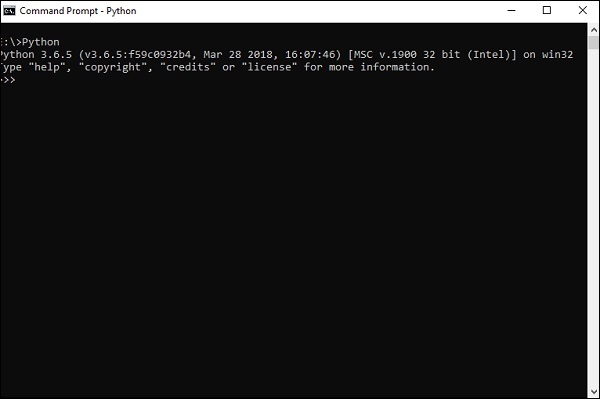
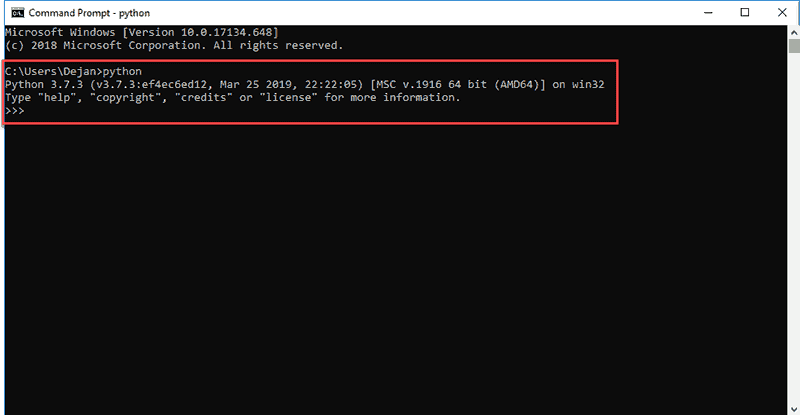
To check if Python is installed on Windows using the Command Prompt you can follow these steps Open the Command Prompt by pressing the Windows key R typing cmd and pressing Enter Type python version and press Enter This will display the version number of the installed Python interpreter if it exists For example Python 3 9 5
Use the py version Command to Check if Python Is Installed on Windows We can also check what version of Python 2 or 3 is installed using the following command The above command will return the latest version installed on the computer and will not start it We can also check if some specific version of Python is installed in the following way To check if Python is installed on your Windows machine using the terminal follow these steps Open a command line tool such as Windows Terminal the default on Windows 11 or Command Prompt the default on Windows 10 In the command line type python If Python is installed you should see a message like Python 3 x x followed by the
To check your Python installed version on a Windows machine using the Command Line Prompt follow these steps Step 1 Press Win R to open the Run dialog Step 2 Type cmd and press Enter to open the Windows Command Prompt Step 3 In the Command Prompt type python version and press Enter