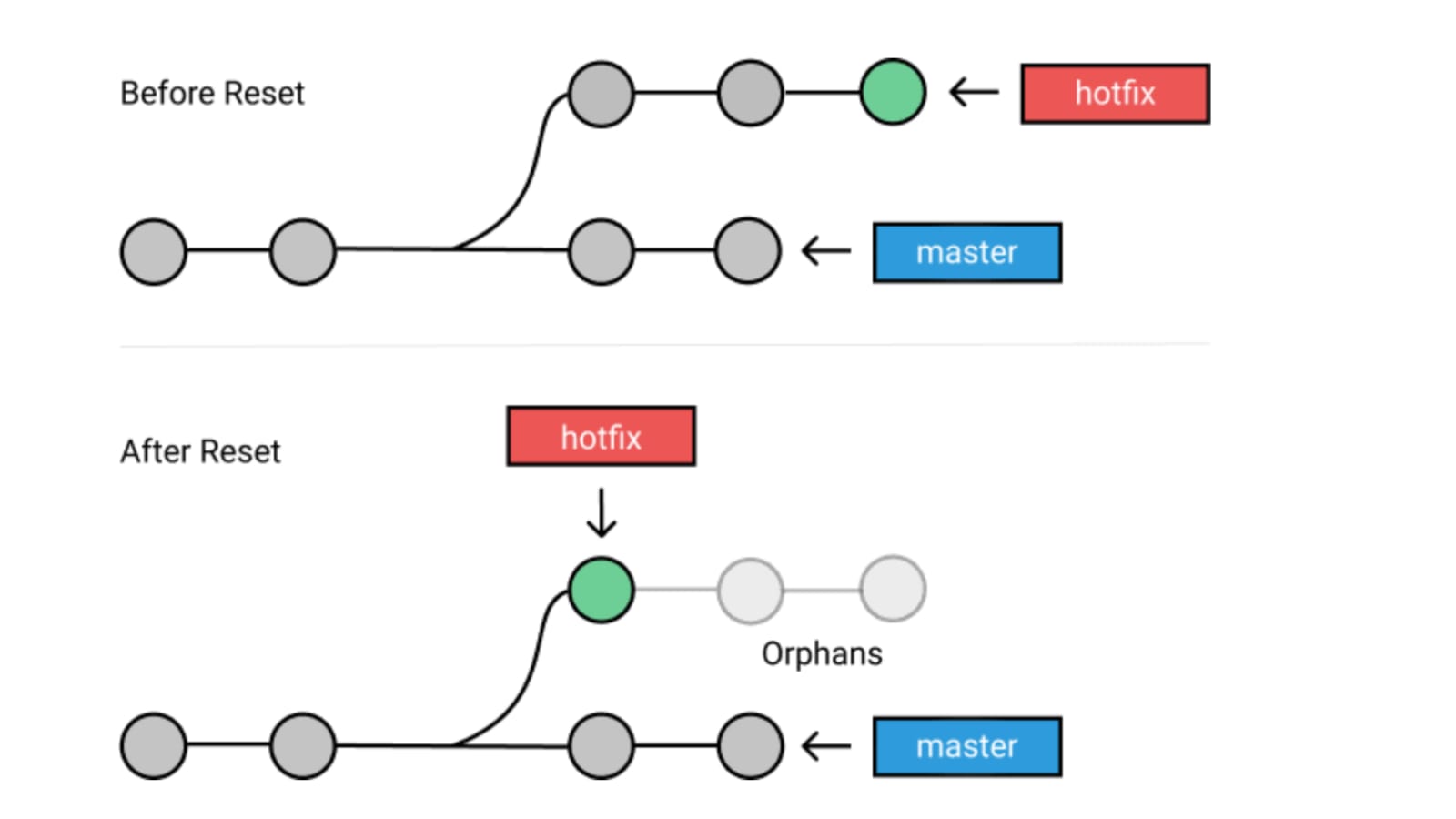
How To Cancel Git Reset How To Reset Your Git Branch To A Previous Commit both Local And Git Reset The Git Reset Command Explained Tutorials How To Git Hard Reset Head WiseTut How To Git Reset To HEAD What Is Git HEAD How To Reset Git Head To Git Abort Merge How To Cancel A Merge In Git Web Jun 19 2018 nbsp 0183 32 Simple we can just move the branch pointer Git supplies the reset command to do this for us For example if we want to reset master to point to the commit two back from the current commit we could use either of the following methods git reset 9ef9173 using an absolute commit SHA1 value 9ef9173 or
Web Resetting Checking Out amp Reverting The git reset git checkout and git revert commands are some of the most useful tools in your Git toolbox They all let you undo some kind of change in your repository and the first two commands can be used to manipulate either commits or individual files Web git checkout git clean git revert git reset git rm The git reset command is a complex and versatile tool for undoing changes It has three primary forms of invocation These forms correspond to command line arguments soft mixed hard
Git Abort Merge How To Cancel A Merge In Git Git Reset File Tutorial WiseTut Git Reset To A Specific Commit Version YouTube Creare E Mantenere Un Repository Git Su Synology Davide Permunian Git Revert Life Saver Of The False Committers Musa Ugurlu Git Revert To Previous Commit Reverting Changes Gitlab The Git Git How To Recover From The oh No I Did A Git Reset And Now My Files Are Git Reset How To Use Git Reset W3Docs Online Git Tutorial
How To Cancel Git Reset
How To Cancel Git Reset
https://miro.medium.com/max/1200/0*Uc_7zvS0MnfQwq3Q
Web May 3 2022 nbsp 0183 32 git reflog 32c2d09 HEAD gt master HEAD 0 reset moving to 32c2d09 d66f707 HEAD 1 reset moving to HEAD d66f707 HEAD 2 commit Change 2 32c2d09 HEAD gt master HEAD 3 commit Change 1 38e2a6e HEAD 4 commit initial Initial commit git reset d66f707 Unstaged changes after reset M file1 ext git
Pre-crafted templates offer a time-saving solution for creating a diverse range of documents and files. These pre-designed formats and layouts can be used for different personal and expert jobs, consisting of resumes, invites, leaflets, newsletters, reports, presentations, and more, enhancing the content production procedure.
How To Cancel Git Reset

Git Reset Modes Soft Mixed Hard Write Down The Problem Think Real

Git Reset File Tutorial WiseTut

Git Reset To A Specific Commit Version YouTube

Creare E Mantenere Un Repository Git Su Synology Davide Permunian
Git Revert To Previous Commit Reverting Changes Gitlab The Git

Git
Web Aug 7 2008 nbsp 0183 32 Don t do it if you have uncommitted work you want to keep git reset hard 0d1d7fc32 Alternatively if there s work to keep git stash git reset hard 0d1d7fc32 git stash pop This saves the modifications then reapplies that patch after resetting
Web Jan 31 2011 nbsp 0183 32 You can use git reset HEAD 1 this will cancel your last git commit that was not pushed to remote and the changes won t be lost You can also go through the different answers posted here for different use cases

Web Undoing git reset with the hard option If the remote tracking branch corresponding to your branch is synchronized with your current branch before resetting you can call the command below to undo the git reset suppose the name of remote is origin which is by default git reset hard origin lt branch name gt

Web Aug 18 2021 nbsp 0183 32 In git reflog you should find some of your commits Once you find the latest commit that you want to move to you should reset back to your commit id git reset Your Hash as git reset soft just reset the files and not the index or working tree

Web Dec 28 2012 nbsp 0183 32 16 Answers Sorted by 2398 This will unstage all files you might have staged with git add git reset This will revert all local uncommitted changes should be executed in repo root git checkout
[desc-11] [desc-12]
[desc-13]