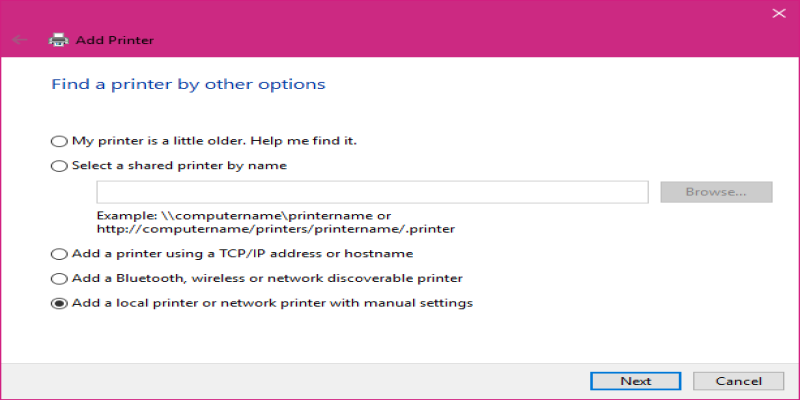
How To Add Adobe Reader Pdf Printer Windows 7 Microsoft Pdf Reader For Windows 10 Resume Examples Install Pdf Printer Windows 7 Newinabox Adobe Reader 11 Offline Installer Download FileHare How To Add Adobe PDF Printer YouTube How To Install Microsoft Pdf Printer Windows 7 Shipley Watiod Web Oct 4 2012 nbsp 0183 32 Solution 1 Repair the Acrobat installation using the option in the Help menu Solution 2 Uninstall and then re install Acrobat on your Windows OS Solution 3 Manually install the PDF Printer Click Start gt Control Panel gt Devices and Printers Select Add a printer Select Add a local printer Check Use an existing port and select Documents
Web Aug 11 2017 nbsp 0183 32 Select Add a printer Select Add a local printer Check Use an existing port and select Documents pdf Adobe PDF from the drop down Click Next Click the Have Disk button Click the Browse button Navigate to C Program Files x86 Adobe Acrobat 10 0 Acrobat Xtras AdobePDF Select AdobePDF inf from the list Web Apply for a license Download free Adobe Acrobat Reader software for your Windows Mac OS and Android devices to view print and comment on PDF documents
How To Install Microsoft Pdf Printer Windows 7 Shipley Watiod What Is Foxit Reader Pdf Printer Ortholikos Windows And Android Free Downloads Virtual Pdf Printer Windows 7 Foxit Pdf Printer Settings Resume Examples How To Install Microsoft Pdf Printer Windows 7 Shipley Watiod Pdf Printer Of PDF WPS PDF Blog Adobe Pdf Printer Free Brownar Windows And Android Free Downloads Virtual Pdf Printer Windows 7 How To Download And Install Adobe Reader For Free In Windows 10 8 8 1
How To Add Adobe Reader Pdf Printer Windows 7
 How To Add Adobe Reader Pdf Printer Windows 7
https://i2.wp.com/rudolfbarshai.com/wp-content/uploads/2021/01/microsoft-pdf-reader-for-windows-10.jpg
Web May 8 2019 nbsp 0183 32 Use this step by step guide to install PDF printer drivers from Adobe or Microsoft on a Windows or to learn how to print as a PDF without installing any printer drivers on a Mac
Pre-crafted templates provide a time-saving solution for developing a varied range of documents and files. These pre-designed formats and designs can be utilized for different personal and expert jobs, consisting of resumes, invitations, flyers, newsletters, reports, discussions, and more, streamlining the material creation process.
How To Add Adobe Reader Pdf Printer Windows 7
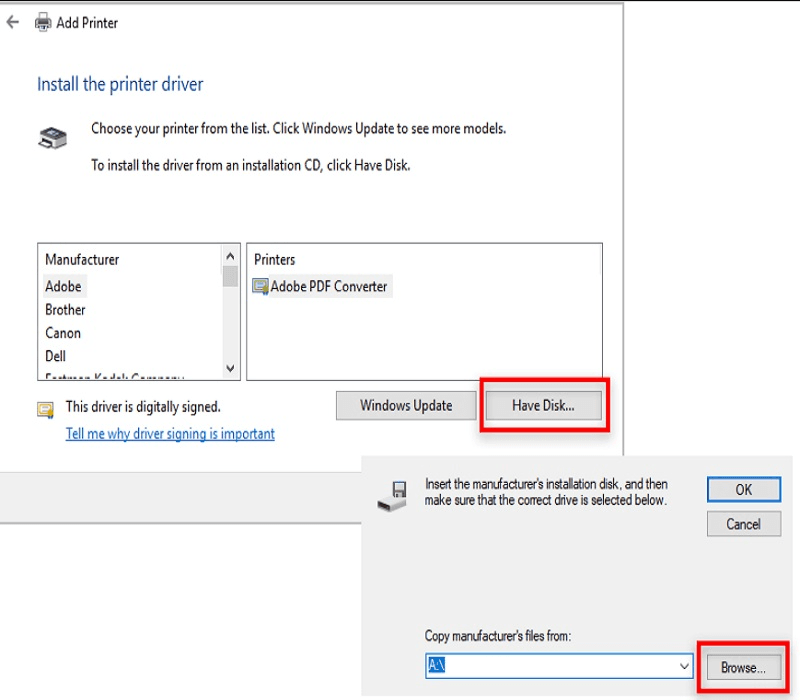
How To Add PDF Printer PDF Agile
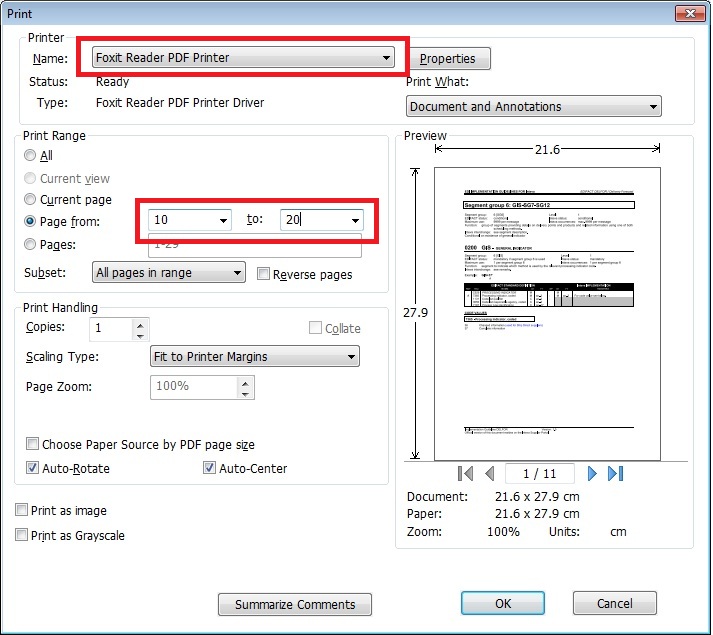
What Is Foxit Reader Pdf Printer Ortholikos

Windows And Android Free Downloads Virtual Pdf Printer Windows 7

Foxit Pdf Printer Settings Resume Examples

Pdf Printer Of PDF WPS PDF Blog
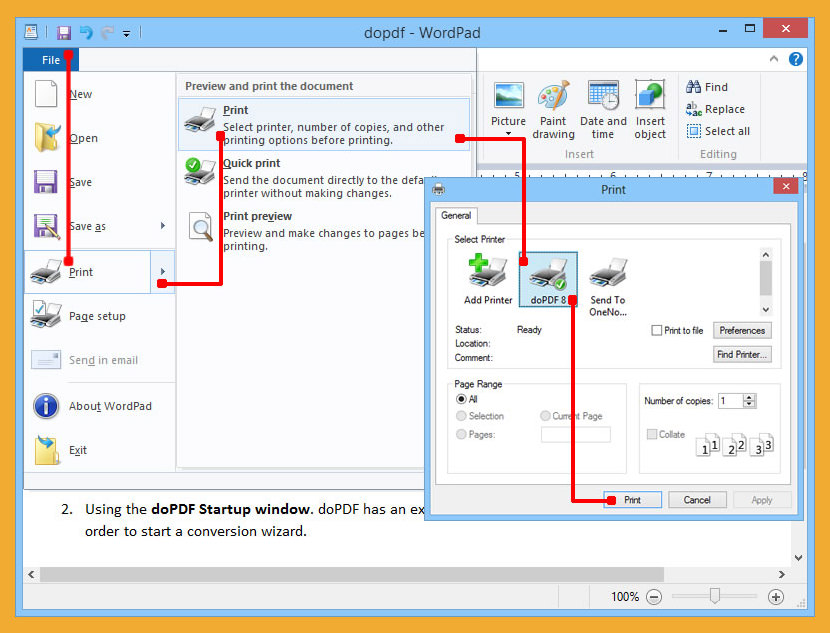
Adobe Pdf Printer Free Brownar

Web May 23 2023 nbsp 0183 32 Choose File gt Print Choose Adobe PDF as the printer in the Print dialog box To customize the Adobe PDF printer setting select the Properties or Preferences button In some applications you may have to select Setup in the Print dialog box to open the list of printers and then select Properties or Preferences

Web Jun 16 2016 nbsp 0183 32 The Adobe PDF printer is only part of Adobe Acrobat Standard or Adobe Acrobat Pro for Windows It is not part of the free Adobe Reader Just wanted to know if anyone has come across on how to setup an Adobe PDF printer on a Windows 7 SP1 64bi laptop using Adobe Acrobat Reader DC version 2015 016 20045

Web Dec 7 2017 nbsp 0183 32 Assuming that the Adobe PDF PostScript printer driver instance is not showing in the printers control panel try the Help gt Repair Installation function in Acrobat If it is showing but not working delete the printer reboot and then try the Help gt Repair Installation function in Acrobat
Web May 23 2023 nbsp 0183 32 Solution Install the latest Acrobat patch The latest patch release has the fix for this problem The patch provides an updated Adobe PDF printer driver Download the respective installer applicable for your product and install Product
Web May 23 2023 nbsp 0183 32 Click the Ports tab and then click Add Port Select Adobe PDF Port Windows XP or Adobe PDF Port Monitor Vista Windows 7 from the list of available port types and click New Port Select a local folder for PDF output files and click OK Then click Close to quit the Printer Ports dialog box
Web However I also often need to print larger PDFs from Adobe Acrobat Reader DC When I open Acrobat and select the A3 Printer s Printer Driver from the Print dialog for the first time the Page Setup dialog always resets itself to A4 Although it s a quick thing to select it and change it back to A3 it s still tedious especially as I Web Choose File gt Print Choose Adobe PDF from the list of printers in the print dialog box Click quot Print quot to use the Acrobat PDF printer Click OK and enter a new file name for your PDF Save to your desired location Learn more about printing to PDF
Web Feb 21 2017 nbsp 0183 32 In the Devices and Printers folder right click on the printer icon and left click on Printer Properties The printer properties window will open on the General tab Select Print Test Page A Test Page will be sent to the printer