How To Access Shared Google Drive Folder Without Gmail How To Share A Google Drive Folder Publicly Workspace Tips Making A Shared Google Drive Folder YouTube 4 Best Ways Share Google Drive Folder With Non Gmail Users Moving Files From Google My Drive To A Google Shared Drive Division Google Drive Shared With Me Not Showing On Desktop Need A Good WEB Thankfully Google Drive now features a sharing setting that allows users to publicly share documents and files with non Google users If done properly the file will accessible and editable in any browser without having to be logged in to a Google account
WEB 3 days ago nbsp 0183 32 Follow these steps to share a Google Drive folder or file on a PC or mobile On Computer Step 1 Open the Google Drive website and right click on the file or folder you want to WEB May 13 2024 nbsp 0183 32 Solution Open Google Drive Click Shared Drives Create a new Shared Drive or open an existing one Right click the desired folder Select Share Enter the desired external non Google
Google Drive Shared With Me Not Showing On Desktop Need A Good How To Access Shared Folders In Dropbox Mac Web Browser Windows How To Share Google Drive Folder Without Permission Kseforyou How To Download Google Drive Folder Without Zipping Greatmaz Clay Snowman Elementary Art art Teacher V Giannetto Preschool Art How To Download Google Drive Folder Without Zipping Realestatebap Boundjes Blog Access Shared Google Drive Gasae Local League Shared Drives LWVMD
How To Access Shared Google Drive Folder Without Gmail

https://lh3.googleusercontent.com/Ew_uOuD6Eo2AO_SVPWciu7mLoKuh-Esz4t1YUnZRcqOFQ1cpj8MveZurayKwhIYXGGDcBmmmgdU8CVD6vEv_x6BHObKY1dJE6LiocVHZaz1SSfNX3z4eqWnqhhp0skJuGTD9ccb25zTyIP3-l4jtFbqgzvU17QHl2Z-6OEQwPbtkK7xYbWERJwX2jt38
WEB To share Google Drive folder with non Gmail users you will have to tweak some settings Let s check the step by step process to do that Click on the Sharing settings that will take you to the sharing option
Templates are pre-designed documents or files that can be utilized for different purposes. They can save effort and time by providing a ready-made format and design for developing different type of material. Templates can be utilized for personal or professional projects, such as resumes, invitations, flyers, newsletters, reports, presentations, and more.
How To Access Shared Google Drive Folder Without Gmail
How To Access Shared Mailbox Office 365 Outlook Gagastimes

How To Access Shared Folders In Dropbox Mac Web Browser Windows
How To Share Google Drive Folder Without Permission Kseforyou
How To Download Google Drive Folder Without Zipping Greatmaz
How To Download Google Drive Folder Without Zipping Realestatebap

Boundjes Blog

WEB Jun 6 2023 nbsp 0183 32 In this article we ll walk you through the steps of sharing a Google Drive file or folder with a non Gmail account 1 Share the File or Folder Through a Link Non Gmail users can access Google Drive files and folders via a link sent to them Right click the file or folder and click Get link
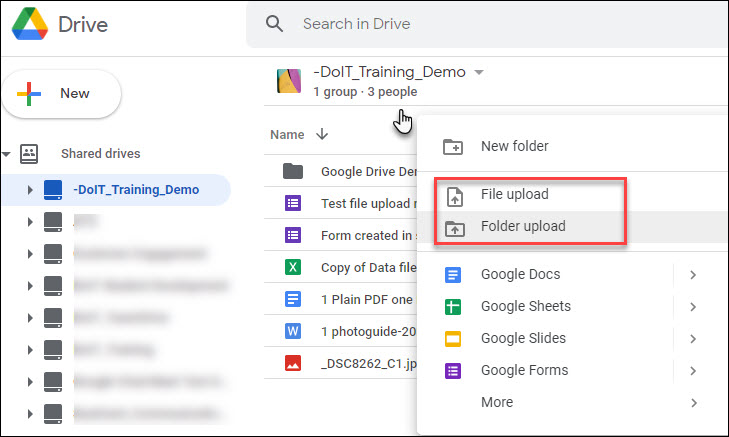
WEB Share files and folders in a shared drive Unless prohibited by the sharing settings for the shared drives described in the previous section members with Manager Content manager or
WEB In Google Drive you can share folders with Google Groups instead of specific people When you Add a member to a group That person gains permission to access the files and folders the group
WEB May 8 2019 nbsp 0183 32 If your email is not a Gmail or G Suite domain then you will need to associate your email address with Google for authentication The following instructions walk through the process of authenticating your existing email address to
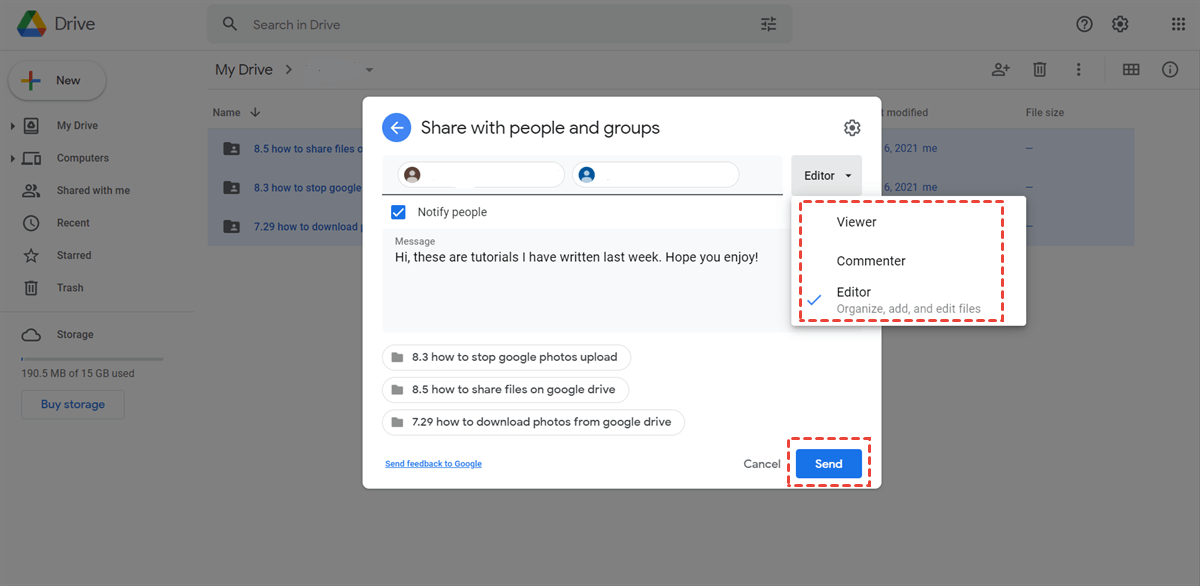
WEB Step 1 Launch Google Drive and right click on the file you want to share Step 2 In the context menu click on the Share option Step3 In the text box below the Share with people and groups type the email of your non Gmail contacts you want to
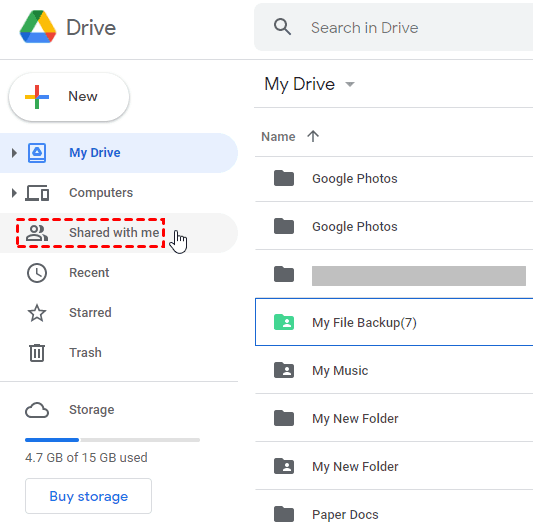
WEB Apr 26 2023 nbsp 0183 32 Documents shared with you through Google Docs can easily be accessed together with your other documents on Google Docs and Google Drive You can access them from the websites or from the mobile apps WEB Is there a way to share a folder in Google Drive that would allow anyone to view the content without signing in Here are some steps to reproduce Click this link to view the test folder I ve shared
WEB You can share the files and folders that you store in Google Drive with anyone When you share from Google Drive you can control whether people can edit comment on or only open the file