How Do I Create A Hyperlink To A Pdf How Do I Create A Hyperlink In Word Document Lasopamint How To Add Hyperlink To PDF Free 5 Easy Ways EaseUS How To Create A Hyperlink In Word Docx File Lasopacraft How Do I Create A Hyperlink In Word Document Operfcook Add Or Remove Hyperlink In Word Ploranode Web Jun 21 2022 nbsp 0183 32 Create link in PDF file Open PDF in editing software gt select text or image gt Edit gt Link gt Add Link to PDF on a website Upload PDF to site gt create hyperlink making sure to use the PDF file extension Link to PDF via WordPress Add Media gt Upload Files gt Select Files gt open PDF gt add info gt Insert into post
Web Jan 24 2024 nbsp 0183 32 Go to where you want to create a link If the location is in the file attachment select the Attachments file option in the Edit panel and add the file attachment Choose Edit gt Link gt Add or edit a link and select the area for the link In the Create Link dialog set the link appearance Web Apr 23 2019 nbsp 0183 32 1 Open the online PDF editor 2 Upload your PDF file 3 Select the text where you want to insert the link and use the Link URL or Page option 4 Remember to download the PDF with the added hyperlink to your
Add Or Remove Hyperlink In Word Ploranode Passpopla blogg se How Do I Create A Hyperlink In Word Perdv Create A Hyperlink In Word That Will In Pdf Toyspassl How To Add A Hyperlink In Illustrator Hyperlink Design Tutorials Illustration Hyperlink Table Of Contents Word Lasopaneo Html Html Link Bodensee jp How To Make A Hyperlink Create Clickable Links In 3 Steps Social Media Marketing By Marta Hyperlink To Page In Word BookTrust
How Do I Create A Hyperlink To A Pdf
 How Do I Create A Hyperlink To A Pdf
https://www.addictivetips.com/app/uploads/2010/04/worddocu.jpg
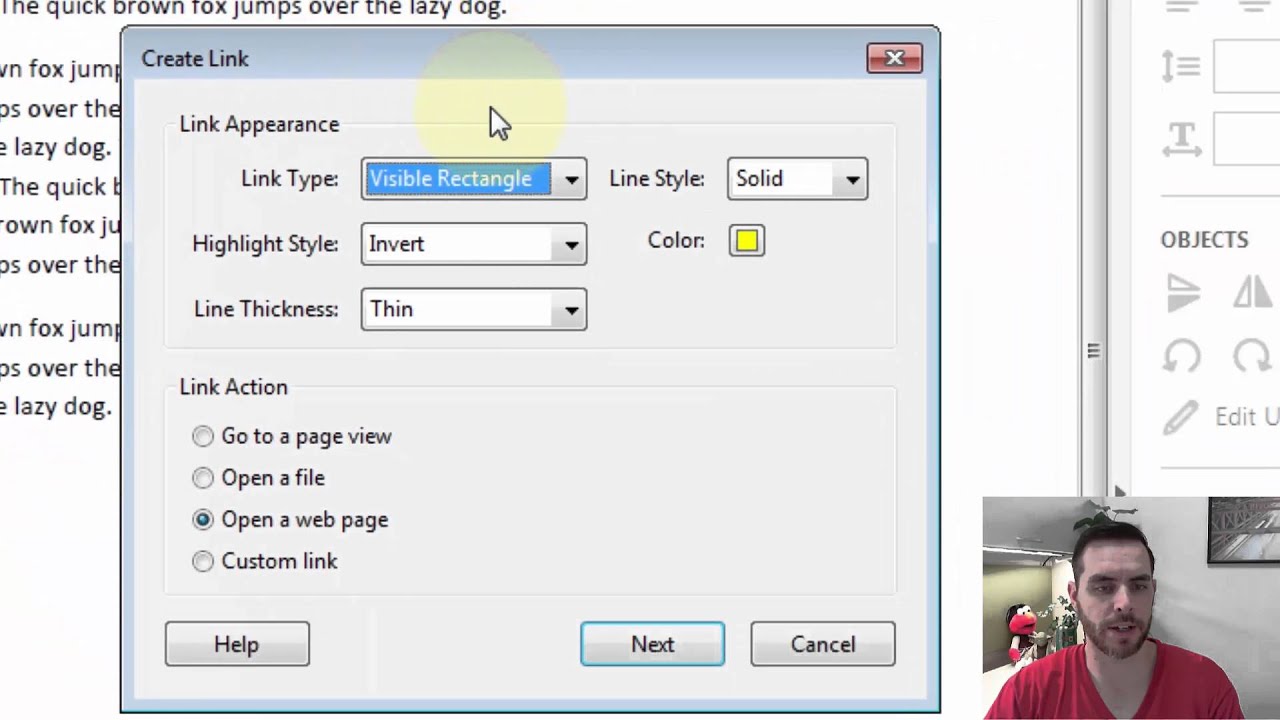
Web Apr 2 2010 nbsp 0183 32 Creating Links Follow these steps to create a link on text Select the text where you want the link to appear with the cursor tool Right Click and choose Create Link Set the appearance of the link Note These settings are sticky so you ll only need to do this for the first link A Link Type Visible Rectangle B Highlight Style Invert
Templates are pre-designed documents or files that can be utilized for numerous purposes. They can conserve effort and time by supplying a ready-made format and design for producing various type of content. Templates can be used for personal or professional jobs, such as resumes, invitations, flyers, newsletters, reports, presentations, and more.
How Do I Create A Hyperlink To A Pdf
Creating Hyperlinks In Excel To Pdf Snper
Passpopla blogg se
How Do I Create A Hyperlink In Word Perdv
Create A Hyperlink In Word That Will In Pdf Toyspassl
Hyperlink Table Of Contents Word Lasopaneo

Html Html Link Bodensee jp
Web First you ll need to create a PDF in Acrobat or Acrobat Reader Then choose one of the options below to convert a PDF into a shareable link Share an anonymous or public link to the PDF file Click the Share A Link To This File icon Allow Comments is switched on by default Click the switch if you want to turn it off
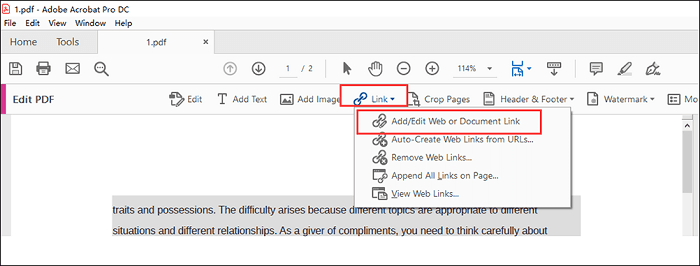
Web Open the Adobe Acrobat editor Choose Tools gt Edit PDF gt Add or Edit The pointer becomes a crosshair and any existing links in the document including invisible links are temporarily visible Drag a rectangle where you want to create a link This will be the area in which the link is active

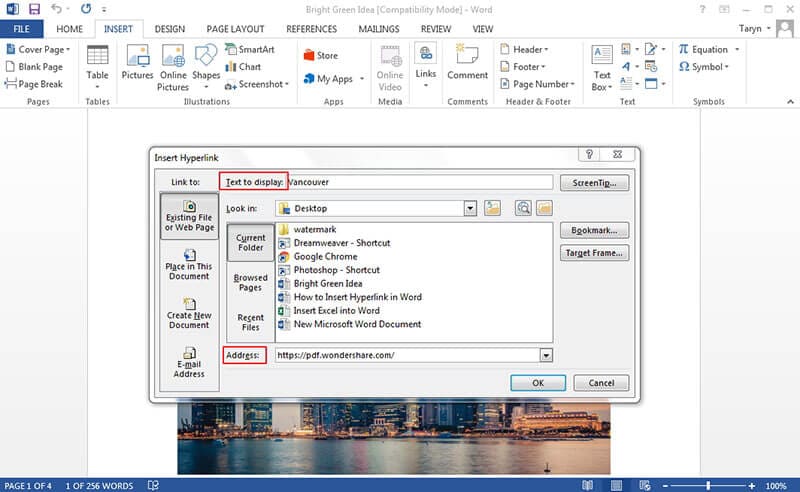
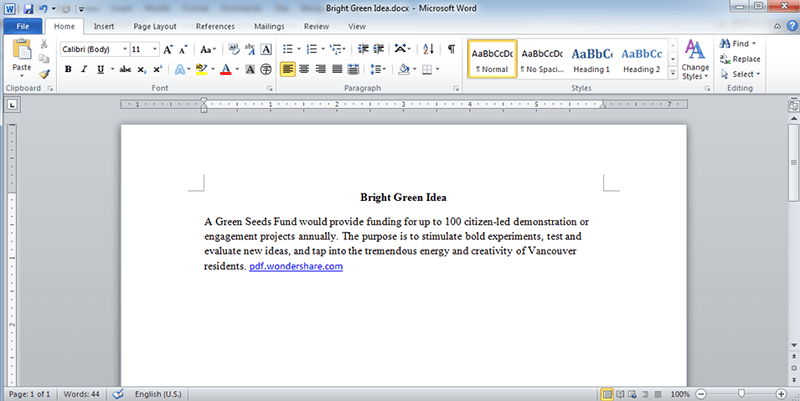
Web May 21 2020 nbsp 0183 32 How to Add Hyperlink to PDF for Free 1 Microsoft Word 2 Google Docs Make a Clickable Link in a PDF with Other Tools 1 DeftPDF 2 PDFescape 3 Sejda 4 Wondershare PDFelement 5 Adobe Acrobat Pro DC Why We

Web Jan 5 2024 nbsp 0183 32 Adding a link to a PDF using MS Word Adding a link using Google Docs Adding a link on mobile So if you re ready to begin let s take a closer look at each method for creating hyperlinks in PDF documents How to add a
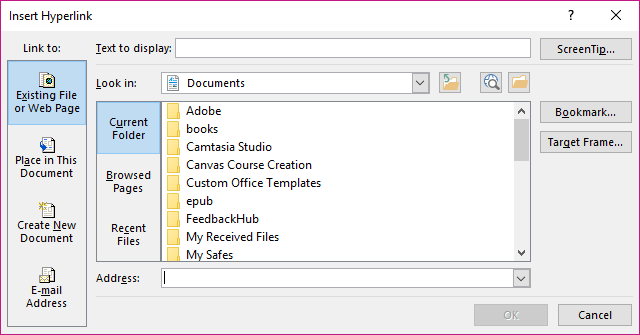
Web Apr 7 2020 nbsp 0183 32 1 Under Edit click the Link button 2 Next draw a square around the text you want to hyperlink like this 3 In the Create a Link dialogue box that pops up select Open a web link and click Next 4 Type in or paste the web address you want to
Web Jun 13 2023 nbsp 0183 32 To create hyperlinks in a PDF with a few clicks follow these simple steps Time Required 5 minutes Using Adobe open a PDF document to add hyperlinks Choose Tools gt Edit PDF gt Link gt Add Edit Web or Document Link and then drag the rectangle to where you want to create the link Web Mar 15 2022 nbsp 0183 32 1 Hyperlink layer Once you have uploaded the PDF on our platform go to our Design Studio and select Link gt Hyperlink to create a new hyperlink layer
Web Apr 30 2024 nbsp 0183 32 In the quot Home quot interface click the quot Tools quot gt quot Edit PDF quot button Go to quot Link quot gt quot Add or Edit quot Drag a rectangle where you want to create a link on the PDF this will open quot Create Link quot dialog box You can create a link with four options Go to a page view Open a file Open a web page Create a custom link