How Do I Change The Data Range For Multiple Pivot Tables How To Connect Slicers To Multiple Pivot Tables In Excel 5 Easy Excel Slicer For Multiple Pivot Tables Connection And Usage ExcelDemy How To Connect Slicers To Multiple Pivot Tables How To Add A Slicer Without Pivot Table In Excel Mac Brokeasshome Excel Slicer For Multiple Pivot Tables Connection And Usage ExcelDemy Web After creating a Pivot Table we can change the range of the Pivot table Source data the origin of the data We can also select the range and expand the source data to include more rows or reduce the rows The steps below will walk through the process Figure 1 Changed Pivot Table Source Data
Web 1 Change Pivot Table Data Range Whenever new Rows or Columns are added to Source Data you can follow the steps below to Change Pivot Table Data Range 1 Click on any Cell in the Pivot Table and this will bring up Analyze and Design Tabs in Web Dec 7 2020 nbsp 0183 32 In this article I will show you how to create Pivot Tables based on multiple data ranges For example sales data for each month of the year may be located in individual worksheets and you may want to create a
Excel Slicer For Multiple Pivot Tables Connection And Usage ExcelDemy Excel Slicer For Multiple Pivot Tables Connection And Usage ExcelDemy Excel Slicer For Multiple Pivot Tables Connection And Usage ExcelDemy The Easiest Way To Connect A Slicer To Multiple Pivot Tables In Excel How To Delete Pivot Table In Excel 2007 Brokeasshome Oracle Arena Seating Concert View Brokeasshome Excel Slicer For Multiple Pivot Tables Connection And Usage ExcelDemy Seatguru Delta 767 300 Brokeasshome Excel Set Data Range For Multiple Charts Super User
How Do I Change The Data Range For Multiple Pivot Tables
 How Do I Change The Data Range For Multiple Pivot Tables
https://i.ytimg.com/vi/ED-6RXTfKbQ/maxresdefault.jpg
Web Mar 29 2019 nbsp 0183 32 Edit the source data range for your pivot table In Excel 2007 and 2010 choose quot Change Data Source quot from the Data group of options In Excel 2003 launch the Wizard utility by right clicking inside the pivot table and choosing quot Wizard quot from the pop up menu Click the quot Next quot button until you see the screen with the source data range
Templates are pre-designed documents or files that can be used for numerous functions. They can save time and effort by providing a ready-made format and design for developing different kinds of content. Templates can be utilized for individual or professional projects, such as resumes, invites, leaflets, newsletters, reports, discussions, and more.
How Do I Change The Data Range For Multiple Pivot Tables

Connect Excel Slicers To Multiple Pivot Tables YouTube

Excel Slicer For Multiple Pivot Tables Connection And Usage ExcelDemy

Excel Slicer For Multiple Pivot Tables Connection And Usage ExcelDemy
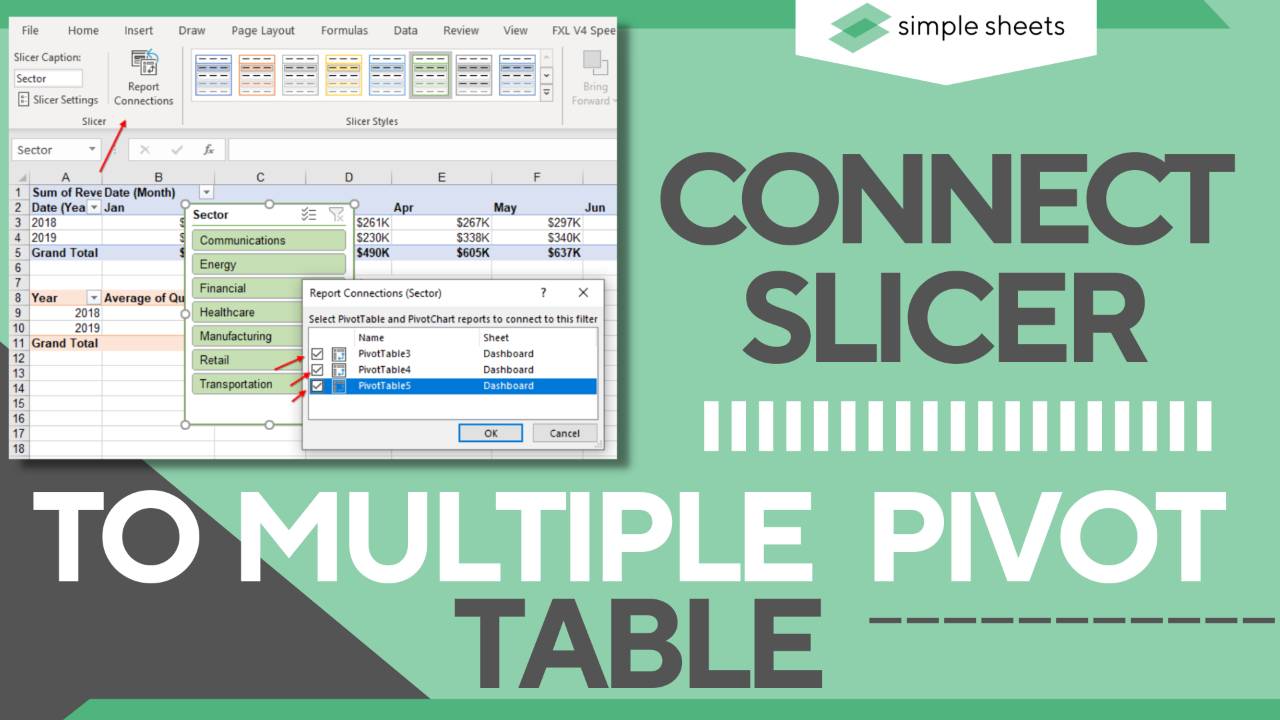
The Easiest Way To Connect A Slicer To Multiple Pivot Tables In Excel

Oracle Arena Seating Concert View Brokeasshome

Excel Slicer For Multiple Pivot Tables Connection And Usage ExcelDemy
Web Mar 26 2010 nbsp 0183 32 Adapted from Dynamically Change A Pivot Table s Data Source Range With This VBA Macro Code The PivotTable SourceData property can be set which is set via the ChangePivotCache method To create a new PivotCache call ActiveWorkbook PivotCaches Create You ll need to pass in a SourceType and a Range

Web Oct 7 2016 nbsp 0183 32 Why do you want to use a macro to change the Pivot Table source data range Instead create a Dynamic Named Range for the Source Data used in each of your Pivot Table Have a look at the following links which will help you to
Web Oct 25 2018 nbsp 0183 32 JA JambukeswaranNeelakandan Created on October 25 2018 Multiple pivots changing data sources Hi Team I mainrain an excel file with multiple pivot tables and egeryrime its required to change data source in each pivot Is thsre a simpler solution Am not a techie and may not use the vb option if the same is difficult Please

Web After you create a PivotTable you can change the range of its source data For example you can expand the source data to include more rows of data However if the source data has been changed substantially such as having more or fewer columns consider creating a new PivotTable

Web Use the Field List to arrange fields in a PivotTable Create a PivotTable to analyze worksheet data Create a PivotTable to analyze external data Create a PivotTable connected to Power BI Datasets Change the source data range for a PivotTable Refresh data in a PivotTable Delete a PivotTable
Web Apr 1 2019 nbsp 0183 32 This code will help you to change Source Data for all Pivot Table in particular Sheet Sub ChangePivotSourceData Dim pt As PivotTable For Each pt In ActiveWorkbook Worksheets quot Sheet1 quot PivotTables pt ChangePivotCache ActiveWorkbook PivotCaches Create SourceType xlDatabase Web Create a Dynamic Pivot Table Range with OFFSET Function The other best way to update the pivot table range automatically is to use a dynamic range Dynamic range can expand automatically whenever you add new data to your source sheet Following are the steps to create a dynamic range
Web Sep 18 2023 nbsp 0183 32 1 Updating the Pivot Table Range Manually by Changing the Data Source First of all we ll see the process of updating the Pivot Table range manually which means by changing the data source Just follow the steps below Select a cell within the created Pivot Table