Hard Reset Hikvision Camera How To Reset Hikvision NVR DVR Password In 2022 Hikvision NVR How To Hard Reset Hikvision IP Camera Mohmand Tech YouTube Forbid Leave Misunderstanding How To Reset Hikvision Ip Camera To Bagaimana Cara Reset Default IP Camera Hikvision Reset Password IP H NG D N RESET C NG CAMERA IP HIKVISION NH AN TO N JSC YouTube Press and hold the reset button Keep holding the reset button and restore the power supply Continue to hold the reset button for a further 10 seconds Release the button and allow the camera to complete a restart reboot When you check the camera in SADP after resetting it should show as inactive and will require you to start afresh
Hikvision How to Video Guide Series from NetviewCCTV co ukALL the latest Hikvision CCTV Surveillance products available on wwwviewcctv co uk UK s leading 8 22K subscribers Subscribe Subscribed 147K views 5 years ago How to reset dome camera HIKVISION IP CAMERA RESET TO DEFAULT How To Reset Hikvision IP Network Bullet Camera to
H NG D N RESET C NG CAMERA IP HIKVISION NH AN TO N JSC YouTube Factory Reset Hikvision IP Camera YouTube How To Reset Hikvision Camera Use Deferent Ways Hikvision Wifi Ip Camera Password Reset YouTube Reset Hikvision Camera To Factory Settings BYRGPUB COM 30 Ide Cara Reset Password Dvr Hikvision Ds 7200 Android Pintar How To Reset Hikvision Camera Holidayaceto SADP Tool Download Hikvision Password Reset Reset Hikvision Camera Password using QR Code Learn CCTV
Hard Reset Hikvision Camera
 Hard Reset Hikvision Camera
https://i.ytimg.com/vi/Y-TriYngZxk/maxresdefault.jpg
How to manually factory reset a camera What is the difference between the main stream and the sub stream How does bit rate relate to the Resolution and Frame rate On IVMS 4200 the device is added manually and shows serial number and net detect is proper but camera s does not show on main view
Pre-crafted templates offer a time-saving option for producing a diverse range of files and files. These pre-designed formats and designs can be made use of for different personal and expert projects, including resumes, invites, flyers, newsletters, reports, presentations, and more, enhancing the content development procedure.
Hard Reset Hikvision Camera
How To Reset Hikvision Camera Factory Default Settings

Factory Reset Hikvision IP Camera YouTube

How To Reset Hikvision Camera Use Deferent Ways

Hikvision Wifi Ip Camera Password Reset YouTube

30 Ide Cara Reset Password Dvr Hikvision Ds 7200 Android Pintar

How To Reset Hikvision Camera Holidayaceto

Answer 1 Press and hold the reset button on the camera for a total of 1 5 minutes 90 Seconds 2 After the first 30 seconds disconnect the network cable with your other hand do not let up on the reset button Wait 30 seconds 3 Re connect the network cable again do not let up on the reset button Wait 30 seconds 4 Release the reset button
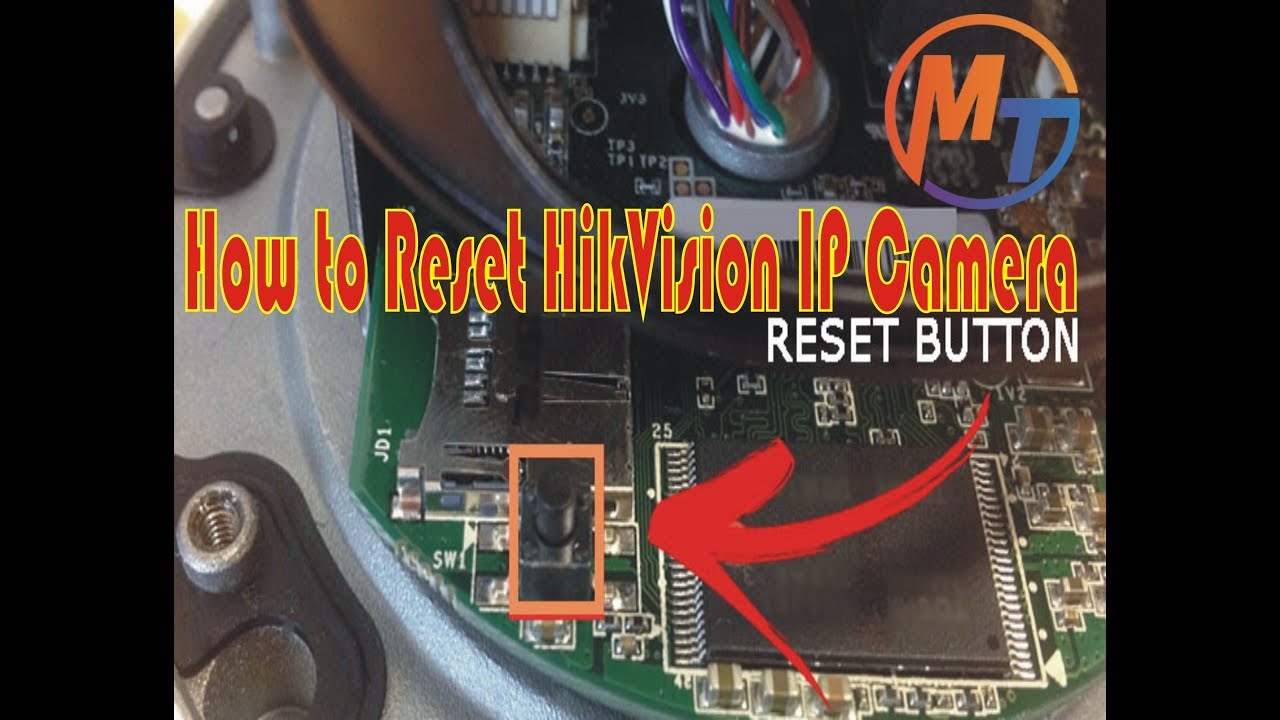
Quick Guide 1 Open IP camera don t give power 2 Push hold Reset button with small wood stick more more Reset a Hikvision PoE IP CCTV Camera Using Button Revert Back to
Our shop https icamera ch

Best Security Devices 3 1K subscribers Subscribe Subscribed 23K views 1 year ago bestsecuritydevices In this video I show how to reset a Hikvision camera to recover from a lost password

Learn how to reset a Hikvision camera to factory defaultIn this video I show how to reset the Hikvision camera to factory default If you lost the password a
Press and hold the reset button Power up the camera Keep holding the reset button for 15 20 seconds Release the reset button After the camera reset you need to use the SAPD tool or a web browser to setup it again since it will lose all the previous configuration including IP address 2 Hikvision IP camera reset via a web browser Shows how to hard reset the speed dome camera so that you can get back that default IP 192 168 1 64
Here are the steps to reset your Hikvision camera to the default settings Firstly locate the reset button present on your Hikvision camera Next turn the power down off your camera by disconnecting the PoE cable or the camera power supply cable Now press and hold the reset button Later turn the power up again for your camera