Google Sheets Merge Two Columns Without Losing Data Merge Cells Without Losing Data In Google Sheets How Do I Merge Cells In Excel Without Losing Data Starssafas Merge Cells Without Losing Data In Google Sheets Merge Cells Columns In Excel Without Losing Data YouTube Merge And Combine Columns Without Losing Data In Excel Verkko 23 maalisk 2023 nbsp 0183 32 With the Merge Cells add in you can combine data from several cells using any separator you like e g space comma carriage return or line break
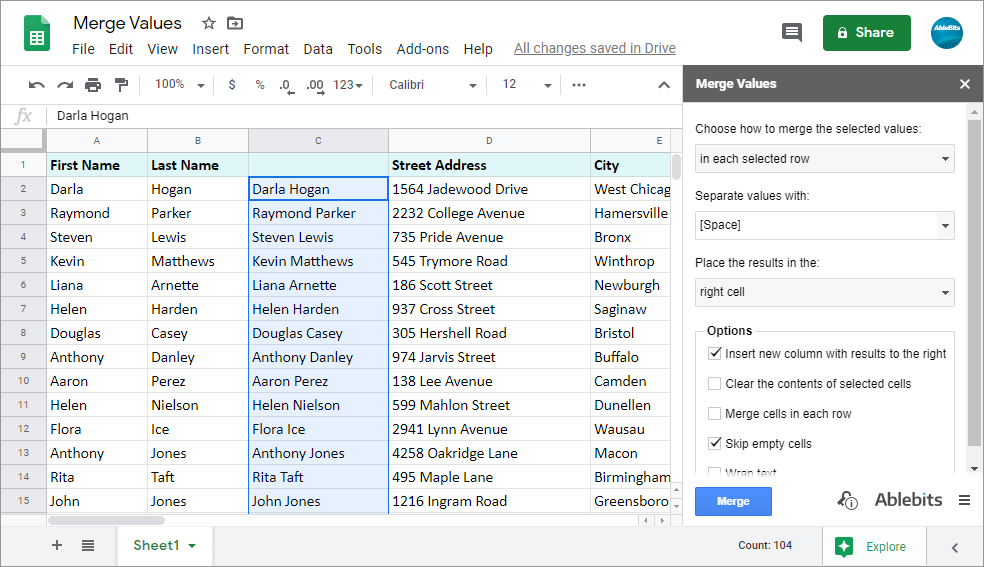
Verkko Choose your plan With Merge Values you will Merge columns in Google Sheets into one Join text from multiple columns merge values horizontally Combine necessary Verkko 16 maalisk 2021 nbsp 0183 32 I want to combine these two google sheets in a master google sheet This is what I used to combine the data and the result that I get
Merge And Combine Columns Without Losing Data In Excel How To Merge Cells In Google Sheets Lexnet How Do You Merge Cells In Excel Without Losing Data Oclight Merge Cells Without Losing Data In Google Sheets How To Merge Cells In Google Sheets Without Losing Data Merge Cells Without Losing Data In Google Sheets How To Merge Two Columns In Excel Youtube Riset How To Merge Or Combine Two Columns In Microsoft Excel How To Merge Cells In Google Sheets
Google Sheets Merge Two Columns Without Losing Data
 Google Sheets Merge Two Columns Without Losing Data
https://cdn.ablebits.com/-img22lp-google-sheets/merge-values/combine-records-horizontally.png
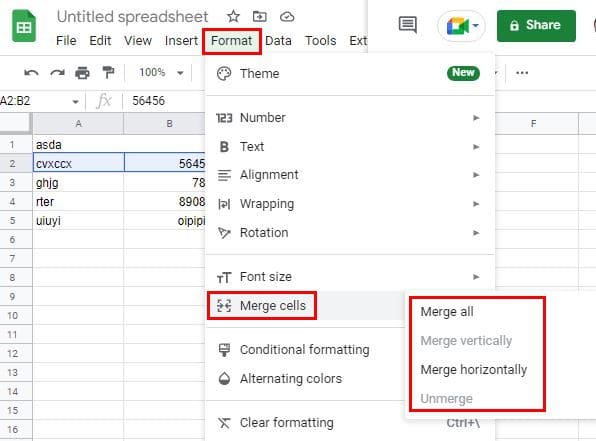
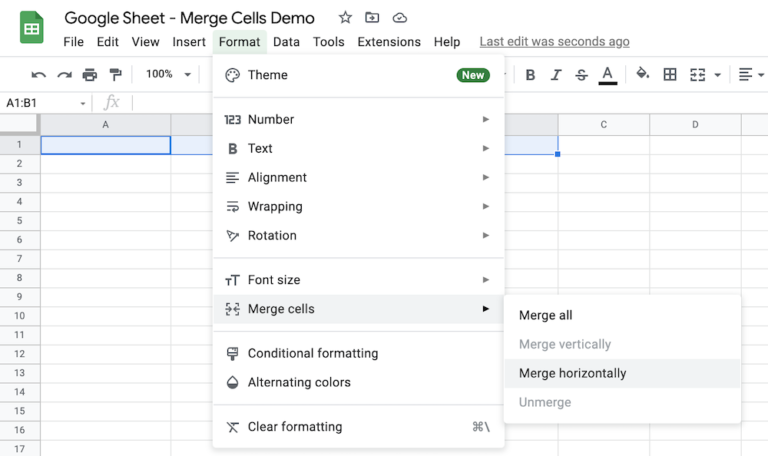
Verkko August 4 2023 Zakhar Yung Oftentimes you ll need to merge cells in Google Sheets either to combine some information or change the look of a spreadsheet There are various approaches to the task that can
Pre-crafted templates provide a time-saving service for producing a varied variety of documents and files. These pre-designed formats and layouts can be utilized for various individual and expert tasks, including resumes, invites, flyers, newsletters, reports, presentations, and more, streamlining the content development procedure.
Google Sheets Merge Two Columns Without Losing Data
Google Sheets How To Easily Merge Cells Technipages
How To Merge Cells In Google Sheets Lexnet
How Do You Merge Cells In Excel Without Losing Data Oclight

Merge Cells Without Losing Data In Google Sheets

Merge Cells Without Losing Data In Google Sheets
How To Merge Two Columns In Excel Youtube Riset
Verkko 15 kes 228 k 2023 nbsp 0183 32 Written by Coursera Updated on Jun 15 2023 Learn how to use CONCATENATE to combine cells in Google Sheets without losing data The term concatenate means to link things together in a

Verkko 23 elok 2023 nbsp 0183 32 The easiest way comes first You can pull entire tables to one file by referencing cells with data from other sheets Note This will do if you need to merge

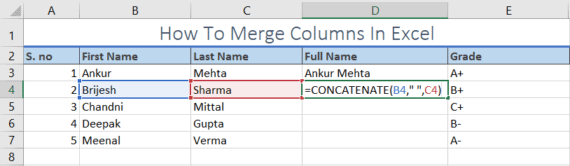
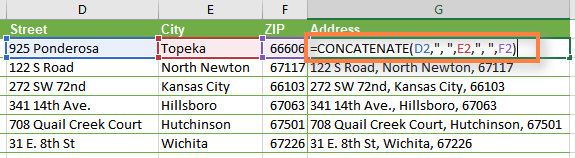
Verkko 1 Select the cells you want to merge Select an empty cell next to the cells you want to merge In our example we will merge the cells next to the data we want to keep 2 Enter the CONCATENATE function

Verkko 25 lokak 2023 nbsp 0183 32 There are a variety of different ways to combine columns in Google Sheets and I am going to show you six different formulas that you can use to combine multiple columns into one

Verkko 4 lokak 2019 nbsp 0183 32 First Step Get the Merge Values Add On The Merge Values add on will let you combine your cells and display them in separate columns or rows This way you ll save all the original data
Verkko 28 elok 2022 nbsp 0183 32 You can use Apps Scripts to merge cells without losing the data in all the cells You can concatenate the data from each cell and display it in the resulting Verkko 11 hein 228 k 2022 nbsp 0183 32 2 Open the dataset that you want to combine its two columns 3 Locate the third column and type the Concatenation formula That is type
Verkko 4 lokak 2016 nbsp 0183 32 186 174K views 6 years ago Google Sheets add ons Whenever you find records that belong together use this simple add on to quickly join values in rows