Google Sheets Countif Google Spreadsheet COUNTIF Function With Formula Examples Google Sheets Pivot Table Calculated Field Countif Cabinets Matttroy Google Sheets COUNTIF Function Using COUNTIF COUNTIFS In Google Sheets To Sort Analyze Data Google Spreadsheet COUNTIF Function With Formula Examples 2022 Web Feb 1 2022 nbsp 0183 32 COUNTIF is a Google Sheets function that counts cells based on a single condition COUNTIF returns the number of cells in a given cell range that meet a specific condition and cannot take in more than one series of data and one condition The COUNTIF function s syntax is as below COUNTIF range condition
Web Nov 15 2019 nbsp 0183 32 The COUNTIF function in Google Sheets lets you analyze data in your spreadsheet and returns the number of times it appears in your document if it meets a set of specific criteria Here s how to use it Use COUNTIF to Match on One Type of Criteria Fire up Google Sheets and open a spreadsheet with data you want to count Web As the name implies COUNTIF combines the abilities of COUNT and IF it checks to see if the IF argument is true before returning the COUNT value Here s what the function looks like COUNTIF
Google Spreadsheet COUNTIF Function With Formula Examples 2022 How To Use COUNTIF Functions In Google Sheets Step By Step Google Sheets SumIF CountIF AverageIF YouTube How To Use The COUNTIF Function In Google Sheets To Determine A Number Google Sheets Tutorial For Beginners Countif Formula YouTube How Do I COUNTIF Non Blank Cells In Google Sheets Script Everything How To Use COUNTIFS In Google Sheets COUNTIF Multiple Criteria Step Google Sheets COUNTIF And COUNTIFS A Complete Guide YouTube How To Use COUNTIF Function In Google Sheets Step By Step
Google Sheets Countif
 Google Sheets Countif
https://cdn.ablebits.com/_img-blog/google-sheets-countif/countif-syntax-numbers.png
Web Nov 13 2020 nbsp 0183 32 The COUNTIF function is a well established function in Excel as well as other programs such as Google Sheets COUNTIF lets users count different values based on one or more conditions Google Sheets the web based Office solution provides a practical alternative to Microsoft s Office COUNTIF in Google Sheets finds a wide range of
Pre-crafted templates provide a time-saving option for developing a varied variety of files and files. These pre-designed formats and layouts can be utilized for different individual and professional jobs, including resumes, invitations, leaflets, newsletters, reports, presentations, and more, enhancing the content development process.
Google Sheets Countif

Google Sheets COUNTIF Function

How To Use COUNTIF Functions In Google Sheets Step By Step
Google Sheets SumIF CountIF AverageIF YouTube
How To Use The COUNTIF Function In Google Sheets To Determine A Number
How Do I COUNTIF Non Blank Cells In Google Sheets Script Everything
How To Use COUNTIFS In Google Sheets COUNTIF Multiple Criteria Step
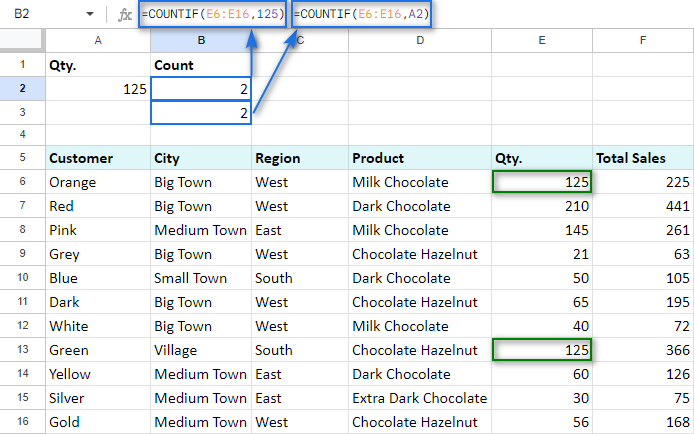
Web Aug 4 2023 nbsp 0183 32 COUNTIF syntax in Google Sheets range a range of cells where we want to count a certain value Required criterion or searching criterion a value to find and count across the data range indicated in the first argument
Web COUNTIFS B8 B27 quot gt quot amp B12 C8 C27 quot lt quot amp C13 D8 D27 lt gt 10 COUNTIFS C1 C100 quot Yes quot COUNTIFS criteria range1 criterion1 criteria range2 criterion2 Returns a conditional
Web The COUNTIF function is used to count the number of times a specific data is found in a selected range of cells that meets a condition It s a combination of the IF and the COUNT function The IF part of the function determines whether the data meets a certain condition It results in either TRUE or FALSE

Web Dec 20 2022 nbsp 0183 32 Google Sheets COUNTIFS function has two required parameters just like COUNTIF However COUNTIFS allows you to provide additional parameters to test multiple ranges using different criteria COUNTIFS criteria range1 criterion1 criteria range2 criterion2 The first range and the first criterion are required arguments
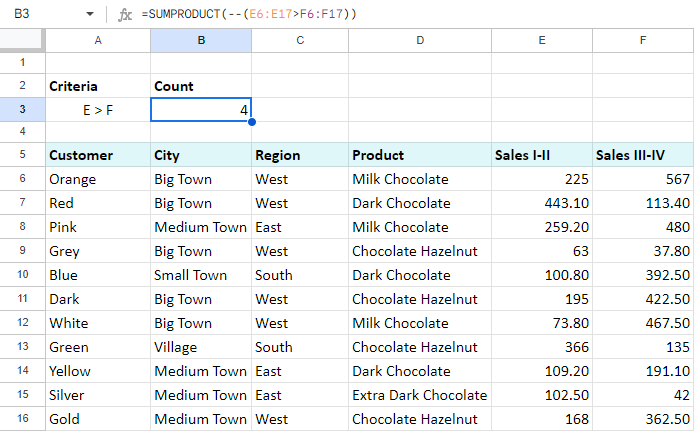
Web Sep 25 2023 nbsp 0183 32 1 The COUNTIF Function Is Not Case Sensitive 2 How To Count Cells That Are Blank or Not Blank 3 You Don t Need To Add Quotation Marks For Numerical Values 4 You Can Contain Your Criterion In a Different Cell Using COUNTIF In Google Sheets Counting Cells That Contain a Particular String Of Text Counting Cells That
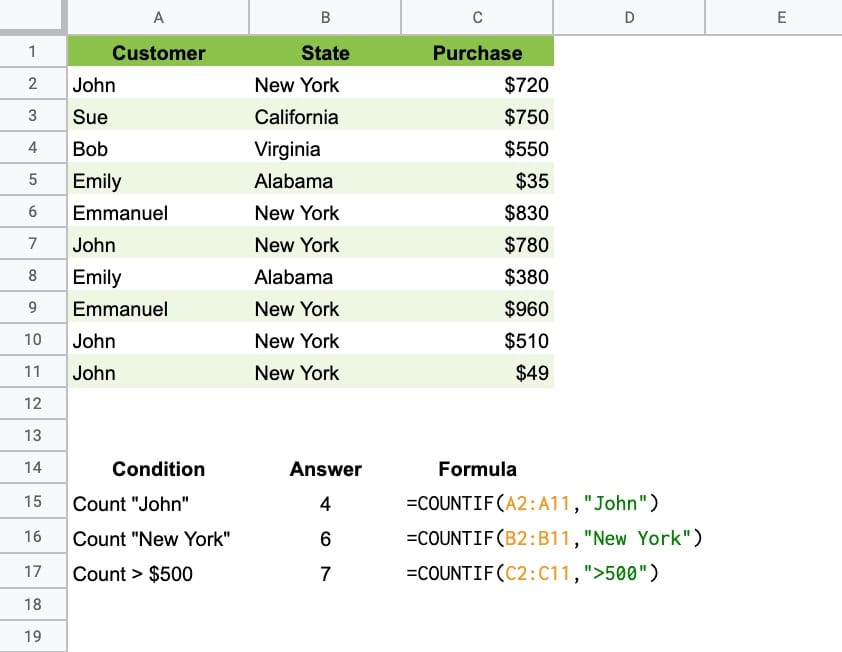
Web Feb 23 2022 nbsp 0183 32 Google Sheets COUNTIF Function The Google Sheets COUNTIF function is used to count items in a range that match a given condition For example consider the following dataset of customer sales This formula counts how many times John is found in the range COUNTIF A2 A11 quot John quot Web Oct 12 2019 nbsp 0183 32 The COUNTIF function in Google Sheets is useful if you want to count the number of times a specific data is found in a selected range of cells that meets a single specified condition Table of Contents The Anatomy of the COUNTIF Function A Real Example of Using COUNTIF Function How to Use COUNTIF Function in Google Sheets
Web Sep 10 2023 nbsp 0183 32 You would use the COUNTIF function as follows COUNTIF D2 D100 Google In this example D2 D100 is the range of cells you want to check and Google is the criteria The asterisks are wildcards that represent any number of characters So Google Sheets will count the number of cells in the range D2 D100 that