Gmail Smtp Server Settings How To Set Up SMTP Server In Email Settings Via A Gmail Microseven Tech Support IM Security How To Find Smtp Server Address For Gmail Erpsado How To Use Gmail s SMTP Settings In EasyMail7 Magro Portugu s ngreme Gmail Outgoing Port Pastor Cinco Tarde Gmail SMTP POP3 IMAP Server Settings For Outlook 2013 The Gmail SMTP server lets you send emails using your Gmail account and Google s servers One option here is to configure third party email clients such as Thunderbird or Outlook to send emails via your Gmail account The default Gmail SMTP details are as follows Gmail SMTP server address smtp gmail
Incoming Mail POP Server pop gmail Requires SSL Yes Port 995 Outgoing Mail SMTP Server smtp gmail Requires SSL Yes Requires TLS Yes if available Requires QUICK ANSWER To configure your Gmail SMTP settings go into the settings of the desktop email client and look for the SMTP section Then enter the details below in this article If you
Gmail SMTP POP3 IMAP Server Settings For Outlook 2013 What Are The Gmail SMTP Server Settings Gmail Smtp Server Settings 2020 YouTube How To Properly Add An Alias To Gmail Without Errors send Mail As How To Use The Gmail SMTP Server To Send Emails For Free Gmail SMTP Settings Updated Guide How To Send Emails With The Gmail SMTP Server Settings And Configuration LaptrinhX How To Use The Gmail SMTP Server To Send Emails For Free How To Configure MIDAS To Send Email Via Gmail SMTP Servers
Gmail Smtp Server Settings
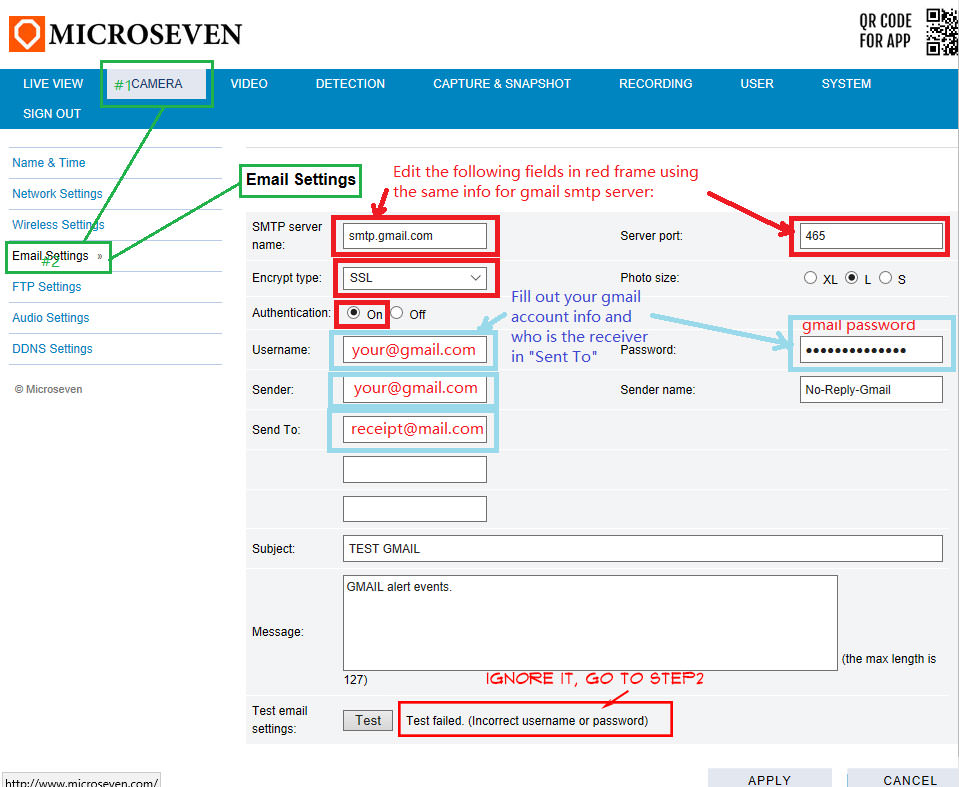 Gmail Smtp Server Settings
https://www.microseven.com/images/B/email/1.jpg
The default Gmail SMTP server name is smtp gmail and if you use it you can configure any external email application to send out messages The email platform connects to the SMTP server over particular email ports An SMTP port is an endpoint used to transmit emails across the internet The secure SMTP Gmail ports are 465 and 587
Templates are pre-designed files or files that can be utilized for numerous functions. They can save time and effort by providing a ready-made format and layout for creating various sort of content. Templates can be used for individual or expert projects, such as resumes, invites, flyers, newsletters, reports, discussions, and more.
Gmail Smtp Server Settings
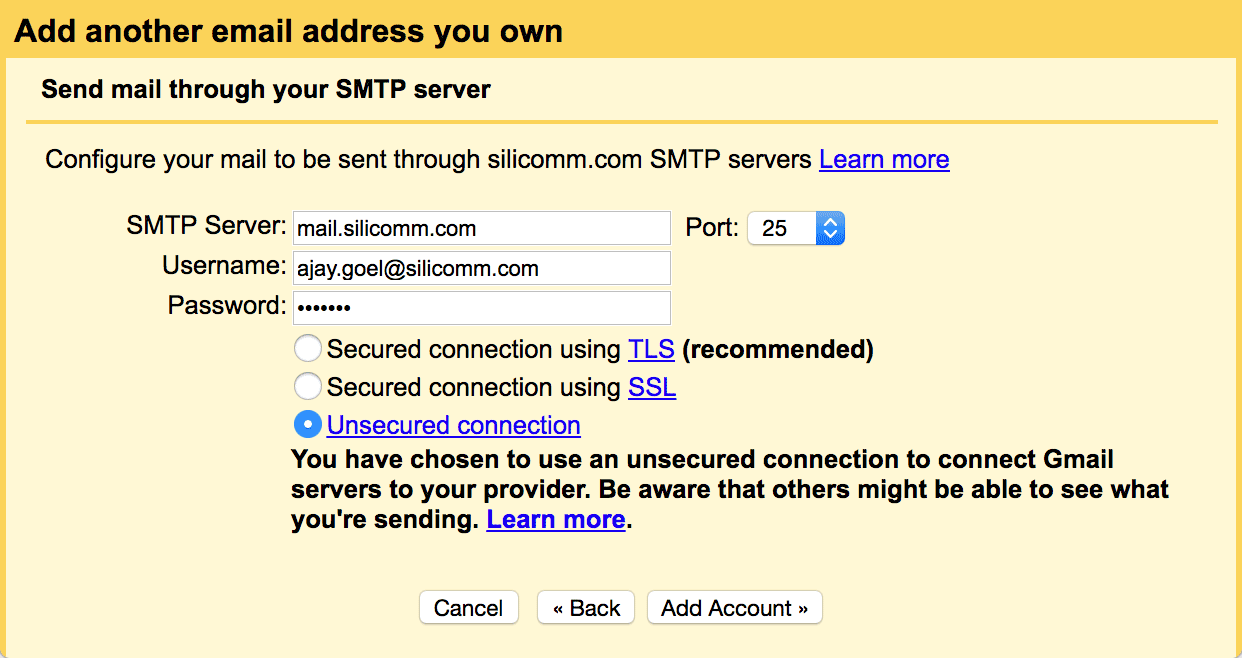
How Using Gmail s Send Mail As Settings Affects Email Deliverability

What Are The Gmail SMTP Server Settings

Gmail Smtp Server Settings 2020 YouTube
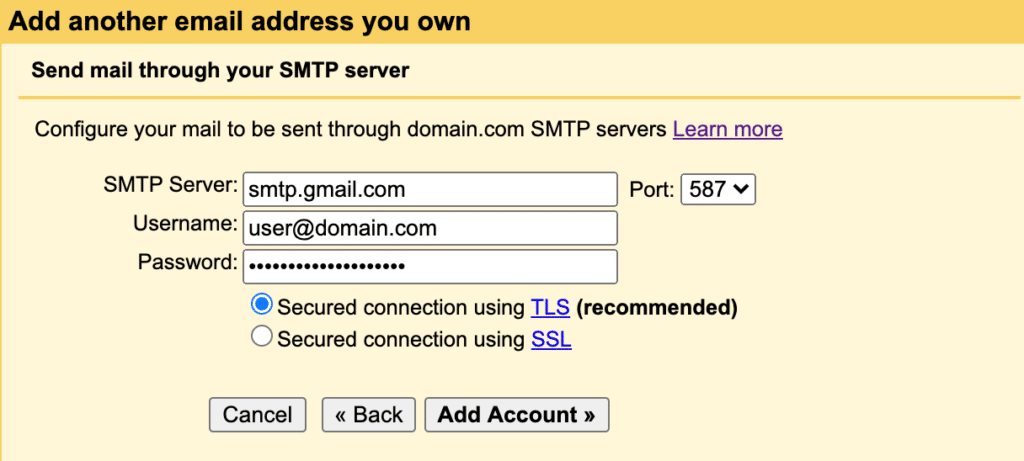
How To Properly Add An Alias To Gmail Without Errors send Mail As
Gmail SMTP Settings Updated Guide

How To Send Emails With The Gmail SMTP Server Settings And Configuration LaptrinhX
How to Configure Gmail SMTP Settings There are three ways you can set up Google s SMTP server to use it for sending emails Use the Google Workspace formerly G Suite SMTP relay service Use Gmail s SMTP server This is what we ll be covering Use the Restricted Gmail SMTP server
Incoming connections to the IMAP server at imap gmail 993 and the POP server at pop gmail 995 require SSL The outgoing SMTP server smtp gmail supports TLS If your

Gmail SMTP Settings Using the Gmail SMTP settings below you can configure a third party email client to send messages via Gmail servers across the public internet Because Gmail servers are trusted by all other email providers your messages are unlikely to end up in the spam folder

Default SMTP Settings for Gmail As you set up an email client to synchronize with your Gmail account a screen asks for your Gmail SMTP information Use these settings Gmail SMTP server address smtp gmail Gmail SMTP username Your Gmail address for example example gmail Gmail SMTP password Your

Update your IMAP settings so you don t sync certain folders Remove your Google Account from your email client then try adding it again In your Gmail IMAP settings set IMAP to only sync
[desc-11] [desc-12]
[desc-13]