Git Save Changes To New Branch Intellij Move Changes To New Branch Git Create Branch In Local Jawerdu Commit Changes To A Git Branch Delft Stack Autonomy Definition Ap World History Git Move Uncommitted Changes To New Branch Web Nov 16 2021 nbsp 0183 32 You can get around this in a few ways The first is by making a new branch and then merging the diverging histories git checkout b tempfeature git checkout feature git merge tempfeature You can also use git stash to store changes for later and reapply them on a new branch git stash git switch feature git stash apply
Web May 31 2010 nbsp 0183 32 You can just create a new branch and switch onto it Commit your changes then git branch dirty git checkout dirty And your commit follows Alternatively you can also checkout an existing branch just git checkout lt name gt But only if there are no collisions the base of all edited files is the same as in your current branch Web Jun 8 2022 nbsp 0183 32 In this article we ve addressed a couple of quick ways to move uncommitted changes to a new Git branch Both commands are pretty straightforward to use git checkout b lt NEW BRANCH gt git switch C lt NEW BRANCH gt
Git Move Uncommitted Changes To New Branch Quickly Switch To New Branch With Unstaged Changes In Git Amit IDEA push Pushed Master To New Branch Origin master Git Move Uncommitted Changes To New Branch Quickly Switch To New Branch With Unstaged Changes In Git Amit Move Uncommitted Changes To New Branch Hexo s Blog How To Merge Local Branch With Master Without Missing Your Changes Introduction To Undoing Things In Git Earth Data Science Earth Lab
Git Save Changes To New Branch
 Git Save Changes To New Branch
https://dmxg5wxfqgb4u.cloudfront.net/styles/inline/s3/2020-07/UFC4_1P_STOREFRONT_USMAN_COLBY_RIPPLE-EFFECT_3840x2160_FINAL_wOverlay_0.jpg?VersionId=tP5E77l5T1ppm5yvudM8Qb4BnQZbLwGv&itok=PzJN7c_C
Web Make your changes big or small and then save and close the file From your terminal window you should still be in the repository directory unless you ve changed something Display the status of the repository with git status
Pre-crafted templates use a time-saving service for creating a varied variety of documents and files. These pre-designed formats and designs can be used for numerous personal and expert projects, including resumes, invitations, flyers, newsletters, reports, presentations, and more, simplifying the material creation process.
Git Save Changes To New Branch

Truliant Federal Credit Union Offers Signing Bonuses To New Branch
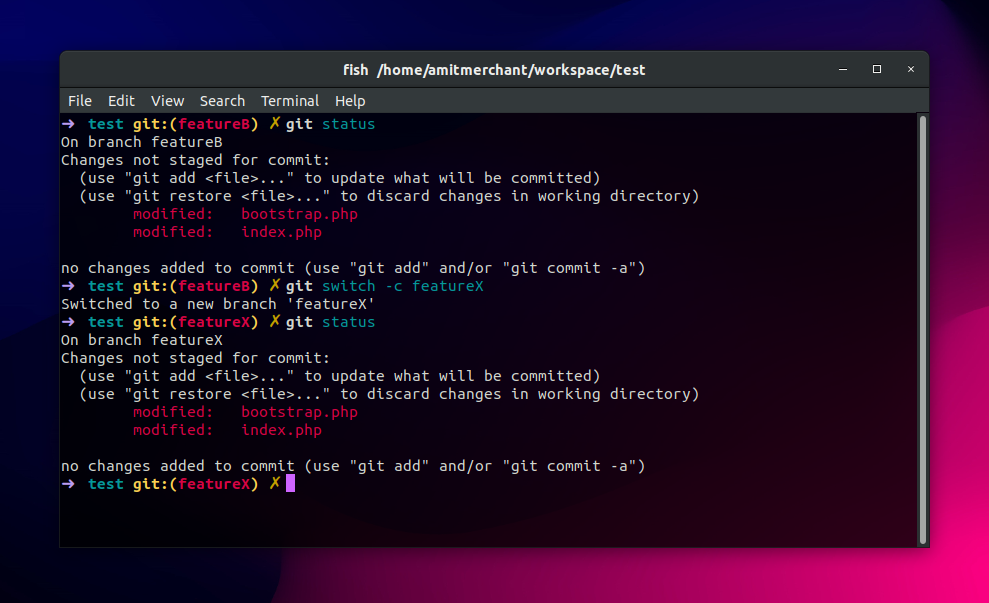
Quickly Switch To New Branch With Unstaged Changes In Git Amit
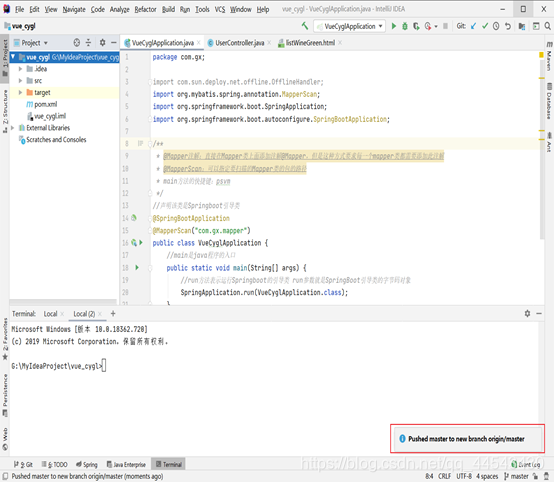
IDEA push Pushed Master To New Branch Origin master

Git Move Uncommitted Changes To New Branch

Move Uncommitted Changes To New Branch

Hexo s Blog

Web Jan 21 2014 nbsp 0183 32 To start working with your existing changes on a different branch you can do git stash then git checkout my branch and then either git stash pop removes the stash if it applies without conflicts or git stash apply does not remove the stash even if it applies without conflicts
Web Dec 10 2016 nbsp 0183 32 Option 1 You can stash your changes If you have changes in Branch A while in branch A do git stash save quot hint to what stash contains quot To retrieve the changes git stash apply If you have multiple stashes you can list them and choose which stash to apply git stash list git stash apply stash lt STASH NUMBER gt

Web Feb 8 2014 nbsp 0183 32 Save your changes in a stash here s the docs http git scm book en Git Tools Stashing Complete works on the current branch Switch to a new branch at a desired branchpoint Apply your stash You may get some conflicts at this point you have to
Web git checkout b branch name This will create a new branch from your current branch assuming it to be master copy the uncommited changes and switch to the new branch Add files to stage amp commit your changes to the new branch git add git commit

Web Jul 30 2012 nbsp 0183 32 2 Answers Sorted by 13 If you haven t committed yet git checkout b lt new branch name gt create and checkout the new branch git commit a commit to the new branch If you have already committed master contains your changes git branch lt new branch name gt create the new branch git reset hard HEAD
[desc-11] [desc-12]
[desc-13]